

Text Scanner Image To Text OCR
Mihir Sonani Productivity iPhoneiPadiPod touch
Text Scanner Image To Text OCR is a free Productivity app for iPhone and iPad by Mihir Sonani. Requires iOS 16.0. Updated July 24, 2025.
- Price
- Free
- on the App Store
- Size
- 96 MB
- Age 4+
- Updated
- Jul 24
- 2025 · v1.0
Screenshots

About Text Scanner Image To Text OCR
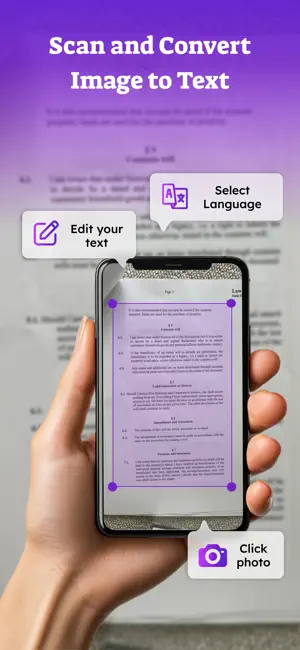
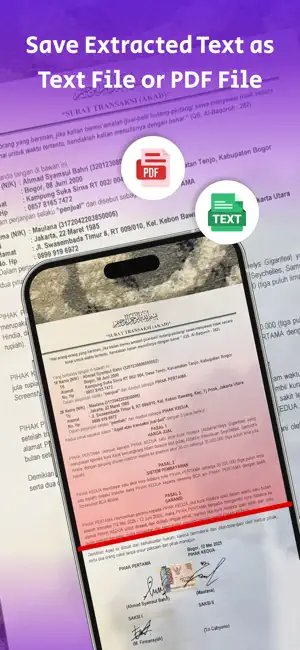
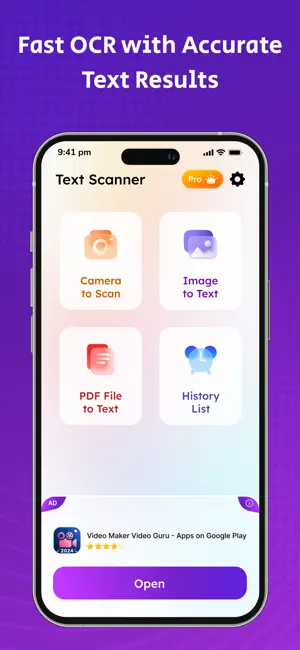
Text Scanner Image To Text OCR is a powerful tool that transforms your device into a high-accuracy text recognition and document scanning solution. Using advanced Optical Character Recognition (OCR) technology, this app allows you to extract text from images and PDFs with ease, speed, and precision. Whether you're a student, professional, researcher, or anyone working with printed content, this app simplifies the process of digitizing text, converting PDFs, and turning images into editable and searchable formats. Key Features: 1. OCR Text Recognition Extract editable text from photos, documents, screenshots, handwritten notes, signs, posters, and more. Achieve high accuracy with printed and handwritten content using our optimized OCR engine. 2. Image to Text Converter Capture or upload an image and instantly convert it into text. You can copy, edit, or export the recognized content as needed—no typing required. 3. PDF Scanner Scan paper documents and save them as clear, high-quality PDFs. Automatically detects edges, applies perspective correction, and allows multi-page scanning for complete reports or books. 4. PDF to Text Converter Convert scanned PDFs or image-based PDFs into fully editable and searchable text files. Ideal for academic, legal, or business use where text reuse is essential. 5. Built-in Text Editor & Export Options Edit the scanned text directly in the app before exporting. Save as TXT or PDF, or share via email, cloud storage, or messaging platforms. 6. Batch Scanning Support Scan and convert multiple pages at once. Organize them into a single document or export them separately—perfect for lengthy paperwork or multi-page forms. 7. Offline Functionality Text recognition works without an internet connection, allowing secure, fast OCR on the go—no data usage, no delays. 8. Multi-Language OCR Support Supports text recognition in major languages. Use Cases: 1. Students – Scan notes, textbooks, and whiteboards for study material. 2. Professionals – Extract content from contracts, business cards, and reports. 3. Researchers – Digitize books and papers for easy reference. 4. Daily Users – Translate and convert printed materials, signs, or labels. Why Choose Text Scanner Image To Text OCR? 1. Fast and accurate OCR for both images and PDFs 2. Simple and clean user interface 3. No registration or sign-in required 4. Multi-page support and export options 5. Fully functional even without internet access 6. Regular updates and performance improvements Text Scanner Image To Text OCR is your all-in-one solution for transforming physical documents into editable digital content. With cutting-edge OCR technology, efficient workflows, and powerful PDF scanning, it's the ultimate tool to boost your productivity and save hours of manual work. Download now and make every image and PDF searchable, editable, and shareable in seconds. To find out more about automatic subscription renewals: Ad-free version Unlimited access Premium Subscription : TextScan One Week - 6.99 USD TextScan One Year - 44.99 USD Your payment will be charged to your iTunes Account. The app offering is auto-renewable subscriptions For More Information : Privacy Policy : https://mihirsonani333.blogspot.com/p/mss-privacy-policy.html Terms of Use : https://mihirsonani333.blogspot.com/p/mss-terms-of-use.html
App privacy
The developer, Mihir Sonani, reported these privacy practices to Apple.
Data Used to Track You
The following data may be used to track you across apps and websites owned by other companies:
- Identifiers: Device ID
- Usage Data: Advertising Data
Data Not Linked to You
The following data, which may be collected but is not linked to your identity, may be used for the following purposes:
- Identifiers: Device ID
- Usage Data: Advertising Data
- Diagnostics: Performance Data
Used for: Third-Party Advertising, Analytics
Alternatives to Text Scanner Image To Text OCR
Looking for apps like Text Scanner Image To Text OCR? Here are 6 similar apps on the App Store. The highest rated is Old Photo Restore : RestoreOld (5.0/5), and 5 of the 6 are free to download.
-
 Image to Text: Scan & Convert
-
 PDF Scanner OCR Light
-
 Screen Mirroring Cast to TV+
-
 Coopa
-
 Focus To Do List: Task Planner
-
 Old Photo Restore : RestoreOld
5.0
| App | Rating | Price | Last updated | Compare |
|---|---|---|---|---|
| Text Scanner Image To Text OCR | – | Free | July 24, 2025 | |
| Image to Text: Scan & Convert | – | Free | Jul 31, 2026 | Compare |
| PDF Scanner OCR Light | – | 2.99 USD | Oct 25, 2023 | Compare |
| Screen Mirroring Cast to TV+ | – | Free | Oct 2, 2025 | Compare |
| Coopa | – | Free | Mar 4, 2026 | Compare |
| Focus To Do List: Task Planner | – | Free | Feb 25, 2026 | Compare |
| Old Photo Restore : RestoreOld | 5.0 / 5 (1) | Free | Sep 24, 2026 | Compare |