

Water Tracker CoffeeWatch
Shutong Technology Health & Fitness iPhoneiPadiPod touchApple Watch
Water Tracker CoffeeWatch is a free Health & Fitness app for iPhone and iPad by Shutong Technology. Rated 4.6/5 from 7 ratings. Requires iOS 17.0.
- Rating
- 4.6
- 7 ratings
- Price
- Free
- on the App Store
- Size
- 81 MB
- Age 4+
- Updated
- Jun 19
- 2026 · v1.1.6
Screenshots


About Water Tracker CoffeeWatch
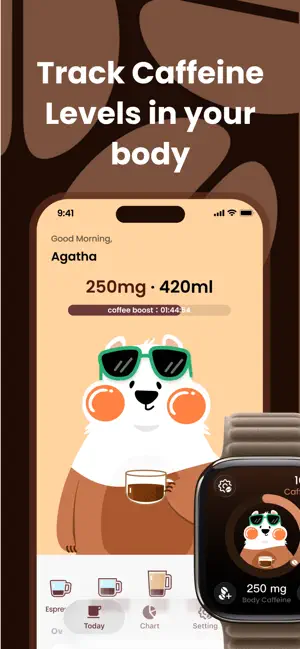
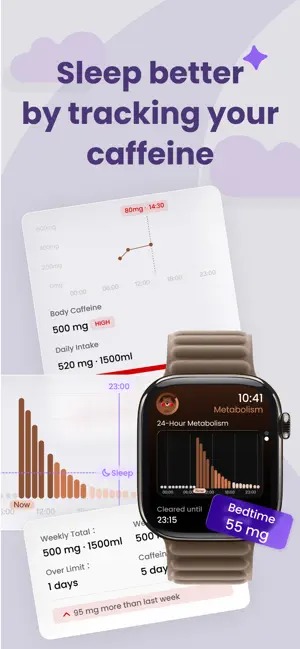
CoffeeWatch is a caffeine tracking app designed for people who love coffee and also care about how their body feels. For the first time, you can truly see your caffeine level in your body and your 24-hour metabolism curve—no more drinking by gut feel, no more pushing through on sleepless nights. Use data to protect your clarity, focus, and sleep. #Why We Built This App We’re a group of people who’ve survived countless late nights — powered by coffee. A “wake-me-up” cup in the morning, a “keep-me-going” cup in the afternoon, and a “let-me-finish-this-deck” delivery coffee at night. Some days it took five or six cups just to “look okay” in a meeting. But instead of feeling more stable, we ended up with: • Faster heartbeats, trembling hands, anxiety • Feeling more awake at night but sleeping lighter • And waking up even more tired — only to drink again It’s a loop: fatigue → more caffeine → worse sleep → more fatigue. We realized caffeine itself isn’t the enemy — The real problem is that we don’t know our current state. • How much caffeine is still in my body right now? • If I drink this cup, will I still be able to sleep tonight? • Am I already over my safe limit? So we made CoffeeWatch. --- # Features 1. Real-Time Caffeine Monitoring • See exactly how much caffeine (mg) is in your body right now • 24-hour metabolism curve • Clear-out countdown — how long until most caffeine is metabolized • Bedtime residual forecast — how much caffeine remains at your usual bedtime • Sleep-risk hints such as “You might fall asleep later tonight — consider skipping this cup” 2. One-Tap Drink Logging • Built-in drinks: Americano, Latte, Espresso, Cold Brew, Milk Tea, Energy Drink, Tea, Cola, Hot Cocoa, and more • Quick-select common sizes • Manually enter your volume (ml / oz) — caffeine is auto-calculated • Save your favorite drink for one-tap add • Each log instantly updates your timeline and metabolism forecast 3. Trends & History • View daily / weekly / monthly / yearly caffeine trends • Total intake, daily average, over-limit days • “Caffeine-free days” — when your body truly rested • See which drinks contribute most to your intake 4. Sleep-Friendly Reminders • About six hours before bedtime: “Caffeine is still active — tonight may be harder to fall asleep.” • Sleep-readiness states: Calm / Alert / Over-stimulated 5. Deep Apple Watch Integration • Record directly from your wrist — no phone needed • Complications show: – Current in-body caffeine – Metabolism curve – Bedtime residual • Your watch becomes both a quick-log tool and a real-time status indicator 6. Widgets & Lock Screen Info • Show key numbers right on your iPhone Home, Lock, or Standby screens: – Current caffeine level – Total consumed today – Distance from your comfort limit • Pin your go-to drink (e.g., “16 oz Latte”) to a widget for one-tap logging 7. Live Activities / Dynamic Island • Your iPhone’s Dynamic Island continuously displays caffeine level and clear-out countdown • Apple Watch shows real-time status as well --- # Apple Ecosystem Integration • Full support for iOS 26 / watchOS 26 • Liquid Glass UI — clear information, non-intrusive, no panic-inducing visuals • Apple Watch app & complications — check status or log a cup with a simple wrist raise • iOS 26 widgets — available on Home Screen, Lock Screen, and StandBy Mode • HealthKit integration — your health data is used only to help you understand yourself. You’re in full control and can revoke access anytime. --- # Coming Soon • AI Drink Recognition — Snap a photo of your beverage, and CoffeeWatch automatically detects type, volume, and typical caffeine strength to draft a log for you. • Caffeine & Performance Insights — learn how precise timing and dosage can safely enhance training and endurance. --- Privacy Policy: https://coffeewatch.app/privacy-policy Terms of Use: https://coffeewatch.app/terms-of-use Email: [email protected]
Ratings & reviews
4.6
7 ratings
What’s new
Version 1.1.6 · Updated June 19, 2026
Updated water intake volume and caffeine sync recording to Apple Health
App privacy
The developer, Shutong Technology, reported these privacy practices to Apple.
Data Used to Track You
The following data may be used to track you across apps and websites owned by other companies:
- Identifiers: Device ID
Data Not Linked to You
The following data, which may be collected but is not linked to your identity, may be used for the following purposes:
- Identifiers: Device ID
- Diagnostics: Crash Data
- Health & Fitness: Health
Used for: Analytics, App Functionality
Alternatives to Water Tracker CoffeeWatch
Looking for apps like Water Tracker CoffeeWatch? Here are 6 similar apps on the App Store. The highest rated is Barista Coffee Tracker (5.0/5), and all 6 are free to download.
-
 Mindful Coffee: Brew & Sleep
3.7
Mindful Coffee: Brew & Sleep
3.7
-
 Caffeine App - Daily Tracker
4.6
Caffeine App - Daily Tracker
4.6
-
 Barista Coffee Tracker
5.0
Barista Coffee Tracker
5.0
-
 读手表-Insight AI健康伙伴
4.0
读手表-Insight AI健康伙伴
4.0
-
 Caffeine Tracker: Alyx
4.9
Caffeine Tracker: Alyx
4.9
-
 CalmWatch: Stress Monitor
4.2
CalmWatch: Stress Monitor
4.2
| App | Rating | Price | Last updated | Compare |
|---|---|---|---|---|
| Water Tracker CoffeeWatch | 4.6 / 5 (7 ratings) | Free | June 19, 2026 | |
| Mindful Coffee: Brew & Sleep | 3.7 / 5 (3) | Free | Oct 3, 2026 | Compare |
| Caffeine App - Daily Tracker | 4.6 / 5 (341) | Free | Mar 18, 2026 | Compare |
| Barista Coffee Tracker | 5.0 / 5 (2) | Free | Sep 15, 2025 | Compare |
| 读手表-Insight AI健康伙伴 | 4.0 / 5 (8) | Free | Sep 23, 2026 | Compare |
| Caffeine Tracker: Alyx | 4.9 / 5 (40) | Free | Sep 18, 2026 | Compare |
| CalmWatch: Stress Monitor | 4.2 / 5 (35) | Free | Jul 18, 2026 | Compare |