

Cadance: Plays music for class
David Wilson Music iPhoneiPadiPod touchApple Watch
Cadance: Plays music for class is a free Music app for iPhone and iPad by David Wilson. Rated 5.0/5 from 6 ratings. Requires iOS 16.0.
- Rating
- 5.0
- 6 ratings
- Price
- Free
- on the App Store
- Size
- 57 MB
- Age 4+
- Updated
- Oct 22
- 2026 · v7.5
Screenshots



About Cadance: Plays music for class
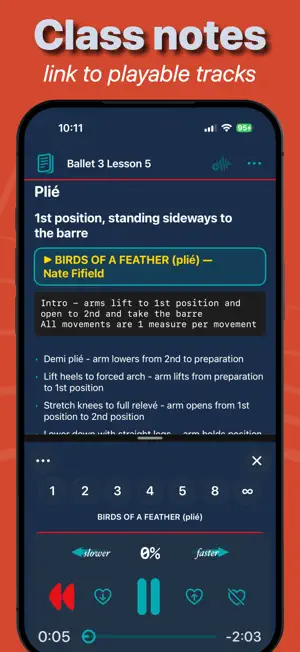
Cadance is the music player built for dance teachers. Change tempo without changing pitch. Find music for the exercise in front of you. Keep playlists, class notes, and playback controls together on iPhone and iPad, with an Apple Watch companion when you are away from the device. TEACH WITH CONTROL • Change the tempo of eligible local music without changing its pitch. • Keep the controls you need close at hand: play, pause, skip, repeat, volume, duck, delay start, and Teaching Lock. • Use the built-in metronome when a count is what the exercise needs. • Remember tempos in your own playlists so recurring classes are ready to go. FIND THE RIGHT MUSIC FASTER • Search Your Media and Apple Music in one place. Your device library, files, Syllabus, and playlists appear first. • Browse dance-focused search terms for barre, centre, allegro, pointe work, musical feel, and style. • Collect results into My Cadance playlists, save favorites, and use More Like This to continue exploring. • Works with your device music library, DRM-free files you import, and your Apple Music library. Apple Music playback and available controls depend on your subscription, the item, and what Apple makes available to Cadance. PLAN, PRACTICE, AND STAY ORGANIZED • Create and organize custom playlists and folders for each class. • Import music, playlists, and Syllabus material from Files, AirDrop, or the Share sheet. • Keep typed and handwritten Teacher Notebook notes with portable track links and iCloud sync when available. • Use Perfect Practice Passes to unlock a chosen eligible track for 30 days. CONTROL CLASS FROM YOUR WRIST The Cadance Apple Watch companion mirrors what is playing on your iPhone. Browse the active collection, choose a track, adjust tempo where supported, control volume, and duck the music without returning to the device. Bluetooth remotes work with iPad and iPhone and they support tempo changes. FLEXIBLE ACCESS Class Planning mode is always available for browsing, organizing, and short previews. New users receive 14 Day Passes and one Perfect Practice Pass. A Day Pass unlocks full Artist-level access for one calendar teaching day and is consumed when activated, not when purchased. Passes never expire. Optional subscriptions and in-app purchases are available for teachers who need ongoing access. PERFECT PRACTICE PASS designed for Dancers • Focus Player: distraction-free, full-screen practice for one track with full tempo control • A/B loop markers: repeat just the section you're working on • Waveforms are available to simplify marker placements • Repeat ladder with delay-start and pauses between runs • A free pass for new users • Practice Pass supports 30 days of full feature access SUBSCRIPTION LEVELS (optional) - Spark (for occasional teaching): Unlocks full playback of your local files, Metronome, Delay Start, Apple Watch, and Bluetooth remote support. - Artist (for regular instruction): The ultimate frictionless experience. Direct streaming of Apple Music albums and playlists without downloading. Spark and Artist are auto-renewing subscriptions available on a monthly or annual basis. You can cancel at any time — your access continues until the end of the current billing period. To check eligibility and actual pricing for your region including discounted introductory rates, see the in-app subscription screen. NOTES: Cadance is not bundled with music and doesn't sell music, so bring your own or use our playlists with your Apple Music account. Standard Apple Terms of Use apply to Cadance: https://www.apple.com/legal/internet-services/itunes/dev/stdeula/
Ratings & reviews
5.0
6 ratings
What’s new
Version 7.5 · Updated October 22, 2026
Cadance 7.5 gets you to your music faster and makes your access easier to understand. • A simpler start: One welcome screen and a single music permission request. Cadance then opens where your music is: your albums or playlists, Cadance Resources, or Apple Music Search. • Better imports: Importing a folder from iCloud Drive now shows its progress and can be paused, resumed or ended, even after closing Cadance. Cadance checks the download size and free space first and warns before using mobile data. Files already in Cadance are skipped, so importing again no longer creates duplicate copies, and a Syllabus folder merges with your copy, asking before it adds missing files. • iPhone Duo: Cadance adapts its layout to both the outer and inner displays. • Moving from another music service? A new guide shows how to bring your playlists into Cadance. • Apple Music previews: Without an Apple Music subscription, Apple Music tracks now play a 30-second preview instead of showing an error, with an option to try Apple Music. • Helpful empty tabs: When Albums, Artists or Syllabus has nothing to show yet, Cadance suggests the next step, such as switching music source, sorting imported items, importing music or Syllabus files, or searching Apple Music. • Clear 15-second messages: When a track stops at 15 seconds, Cadance now tells you why and what unlocks it. • New Subscription screen: See your plan, renewal date and price paid, manage your subscription with Apple, request a refund, restore purchases and contact support in one place. • Clearer Restore Purchases messages, including steps to sign in to the App Store when needed. • Apple Watch: Tracks started from your Watch now respect No Repeat, and switching between No Repeat and Play All on iPhone takes effect without restarting the track. • More dependable access: Your subscription is recognised as soon as iCloud sign-in completes after a reinstall, and reinstalling on the same device keeps today's active Day Pass. • Visual Tour: A new Bluetooth Remote topic, plus refreshed information panels. This release also includes stability and layout improvements.