

Factsplat
Metaito AS Productivity iPhoneiPadiPod touch
Factsplat is a free Productivity app for iPhone and iPad by Metaito AS. Rated 5.0/5 from 1 ratings. Requires iOS 14.0. Updated October 19, 2026.
- Rating
- 5.0
- 1 ratings
- Price
- Free
- on the App Store
- Size
- 67 MB
- Age 17+
- Updated
- Oct 19
- 2026 · v1.6.0
Screenshots

About Factsplat
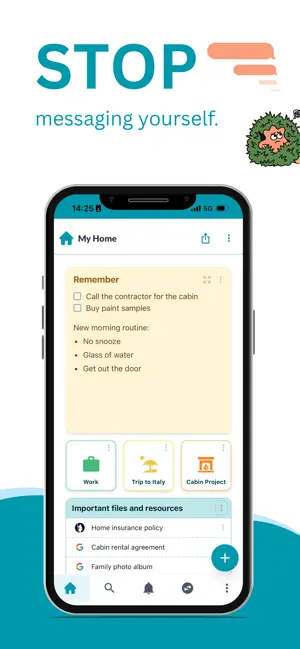
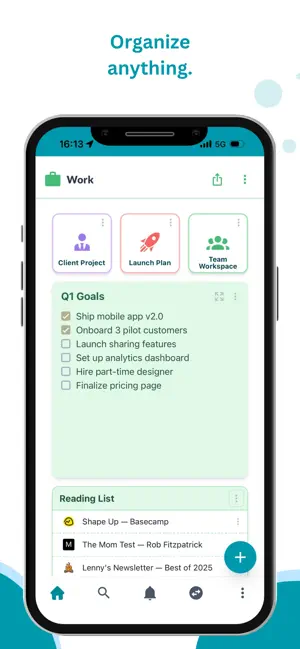
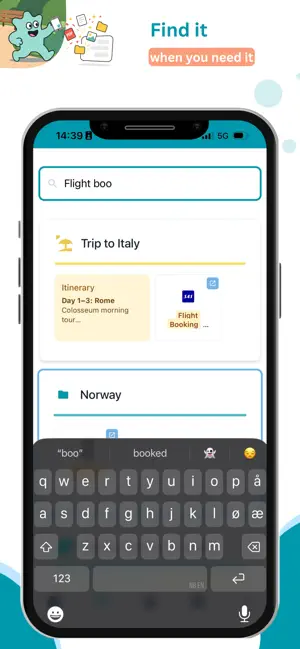
We all do it. You find a link, a document, a recipe, an interesting post. So you message it to yourself. Then it disappears into an infinite scroll. Factsplat is where it all goes instead. NEW: AI ASSISTANT Ask the AI to create notes, organize your content, add colors, or set up a whole project for you. It works right on your board you see changes as they happen, and you can undo anything. SAVE FROM ANY APP Tap share, pick Factsplat, done. Links, notes, files, photos. Saved in one tap from whatever app you're in. No copy-pasting, no emailing yourself. CAPTURE ON YOUR PHONE, ORGANIZE ON ANY DEVICE Save things on the go. Organize them later on the web from any device. Your stuff follows you. VISUAL BOARDS Organize your stuff on boards called splats. See the big picture at a glance. Use colors and icons to make things scannable. Group related items into collections. SHARE AND COLLABORATE Share a board with friends, co-workers, or clients. Edit together in real time. Control who can view and who can edit. FIND ANYTHING FAST Full-text search across everything you've saved. Notes, links, files. Just type and find it. WHAT YOU CAN SAVE Links, notes with rich text, files, images, polls, discussions, calendars, and more. Everything lives on your boards, organized however makes sense to you. PRICING Free to download and use. Premium features (file uploads, custom colors, modes, AI assistant, and more) are available as in-app purchases. For anyone drowning in tabs, bookmarks, and "I'll remember this later." Terms of use (EULA): https://www.apple.com/legal/internet-services/itunes/dev/stdeula/ Terms of Service: https://factsplat.com/legal/terms Privacy Policy: https://factsplat.com/legal/privacy
What’s new
Version 1.6.0 · Updated October 19, 2026
A quicker start, your voice, and a lot of polish. • New here? Answer two or three questions and the assistant builds your first page for you, free on every plan. • Voice: dictate straight into a note, record voice messages as cards or inside a chat, and read the transcript. Plus and up. • The app now follows your phone's light or dark setting. Change it under Settings. • Save from the share sheet without picking a splat: "Just save" puts it in your notes. • Events: invite guests by email and tell them when the time or place changes. • Forms get an "Other" choice people can write in. • Word, Excel and PowerPoint files preview inside the app. • Open a document or form as a full page, and share a single card with its own link. • Fixes to notifications, collections, the event form, access requests and the links that open the app.
App privacy
The developer, Metaito AS, reported these privacy practices to Apple.
Data Linked to You
The following data, which may be collected and linked to your identity, may be used for the following purposes:
- Identifiers: User ID, Device ID
- Usage Data: Product Interaction
- Purchases: Purchase History
- Contact Info: Email Address, Name
- User Content: Photos or Videos, Customer Support, Other User Content
- Diagnostics: Crash Data, Performance Data
Used for: Analytics, App Functionality
Alternatives to Factsplat
Looking for apps like Factsplat? Here are 6 similar apps on the App Store.
-
 Mesh Community
-
 Anchu: Notes & Tasks
-
 Fire Notes: Burn Journal
-
 Sidequest Habit Tracker
-
 Deep Work Everyday
-
 TaskCtrl
| App | Rating | Price | Last updated | Compare |
|---|---|---|---|---|
| Factsplat | 5.0 / 5 (1 rating) | Free | October 19, 2026 | |
| Mesh Community | – | Free | Aug 20, 2026 | Compare |
| Anchu: Notes & Tasks | – | Free | Sep 22, 2026 | Compare |
| Fire Notes: Burn Journal | – | Free | Sep 2, 2026 | Compare |
| Sidequest Habit Tracker | – | Free | Oct 7, 2025 | Compare |
| Deep Work Everyday | – | 0.99 USD | Mar 9, 2026 | Compare |
| TaskCtrl | – | Free | Sep 24, 2026 | Compare |
Compare Factsplat with the top alternatives: ratings, updates, ASO score and keyword gaps →