

Depth Area Cam
Philippe Zay Photo & Video iPhoneiPadiPod touch
Depth Area Cam is a paid Photo & Video app for iPhone and iPad by Philippe Zay. Requires iOS 18.0. Updated October 3, 2025.
- Price
- 1.99 USD
- on the App Store
- Size
- 4 MB
- Age 4+
- Updated
- Oct 3
- 2025 · v1.0.0
Screenshots
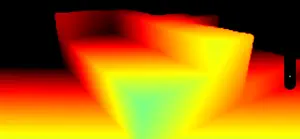


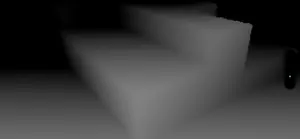
About Depth Area Cam
Depth Area Cam Explore the World in Depth. Literally. Depth Area Cam transforms your iPhone or iPad into a powerful real-time depth visualization tool. Using the device’s LiDAR scanner and depth sensors, this app reveals the hidden distance layers of your environment — perfect for creators, developers, or anyone curious about spatial perception. Key-Features: Real-Time Depth Visualization Visualize the world using vibrant depth-based color gradients. Near objects are shown in cool blues, far objects in warm reds — or invert this spectrum at the tap of a switch. Grayscale Depth Mode Prefer minimalism? Use the grayscale mode for a clean black-to-white depth representation. Near objects are light, distant areas are dark — switch the gradient direction as needed. High Dynamic Range Video Recording Record depth videos in HLG (Hybrid Log-Gamma), PQ (Perceptual Quantizer), Linear, or Standard Dynamic Range (SDR). Use the home screen quick actions to choose your recording mode before launching the app or anytime during usage. High-Quality Snapshots Capture lossless depth screenshots directly to your Photo Library—without UI overlays or compression artifacts. Perfect for saving your best visualizations. Adjustable Depth Range Customize the depth threshold dynamically with the smart slider. Focus on near details or capture the full scene, up to 20 meters. Color Inversion & Customization Easily invert color mappings or switch between visualization modes in real-time. No need to restart recording or exit the app. Intuitive Interface All controls are live-adjustable while running. Adjust sliders, toggle options, or take snapshots without interrupting your session. Why Depth Area Cam? - Visualize depth like never before - Create creative AR content - Test and prototype LiDAR-based ideas - Record stunning HDR depth videos for post-processing - Capture scientific or educational visuals Requirements: Depth Area Cam requires a LiDAR-equipped iPhone or iPad (e.g., iPhone Pro models or iPad Pro). On devices without LiDAR, a camera-only mode is available.
App privacy
The developer, Philippe Zay, reported these privacy practices to Apple.
Data Not Collected
The developer does not collect any data from this app.
Alternatives to Depth Area Cam
Looking for apps like Depth Area Cam? Here are 6 similar apps on the App Store. The highest rated is DepthWeaver: Stereogram Maker (5.0/5), and 5 of the 6 are free to download.
-
 Depth Camera RAW
2.8
Depth Camera RAW
2.8
-
 MemoAR - Memoir in AR
-
 DepthWeaver: Stereogram Maker
5.0
DepthWeaver: Stereogram Maker
5.0
-
 Cameranaglyph
5.0
Cameranaglyph
5.0
-
 DepthPop: 3D Photo & Wallpaper
-
 Poloska
4.1
Poloska
4.1
| App | Rating | Price | Last updated | Compare |
|---|---|---|---|---|
| Depth Area Cam | – | 1.99 USD | October 3, 2025 | |
| Depth Camera RAW | 2.8 / 5 (5) | 3.99 USD | Jun 7, 2025 | Compare |
| MemoAR - Memoir in AR | – | Free | May 20, 2025 | Compare |
| DepthWeaver: Stereogram Maker | 5.0 / 5 (1) | Free | Sep 25, 2026 | Compare |
| Cameranaglyph | 5.0 / 5 (1) | Free | Dec 17, 2025 | Compare |
| DepthPop: 3D Photo & Wallpaper | – | Free | Aug 11, 2026 | Compare |
| Poloska | 4.1 / 5 (76) | Free | Mar 25, 2025 | Compare |
Compare Depth Area Cam with the top alternatives: ratings, updates, ASO score and keyword gaps →