

SecureDoc · Document Vault AI
Frantisek Varadzin Productivity iPhoneiPadiPod touch
SecureDoc · Document Vault AI is a free Productivity app for iPhone and iPad by Frantisek Varadzin. Requires iOS 17.6. Updated August 14, 2026.
- Price
- Free
- on the App Store
- Size
- 28 MB
- Age 4+
- Updated
- Aug 14
- 2026 · v2.03
Screenshots

About SecureDoc · Document Vault AI
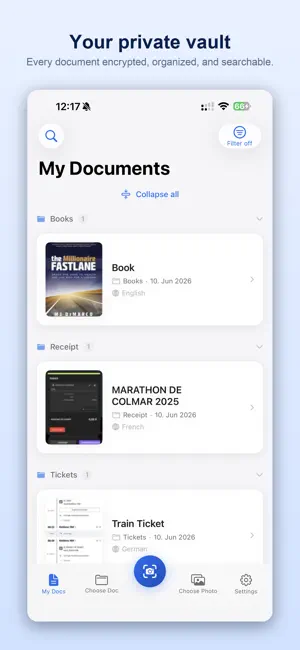
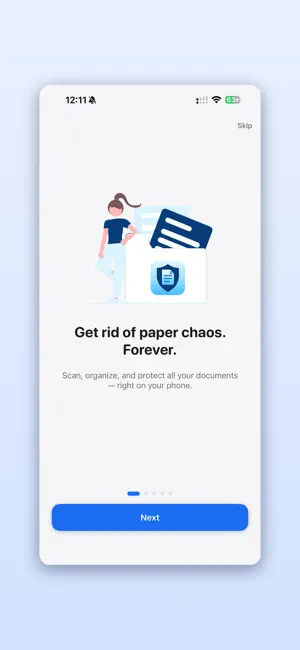
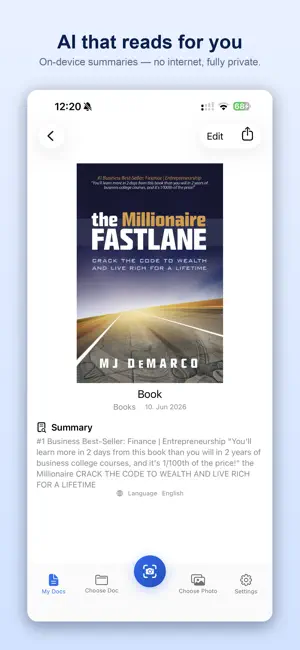
Your documents deserve better than a shoebox — and more privacy than a cloud. SecureDoc turns your iPhone into a private, AI-powered document vault. Scan receipts, contracts, invoices, medical records, or any paperwork — and find them again in seconds. Everything stays on your device by default. No third-party servers. You decide whether your documents stay only on your device or sync through your own Apple iCloud. Just you and your documents. PRIVATE BY DESIGN Unlike other scanner apps, SecureDoc never sends your files to third-party servers. All scanning, OCR, and AI processing happens entirely on your device. You're in control: keep everything strictly on your device, or use your own Apple iCloud to sync between iPhone and iPad — the choice is always yours. Your sensitive documents — tax returns, medical records, IDs — stay where they belong: with you. SCAN & UNDERSTAND Point your camera at any document and let AI do the rest. Multi-page scanning creates searchable PDFs instantly. On-device OCR extracts text in multiple languages, while smart AI generates summaries and detects the document language — all without an internet connection. NEVER MISS AN EXPIRY SecureDoc automatically detects expiration dates on passports, ID cards, driver's licenses, insurance policies and more — and reminds you in time: 180, 90, 30 and 7 days before a document expires. The new alerts bell also tracks payment due dates and appointments, and you can add any deadline to your calendar with one tap. SAVE FROM ANYWHERE The new Share Extension saves PDFs and photos from Mail, Safari or Files straight into SecureDoc — choose the name and folder as you save, while duplicate detection warns you if you already have the file. Home Screen widgets and Shortcuts keep expiring documents and Quick Scan one tap away. ORGANIZE EFFORTLESSLY Stop searching through piles. Sort documents into categories, add custom tags, and use full-text search to find any receipt, contract, or invoice in seconds. Collapse categories for a clean overview, or filter by date, tags, and type. Select multiple documents to move or delete them at once, drag & drop them between folders, or long-press a folder to rename it. LOCKED DOWN TIGHT Protect your document vault with Face ID, Touch ID, or a PIN code. A recovery code ensures you're never locked out. Your files are secured in the iOS Keychain — the same security used by banking apps. BACKUP ON YOUR TERMS Create complete ZIP backups of your entire library — metadata, tags, and files included. Save them wherever YOU choose: external drive, USB, or your own NAS. Restore or merge backups anytime. Or use Apple iCloud storage to use the app on both iPhone and iPad. START FREE Scan and organize up to 15 documents completely free. Upgrade to SecureDoc Pro for unlimited documents and full access to every feature. Why people choose SecureDoc over other scanners: 100% on-device — no third-party servers, no data leaks Face ID / Touch ID protection AI-powered OCR + smart summaries Categories, tags & full-text search Multi-page PDF scanning Backup & restore as ZIP Clean, intuitive design No ads. Ever. Terms of Use (EULA): https://www.varadzin.com/terms-of-use-eula-for-securedoc/ Privacy Policy: https://www.varadzin.com/privacy-policy-for-securedoc/
What’s new
Version 2.03 · Updated August 14, 2026
NEW - SecureDoc Pro Lifetime: pay once, keep Pro forever - Redesigned paywall with clear plan comparison - Dismiss expiry alerts you've already handled - the document stays in your vault IMPROVED - Importing a multi-page PDF from Files now keeps every page - Smoother scrolling in long document lists - Toolbar labels no longer get cut off
App privacy
The developer, Frantisek Varadzin, reported these privacy practices to Apple.
Data Not Collected
The developer does not collect any data from this app.
Alternatives to SecureDoc · Document Vault AI
Looking for apps like SecureDoc · Document Vault AI? Here are 6 similar apps on the App Store. The highest rated is Proof Locker (5.0/5), and all 6 are free to download.


| App | Rating | Price | Last updated | Compare |
|---|---|---|---|---|
| SecureDoc · Document Vault AI | – | Free | August 14, 2026 | |
| Papiertresor | – | Free | Apr 27, 2026 | Compare |
| Proof Locker | 5.0 / 5 (2) | Free | Jul 21, 2026 | Compare |
| Mnemosa | – | Free | Mar 3, 2026 | Compare |
| MyDocuBox – Dokumenten Tresor | – | Free | May 12, 2026 | Compare |
| Liefer-Max | – | Free | Aug 22, 2024 | Compare |
| MyDigitalSafe | 5.0 / 5 (6) | Free | Jul 3, 2026 | Compare |