

PlanCoach - Task Splitting
晓江 苏 Utilities iPhoneiPadiPod touchApple Watch
PlanCoach - Task Splitting is a free Utilities app for iPhone and iPad by 晓江 苏. Rated 4.5/5 from 20 ratings. Requires iOS 17.0. Updated October 19, 2026.
- Rating
- 4.5
- 20 ratings
- Price
- Free
- on the App Store
- Size
- 51 MB
- Age 4+
- Updated
- Oct 19
- 2026 · v2.15.2
Screenshots


About PlanCoach - Task Splitting
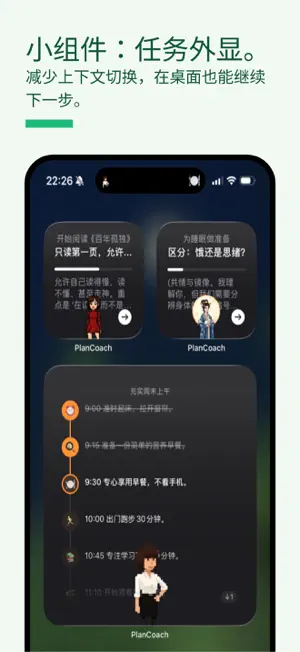
PlanCoach helps you get through everything you thought was too hard, one thing at a time, and actually enjoy the process. Built on CBT and cognitive offloading: serious about beating procrastination, and ADHD-friendly. What makes PlanCoach different from its many imitators? ================================= 1. A larger community. Since a viral post in July 2025 (300K likes, 3M+ views), PlanCoach has grown to hundreds of thousands of users. 2. Built with the community. Shaped by 1,000+ pieces of community feedback, with constant iteration and great reviews. 3. Covers the whole task cycle (start, execute, focus, capture distracting thoughts, record reflections, time receipts), so you can get back on track from any stage. 4. Deep customisation. Coaches, personal profiles, per-coach rewrites and lorebooks give you huge freedom and fun. The Psychology Behind It ======== 1. Zeigarnik effect: unfinished tasks keep occupying your mind. Making a plan lets you put them down, and once you start, you want to finish. → AI breaks tasks into steps, with a first step small enough to start now; widgets, Live Activities and persistent reminders keep it in sight. 2. Cognitive offloading: your mind is for thinking, not for storing. → Shake to save a thought to Idea Capture; Navigation Mode keeps the current step on screen, so you only need to look, not remember; lorebooks and your profile remember your context. 3. CBT (Cognitive Behavioural Therapy): act first, and your mood will follow. → Coaches turn tasks into concrete actions and answer self-doubt with encouragement; "Explain it" shows the reasoning behind each step, dissolving resistance. 4. Tiny starts (Atomic Habits): make the bar so low you can't fail. → Revise steps until they are small enough; Shortcuts can start a routine on a schedule or with an NFC tap. 5. Instant positive feedback: make progress visible. → Check-ins, the Growth System and time receipts turn your real-world effort into results you can see. Key Features ====== 1. Multiple Coaches 4 carefully selected built-in coaches: Coach W gets you started, the cool big sister is blunt and balanced, Miss S handles chained tasks, and the NPC Mage turns boring tasks into role-playing adventures. 2. Coach DLC Download the coaches you like: a minister, a butler, a communication coach, a sleep coach, even a chef… one app, endless ways to play. 3. Growth System Make your real-world effort visible inside the app, so you fall in love with the version of yourself that keeps improving. 4. Personal Profile Coaches refer to your profile every time they plan, so steps fit your situation and encouragement hits home. Each coach can see its own rewrite of your profile (the "Master Chef" sees your food preferences; the "Minister" sees that you are a Spanish princess). 5. Navigation Mode (Focus) An ADHD-friendly focus mode: large always-visible text (GTD-inspired), progressive step disclosure and course correction, so focus comes naturally. 6. Idea Capture (Not a TODO List) "Your mind is for having ideas, not holding them." Shake firmly on any screen to capture an idea instantly. You don't need a brilliant idea every time. Keep capturing them, and the rare good ones will eventually connect into real change. 7. Lorebook Define a dictionary for your own world, packaging complex instructions, technical terms and personal SOPs into reusable entries. 8. Apple Watch Support! Great for cooking, exercising or walking, when you can't keep looking at your phone. 9. Iterative Revision Good plans are made by revising. Refine yours endlessly with AI until it truly fits. ==== The app price is increasing month by month, and the lifetime purchase will gradually rise to ¥268. The earlier you buy, the better the deal! Website: https://plancoach.freemindworkshop.com/ Terms of Use (EULA): https://www.apple.com/legal/internet-services/itunes/dev/stdeula/
Ratings & reviews
4.5
20 ratings
What’s new
Version 2.15.2 · Updated October 19, 2026
Highlight: Ambience 2.0 - Mix multiple ambience sounds, choose a projection independently, and save your mix as a custom preset that syncs across your iCloud devices. (@卡卡) - Added rustling leaves, fireplace, and cat purring sounds for you to mix and match. (@卡卡) More ambience content is on the way! Share your suggestions on our message board (https://plancoach.freemindworkshop.com/board/).
App privacy
The developer, 晓江 苏, reported these privacy practices to Apple.
Data Not Collected
The developer does not collect any data from this app.
Alternatives to PlanCoach - Task Splitting
Looking for apps like PlanCoach - Task Splitting? Here are 6 similar apps on the App Store. The highest rated is Snowballing - Start small (5.0/5), and all 6 are free to download.
-
 Snowballing - Start small
5.0
Snowballing - Start small
5.0
-
 排版小动物 - tinytype 你的生活记录小助手
4.9
排版小动物 - tinytype 你的生活记录小助手
4.9
-
 Awareness - Time Visualization
4.7
Awareness - Time Visualization
4.7
-
 MindBack
4.5
MindBack
4.5
-
 herein - Home Screen Widgets
4.8
herein - Home Screen Widgets
4.8
-
 Proactive List
4.5
Proactive List
4.5
| App | Rating | Price | Last updated | Compare |
|---|---|---|---|---|
| PlanCoach - Task Splitting | 4.5 / 5 (20 ratings) | Free | October 19, 2026 | |
| Snowballing - Start small | 5.0 / 5 (41) | Free | Oct 11, 2026 | Compare |
| 排版小动物 - tinytype 你的生活记录小助手 | 4.9 / 5 (407) | Free | Oct 10, 2026 | Compare |
| Awareness - Time Visualization | 4.7 / 5 (26) | Free | Oct 9, 2026 | Compare |
| MindBack | 4.5 / 5 (15) | Free | Oct 10, 2026 | Compare |
| herein - Home Screen Widgets | 4.8 / 5 (32) | Free | Oct 17, 2026 | Compare |
| Proactive List | 4.5 / 5 (2) | Free | Aug 6, 2025 | Compare |