

KeycoBoard: AI Voice Keyboard
Keyco Tech Ltd. Productivity iPhoneiPadiPod touch
KeycoBoard: AI Voice Keyboard is a free Productivity app for iPhone and iPad by Keyco Tech Ltd. Rated 4.0/5 from 4 ratings. Requires iOS 16.6.
- Rating
- 4.0
- 4 ratings
- Price
- Free
- on the App Store
- Size
- 170 MB
- Age 17+
- Updated
- Oct 17
- 2026 · v1.1.4
Screenshots



About KeycoBoard: AI Voice Keyboard
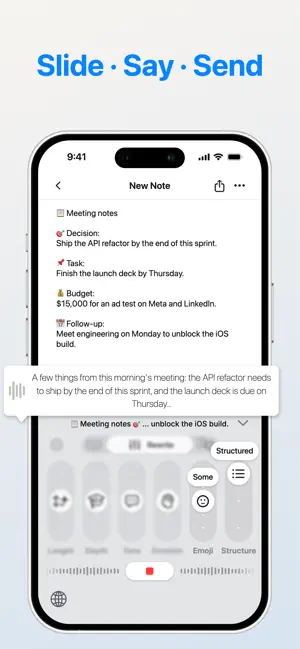
Speak naturally, or rewrite text already in the current field. With nothing selected, KeycoBoard rewrites all the text it detects in the field; select part of it to rewrite only that part. You get the result in the tone, length and language you choose, right in the text field. No prompts to write. No copying and pasting between apps. VOICE INPUT YOU CONTROL Choose a style before you speak: more formal for a work update, more relaxed for a chat, or another language entirely. Tap the mic on the KeycoBoard keyboard and talk. Your words come back cleaned up and written in that style, ready to send. Follow progress on the Lock Screen and in the Dynamic Island. REWRITE WITH SLIDERS Set the sliders and tap Apply. With nothing selected, KeycoBoard rewrites all the text it detects in the current field. Select part of it, and only that part changes. Six dimensions give you 9,375 combinations: - Length: from a short summary to a fuller version - Depth: from plain words to expert terms - Tone: from casual to formal - Emotion: from neutral to enthusiastic - Emoji: from none to plenty - Structure: keep it conversational or turn it into a numbered list TRANSLATE IN PLACE Translate all the text detected in the current field, or select just the part you need. You can also speak in your own language and get text in another. Supported languages: English, Spanish, French, German, Italian, Chinese, Japanese, Korean, Russian and Cantonese. Reorder or hide languages in Settings. KNOWS WHAT YOU'VE ALREADY WRITTEN KeycoBoard uses the text already in the field as context, so formatting and wording fit what came before. Keep talking or writing without explaining the background again. WORKS WHERE YOU TYPE Use it in messaging, email, notes and most other apps with a text field. Tap the globe key to switch to KeycoBoard, and tap it again to go back to your usual keyboard. YOUR HISTORY STAYS ON YOUR DEVICE Your generation history, including text, results and voice recordings, is saved on your device. Delete it anytime or set automatic cleanup. FREE AND PRO The free plan includes 30 uses a month, shared across voice input and base-model rewriting and translation. KeycoBoard Pro includes: - Unlimited voice input, plus rewriting and translation with base models - Up to 100 advanced-model rewrites a month - Custom rewrite instructions - Early access to new features Payment is charged to your Apple Account at confirmation of purchase. Subscriptions renew automatically unless canceled at least 24 hours before the end of the current period. Manage or cancel your subscription in your App Store account settings. PERMISSIONS AND PRIVACY AI features need "Allow Full Access" so the keyboard can connect to the network. KeycoBoard uses the text in the current field to process your request. Requests are handled by third-party AI providers under their own policies. Our Privacy Policy explains how text and audio are processed. Privacy Policy: https://www.keycoboard.com/privacy Terms of Use: https://www.keycoboard.com/terms
What’s new
Version 1.1.4 · Updated October 17, 2026
- Added a typing keyboard for Chinese, English, Spanish, Italian, French, German and Russian—type, rewrite and translate in one place. - Voice input now switches back automatically, reducing manual app switching. - Improved voice input startup speed, with clearer feedback and better handling when recording is interrupted. - Fixed known issues to improve stability.
App privacy
The developer, Keyco Tech Ltd., reported these privacy practices to Apple.
Data Linked to You
The following data, which may be collected and linked to your identity, may be used for the following purposes:
- Diagnostics: Crash Data
- Purchases: Purchase History
- Contact Info: Email Address, Name
- User Content: Audio Data, Other User Content
- Identifiers: User ID
- Usage Data: Product Interaction
Used for: Analytics, App Functionality
Alternatives to KeycoBoard: AI Voice Keyboard
Looking for apps like KeycoBoard: AI Voice Keyboard? Here are 6 similar apps on the App Store. The highest rated is Memoit - Capture What Matters (5.0/5), and all 6 are free to download.
-
 iLinkbox
3.0
-
 Memoit - Capture What Matters
5.0
-
 HabitStar: Bad Habit Tracker
4.3
-
 Near: Private Action Hub
4.9
-
 Platen — Paper & Ink
4.7
-
 PhotoHub - Clean,Blur,collage
4.7
| App | Rating | Price | Last updated | Compare |
|---|---|---|---|---|
| KeycoBoard: AI Voice Keyboard | 4.0 / 5 (4 ratings) | Free | October 17, 2026 | |
| iLinkbox | 3.0 / 5 (1) | Free | Oct 3, 2026 | Compare |
| Memoit - Capture What Matters | 5.0 / 5 (6) | Free | Sep 17, 2026 | Compare |
| HabitStar: Bad Habit Tracker | 4.3 / 5 (18) | Free | May 13, 2026 | Compare |
| Near: Private Action Hub | 4.9 / 5 (7) | Free | Oct 15, 2026 | Compare |
| Platen — Paper & Ink | 4.7 / 5 (23) | Free | Oct 23, 2026 | Compare |
| PhotoHub - Clean,Blur,collage | 4.7 / 5 (10) | Free | Sep 23, 2026 | Compare |