

PlanForm
Beijing Honghu Yuntu Technology Co., Ltd. Productivity iPhoneiPadiPod touch
PlanForm is a free Productivity app for iPhone and iPad by Beijing Honghu Yuntu Technology Co., Ltd. Rated 5.0/5 from 2 ratings. Requires iOS 15.0.
- Rating
- 5.0
- 2 ratings
- Price
- Free
- on the App Store
- Size
- 22 MB
- Age 4+
- Updated
- Sep 29
- 2026 · v1.0.23
Screenshots


About PlanForm
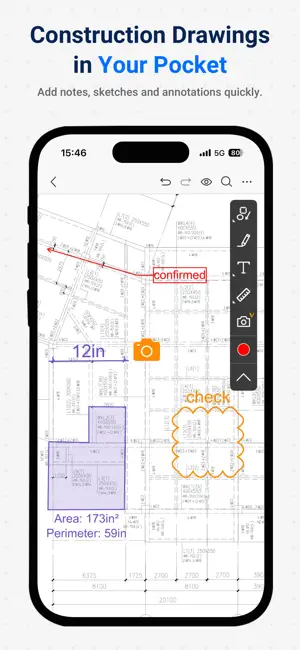
PlanForm is a professional-grade PDF reader specifically designed for Architectural, Engineering, and Construction (AEC) professionals. Delivering exceptional performance across all mobile devices and tablets, it ensures seamless viewing and measuring of PDFs and technical drawings with pixel-perfect precision. PlanForm Highlights for iOS/iPad: 1.Unzip&Browse PDF Drawings • Seamless browsing for drawings of any size 2.Measure PDF Drawings • Set the scale easily • Measure length and area quickly 3.Annotate PDF Drawings • Cloud/Pen/Text • Multiple annotation options to meet diverse needs 4.Search PDF Bookmarks • Too many pages?Find any instantly with bookmark search PlanForm Highlights for Windows/Mac: 1. Intelligent Measurement Tools • Set scale by length or select preset scale, supports metric and imperial systems • Length measurements, such as Linear and Aligned • Continuous length measurement • Measure square and polygon area • Auto Fill irregular area • Count Tool • Measure radius, angles, arc length etc. • Data tabulation of all measurements and markups • Automatic snapping points for better accuracy 2. Quick Markup Tools • Drawing tools such as Line, Rectangle, Ellipse, Arrow, Revision Cloud • Compare Revision Drawings • Highlighter tool • Add and modify texts • Sequence labelling • Insert and paste image • Erase content 3. OCR Functions • Identify & Extract Texts/Tables (OCR) • Find texts In Scanned PDF • Auto generate bookmarks for PDF 4. Document Management & Convert • Convert image files to PDF • Combine documents • Split document • Extract Pages • Delete Pages • Insert Pages Still have questions? Feel free to contact our technical support via email, we provide 1-to-1 services for free! Email: [email protected] Don't forget to follow our social media pages to learn more tips and tutorials! YouTube: https://www.youtube.com/@PlanFormPDF TikTok: www.tiktok.com/@PlanFormPDF Facebook: https://www.facebook.com/PlanFormPDF Instagram: https://www.instagram.com/planformpdf/ LinkedIn: https://www.linkedin.com/company/cadreader/ Website: https://pdf.fastcadreader.com/
What’s new
Version 1.0.23 · Updated September 29, 2026
Printing function is supported.
App privacy
The developer, Beijing Honghu Yuntu Technology Co., Ltd., reported these privacy practices to Apple.
Data Not Linked to You
The following data, which may be collected but is not linked to your identity, may be used for the following purposes:
- Identifiers: User ID
Used for: Analytics
Alternatives to PlanForm
Looking for apps like PlanForm? Here are 6 similar apps on the App Store. The highest rated is ScaleTap: PDF Plan Measure (5.0/5), and all 6 are free to download.
-
 ScaleTap: PDF Plan Measure
5.0
-
 Planformer – Smart Takeoffs
5.0
-
 PlanMeasure Takeoff
5.0
-
 DraftPlanar: PDF Plan Viewer
5.0
-
 Drawboard Projects
3.3
-
 PlanInspect CAD DWG PDF Viewer
3.0
| App | Rating | Price | Last updated | Compare |
|---|---|---|---|---|
| PlanForm | 5.0 / 5 (2 ratings) | Free | September 29, 2026 | |
| ScaleTap: PDF Plan Measure | 5.0 / 5 (1) | Free | Sep 17, 2026 | Compare |
| Planformer – Smart Takeoffs | 5.0 / 5 (6) | Free | Oct 6, 2026 | Compare |
| PlanMeasure Takeoff | 5.0 / 5 (2) | Free | Oct 15, 2026 | Compare |
| DraftPlanar: PDF Plan Viewer | 5.0 / 5 (2) | Free | Oct 9, 2026 | Compare |
| Drawboard Projects | 3.3 / 5 (18) | Free | Oct 14, 2026 | Compare |
| PlanInspect CAD DWG PDF Viewer | 3.0 / 5 (1) | Free | Oct 5, 2026 | Compare |
Compare PlanForm with the top alternatives: ratings, updates, ASO score and keyword gaps →