

QR Code Maker & QR Scanner
Muhammad Usama Tahir Utilities iPhoneiPadiPod touch
QR Code Maker & QR Scanner is a free Utilities app for iPhone and iPad by Muhammad Usama Tahir. Requires iOS 15.0. Updated October 16, 2026.
- Price
- Free
- on the App Store
- Size
- 119 MB
- Age 4+
- Updated
- Oct 16
- 2026 · v2.1
Screenshots



About QR Code Maker & QR Scanner
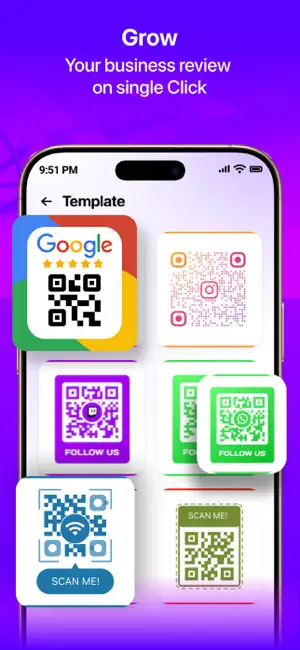
Create, scan and design QR codes in seconds. Make a QR code for your Wi-Fi, website, Google reviews, contact card or social media, add your logo and colors, pick a ready-made template and share it anywhere. Scan any QR code or barcode with your camera or from a photo, and act on the result with one tap. Every scanned link is checked for scam and phishing signs before you open it. CREATE A QR CODE FOR ANYTHING • Website / URL, text and notes • Wi-Fi: guests scan to join your network, no password typing • Contact card: name, phone number and email in one scan • SMS and email: scan to send you a message or email • Event: scan to add a meeting or promotion to the calendar • Location: scan to open a place in Maps • PayPal, crypto wallet, App Store and Google Play links • Google review QR code: help customers leave a review faster • 20+ social apps: Instagram, WhatsApp, Facebook, TikTok, YouTube, LinkedIn, X, Threads, Telegram, Snapchat, Pinterest, Discord, Reddit, Messenger, Viber, Spotify and more DESIGN A QR CODE THAT STANDS OUT • 45 ready-made templates and frames: "Scan Me", "Follow Us", Wi-Fi, reviews and more • Dot styles: dots, stars, hearts, sparkles, triangles and more • Eye styles: rounded, circle, leaf, drop, gem and more • Solid or gradient colors for the code and the background • Add a logo: pick a built-in icon or use your own photo • Add a caption above or below the code with your own font, size and color QR CODE READER & BARCODE SCANNER • Fast camera scanning with flashlight for dark places • Scan QR codes and barcodes from photos in your gallery • Reads QR, EAN-8, EAN-13, UPC-E, Code 128, Code 39, Code 93, ITF-14, PDF417, Aztec and Data Matrix • Smart actions: open links, join Wi-Fi, add events, send SMS or email, open Maps, search the web • Batch scan: scan many codes in a row and export the list as a CSV file • Link safety check: spot scam and phishing links before you open them, even offline • Product lookup: scan a product barcode to see its name and brand and search prices online BARCODE GENERATOR • Turn any text or number into a Code 128 barcode SCAN IN ONE TAP • Home Screen and Lock Screen widgets • Control Center button on iOS 18 • Quick actions: press and hold the app icon • Siri and the Shortcuts app: start a scan by voice HISTORY, EXPORT & PRINT • Every code you create or scan is saved in History, with its colors, logo and style • Reopen any saved design and edit it later • Export in high quality as PNG, PDF or SVG for print and design tools • Print a sheet of codes for labels, tables and stickers • Save to Photos or share via AirDrop, Messages, WhatsApp, email and more MADE FOR BUSINESS Restaurants, cafés, shops, salons, real estate agents, event organizers and creators use QR codes to share menus, Wi-Fi, reviews, contact details and social profiles. Print yours on table cards, flyers, posters, packaging or business cards. Available in 16 languages. PREMIUM The app is free to download and use with ads. Premium removes all ads and unlocks every template, gradient, dot and eye style, font and custom photo logos. Want to try first? Watch a short video to unlock a premium template or style for free. • Weekly, Monthly (with free trial) and Yearly plans. • Payment is charged to your Apple ID account at confirmation of purchase. • The subscription renews automatically unless it is cancelled at least 24 hours before the end of the current period. • Your account is charged for renewal within 24 hours before the end of the current period. • Manage or cancel your subscription anytime in your App Store account settings. • Any unused portion of a free trial is forfeited when you purchase a subscription. Privacy Policy: https://tapsolve.blogspot.com/p/privacy-policy.html Terms of Use: https://tapsolve.blogspot.com/p/terms-of-use.html
What’s new
Version 2.1 · Updated October 16, 2026
• Batch Scan: scan many codes in a row and export them as CSV • Link Safety Check: scanned links are checked for scam signs • Product Lookup: scan a product barcode to see its details • Designs saved in History: reopen and edit any QR later • HD export: PNG, PDF, SVG and printable sheets • Widgets, Lock Screen, Control Center and Siri shortcuts • Unlock premium templates and styles by watching a short video • Performance improvements and bug fixes
App privacy
The developer, Muhammad Usama Tahir, reported these privacy practices to Apple.
Data Used to Track You
The following data may be used to track you across apps and websites owned by other companies:
- Usage Data: Other Usage Data
Data Not Linked to You
The following data, which may be collected but is not linked to your identity, may be used for the following purposes:
- Identifiers: Device ID
- Usage Data: Other Usage Data, Advertising Data
- Diagnostics: Crash Data
Used for: Third-Party Advertising, Analytics, App Functionality
Alternatives to QR Code Maker & QR Scanner
Looking for apps like QR Code Maker & QR Scanner? Here are 6 similar apps on the App Store. The highest rated is QR Code Generator - ScanX (5.0/5), and all 6 are free to download.
-
 QR Code Generator - ScanX
5.0
-
 QR Code Scaner & Generator
1.0
-
 ScanCraft: QR Code Generator
5.0
-
 QR Code Generator - Studio
-
 Link Generator for WA
4.5
-
 QuickQR Plus
| App | Rating | Price | Last updated | Compare |
|---|---|---|---|---|
| QR Code Maker & QR Scanner | – | Free | October 16, 2026 | |
| QR Code Generator - ScanX | 5.0 / 5 (2) | Free | Nov 29, 2025 | Compare |
| QR Code Scaner & Generator | 1.0 / 5 (1) | Free | Sep 11, 2025 | Compare |
| ScanCraft: QR Code Generator | 5.0 / 5 (1) | Free | Nov 5, 2025 | Compare |
| QR Code Generator - Studio | – | Free | Sep 21, 2026 | Compare |
| Link Generator for WA | 4.5 / 5 (2) | Free | Oct 5, 2026 | Compare |
| QuickQR Plus | – | Free | Jan 31, 2026 | Compare |