

Stacks - Browser
Elliot Williams Utilities iPhoneiPadiPod touchApple Watch
Stacks - Browser is a free Utilities app for iPhone and iPad by Elliot Williams. Requires iOS 15.0. Updated January 15, 2026.
- Price
- Free
- on the App Store
- Size
- 8 MB
- Age 17+
- Updated
- Jan 15
- 2026 · v1.1.1
Screenshots


About Stacks - Browser
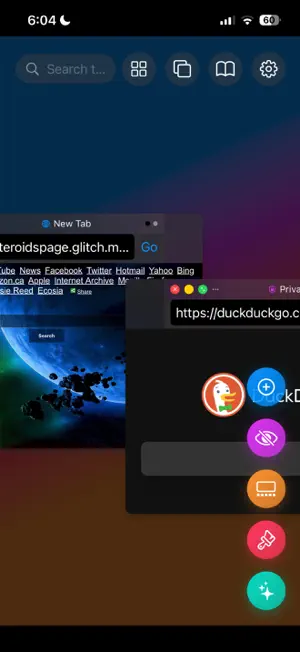
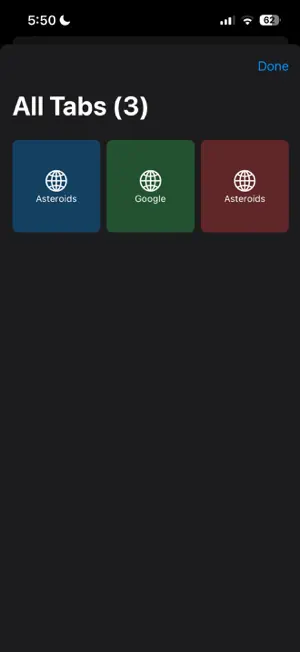
Stacks - Ultimate Stackable Web Browser Pinch from the corners of a window to resize it Description Stacks is a revolutionary SwiftUI-based web browser that reimagines how we interact with multiple web pages. Unlike traditional browsers with static tabs, Stacks presents each webpage as an independent, floating window that can be freely moved, resized, and stacked in three-dimensional space. Core Innovation The browser treats each tab as a draggable, resizable window that exists in a shared workspace. Users can organize their browsing experience spatially - stacking related pages, spreading out research materials, or creating custom layouts that match their workflow. Key Features Advanced Window Management • Drag & Drop: Move windows anywhere by dragging title bars • Pinch-to-Zoom: Scale windows from 50% to 200% with gesture support • Resize Handles: Precise window sizing with corner drag controls • Layer Management: Bring windows to front with a single click Professional Web Browsing • Full WebKit Integration: Complete web browsing with modern standards support • Smart Navigation: Back/Forward buttons with real-time state management • URL Synchronization: Address bars automatically update when clicking links • Loading Optimization: 15-second timeouts prevent hanging pages Rich Customization • 6 Beautiful Themes: Default, Dark, Blue, Green, Purple, and Red color schemes • Dynamic Theming: Each window can have its own visual identity • Animated Backgrounds: Flowing gradients that respond to user interaction • Visual Feedback: Smooth animations for all interactions Privacy & Security • Private Browsing: True private mode with non-persistent data stores • Isolated Sessions: Private and regular browsing completely separated • Visual Indicators: Clear privacy status with lock-shield icons Enhanced User Experience • Grid/Stack Modes: Toggle between organized grid and free-form layouts • Magic Organization: Auto-arrange windows in perfect layouts • Search Integration: Create tabs from search queries or direct URLs • Bookmark Management: Integrated bookmark system with quick access Browser Tab Model: Each tab (BrowserTab) acts as an independent window with position, size, theme, history, and states (minimized/maximized). Supports private browsing, bookmarking, loading progress, and animations (scale/rotation/opacity). UI Components: Draggable Windows: Tabs can be moved, resized, minimized, or maximized. Theming: 6 color themes (default, dark, blue, green, purple, red) with gradient accents. Title Bar: Shows favicons, titles, loading progress, and window controls. URL Bar: Smart URL handling (auto-adds https://). Animated Background: Dynamic gradient effects. Advanced Features: Tab Organization: Grid/stack layout toggling. Tab Overview: Grid view of all open tabs. Bookmarks: Save/load frequently visited sites. Floating Action Menu: Quick actions (new tab, private tab, randomize themes, animations). Visual Effects: Smooth animations for opening/closing tabs, scaling, and rotation. State Management: Tabs maintain navigation history, loading progress, and interaction states. Z-index handling ensures focused windows stay on top. Summary Dynamic Tab Management: Tabs support dragging, resizing, minimizing, theming, and visual effects (e.g., "magic" animations). Rich Web Experience: Robust WebView with history tracking, loading states, and gesture-based navigation. User-Centric Tools: Tab overview for quick navigation. Bookmarks manager. Theming and layout customization. Floating action menu for common tasks. Aesthetic Polish: Animated gradients, smooth transitions, and tactile feedback for interactions. Use Case: Ideal for demonstrating advanced SwiftUI capabilities in building complex, interactive multi-window UIs with real-world browser functionality. Enjoy today!
What’s new
Version 1.1.1 · Updated January 15, 2026
Bug fixes and improvements adds support for iOS 26
App privacy
The developer, Elliot Williams, reported these privacy practices to Apple.
Data Not Collected
The developer does not collect any data from this app.
Alternatives to Stacks - Browser
Looking for apps like Stacks - Browser? Here are 6 similar apps on the App Store. The highest rated is Teleport WEB - Proxy Browser (5.0/5), and all 6 are free to download.
-
 Teleport WEB - Proxy Browser
5.0
Teleport WEB - Proxy Browser
5.0
-
 Nova Browser
5.0
Nova Browser
5.0
-
 Shield Browser & Search Engine
3.7
Shield Browser & Search Engine
3.7
-
 BrowsAI-Agent Web Browser
5.0
BrowsAI-Agent Web Browser
5.0
-
 Gold Browser
-
 Private Browser: Safe & Secure
| App | Rating | Price | Last updated | Compare |
|---|---|---|---|---|
| Stacks - Browser | – | Free | January 15, 2026 | |
| Teleport WEB - Proxy Browser | 5.0 / 5 (1) | Free | Jun 18, 2026 | Compare |
| Nova Browser | 5.0 / 5 (1) | Free | Oct 28, 2025 | Compare |
| Shield Browser & Search Engine | 3.7 / 5 (6) | Free | Oct 21, 2026 | Compare |
| BrowsAI-Agent Web Browser | 5.0 / 5 (1) | Free | Sep 26, 2026 | Compare |
| Gold Browser | – | Free | Oct 11, 2026 | Compare |
| Private Browser: Safe & Secure | – | Free | Sep 28, 2026 | Compare |
Compare Stacks - Browser with the top alternatives: ratings, updates, ASO score and keyword gaps →