

Previewly: Video Safe Zone
SD Trends Photo & Video iPhoneiPadiPod touch
Previewly: Video Safe Zone is a free Photo & Video app for iPhone and iPad by SD Trends. Rated 5.0/5 from 1 ratings. Requires iOS 17.0.
- Rating
- 5.0
- 1 ratings
- Price
- Free
- on the App Store
- Size
- 32 MB
- Age 4+
- Updated
- Nov 24
- 2025 · v1.2 (5)
Screenshots


About Previewly: Video Safe Zone
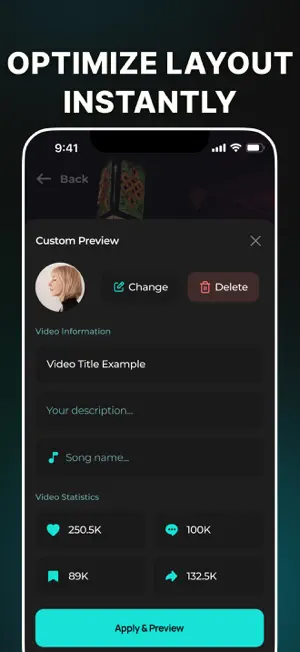
Previewly is the ultimate video preview tool for creators posting on TikTok, Instagram Reels, YouTube Shorts, and Snapchat. It helps you see how your vertical video will actually look in each platform’s interface - with real UI overlays, platform-specific safe zones, and mobile frame previews. Join 10,000+ Creators and professionals No more cut-off captions, blocked faces, or misplaced text. Previewly shows you exactly where likes, comments, and captions will appear, so you can make sure nothing important gets covered. Whether you're an influencer, a brand, or a content editor, this tool helps you preview your video layout before posting - and avoid costly publishing mistakes. Why creators love Previewly: • Preview videos with real UI overlays for TikTok, Instagram Reels, YouTube Shorts & Snapchat. • Safe zones that match each platform’s layout - prevent your text or subject from being hidden by buttons or avatars. • Switch between platforms instantly. Compare how the same video looks on each app. • Mobile screen frame simulation. Preview content the way your followers will actually see it. • Crop, trim, and export optimized videos with the right aspect ratio (9:16) and resolution. • Use templates for trending styles and mockups. • Optional AI layout checkers (coming soon) will warn you when key content is placed in risky areas. • Remove watermarks, save presets, and unlock more features with the PRO plan. Designed for: • TikTok creators and influencers who want maximum engagement • Instagram Reels content editors and social media managers • YouTube Shorts producers, marketers, and agencies • Snapchat storytellers who care about visual clarity • Brands, businesses, and small teams creating content in-house Use Previewly to: • Visualize your video layout before posting to any social platform • Align your face, captions, and calls-to-action in the visible zone • Avoid publishing errors like blocked subtitles or hidden graphics • Edit one video and instantly adapt it for TikTok, Reels, Shorts & more • Export your content in high-quality, platform-ready formats Backed by research Over 50% of creators experience layout issues when uploading vertical videos. On Reddit, Google, and professional forums, users frequently search for terms like “TikTok safe zone overlay”, “Reels UI preview”, and “how to avoid interface blocking.” Previewly solves this problem with a clean, mobile-friendly tool designed specifically for video creators and marketers. Stop guessing. Start previewing. Previewly saves you time, protects your content, and helps you post with confidence. Flexible pricing: Try Previewly free with 1 video per day Or unlock unlimited previews, all platforms, and premium export with PRO for just $2.99/month Not ready to subscribe? Buy tokens to preview a few videos at a time - easy, flexible, and affordable Monthly and Yearly plan Learn More • Terms of Use: https://bit.ly/4bqouvH • Privacy Policy: https://bit.ly/41FVyN0 Boost engagement. Save time. Improve results. If you post videos on TikTok, Instagram, YouTube Shorts, or Snapchat, Previewly is your must-have companion for smart video publishing
What’s new
Version 1.2 (5) · Updated November 24, 2025
Now paste any video link - TikTok, YouTube, Insta, SpanChat and instantly get a transcript in any language. Record your response with our clean teleprompter inside your own Safe Zone. All in one tap, zero creepiness
App privacy
The developer, SD Trends, reported these privacy practices to Apple.
Data Used to Track You
The following data may be used to track you across apps and websites owned by other companies:
- Identifiers: User ID
- Usage Data: Advertising Data, Other Usage Data
Data Linked to You
The following data, which may be collected and linked to your identity, may be used for the following purposes:
- Identifiers: User ID
Used for: Third-Party Advertising, Developer’s Advertising or Marketing, Analytics
Data Not Linked to You
The following data, which may be collected but is not linked to your identity, may be used for the following purposes:
- Location: Coarse Location
- Identifiers: Device ID
- Usage Data: Product Interaction, Advertising Data, Other Usage Data
- Diagnostics: Performance Data, Other Diagnostic Data, Crash Data
Used for: Third-Party Advertising, Developer’s Advertising or Marketing, Analytics, Product Personalization, App Functionality
Alternatives to Previewly: Video Safe Zone
Looking for apps like Previewly: Video Safe Zone? Here are 6 similar apps on the App Store. The highest rated is Trimio – Crop & Trim Videos (5.0/5), and all 6 are free to download.
-
 OnFrame
-
 Daily Studio: AI Teleprompter
-
 VYRO Prompt
-
 dioptify: Blur Faces
-
 CaptionSafe
-
 Trimio – Crop & Trim Videos
5.0
Trimio – Crop & Trim Videos
5.0
| App | Rating | Price | Last updated | Compare |
|---|---|---|---|---|
| Previewly: Video Safe Zone | 5.0 / 5 (1 rating) | Free | November 24, 2025 | |
| OnFrame | – | Free | Aug 30, 2026 | Compare |
| Daily Studio: AI Teleprompter | – | Free | Aug 11, 2026 | Compare |
| VYRO Prompt | – | Free | Oct 7, 2026 | Compare |
| dioptify: Blur Faces | – | Free | Jul 29, 2026 | Compare |
| CaptionSafe | – | Free | Feb 20, 2026 | Compare |
| Trimio – Crop & Trim Videos | 5.0 / 5 (1) | Free | Feb 26, 2026 | Compare |