

StitchPDF: Merge JPG to PDF
Yash Mandhyan Productivity iPhoneiPadiPod touch
StitchPDF: Merge JPG to PDF is a free Productivity app for iPhone and iPad by Yash Mandhyan. Rated 4.5/5 from 4 ratings. Requires iOS 16.6.
- Rating
- 4.5
- 4 ratings
- Price
- Free
- on the App Store
- Size
- 47 MB
- Age 4+
- Updated
- Oct 15
- 2026 · v2.2.1
Screenshots

About StitchPDF: Merge JPG to PDF
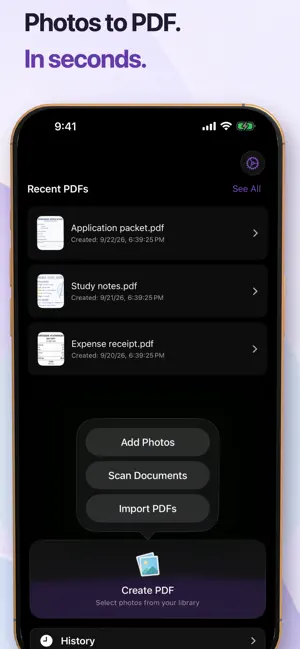
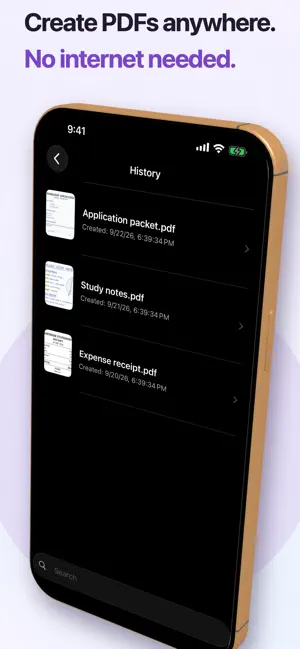
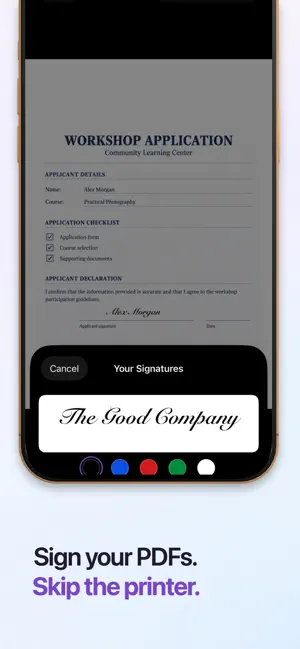
StitchPDF is the fastest way to combine photos, scans, and documents into a single PDF on iPhone and iPad. Everything runs on-device — no account, no cloud upload, no subscription. WHAT IT DOES Merge multiple JPG, PNG, HEIC images, scans, or existing PDFs into one document. Drag to reorder pages, add page numbers, set page size, and choose how images fit — fill, fit, or original. Add your own signature or custom watermarks. HOW IT WORKS 1. Select photos, files, or scan a document 2. Arrange and customise pages 3. Preview, then export or share KEY FEATURES - Combine photos and PDFs into one file - Convert JPG, PNG, HEIC to PDF instantly - Built-in preview and page editor - Add page numbers automatically - Multiple page sizes (A4, Letter, and more) - Image fit modes: fill, fit, or original - Local history to re-open past documents - Drag to reorder pages PRIVACY Your files never leave your device. No accounts, no cloud processing, no tracking. PERFECT FOR - Combining receipts or invoices - Compiling photo albums as PDF - Preparing multi-page documents - Archiving scanned paperwork - Converting screenshots to PDF FAQ Q: Is StitchPDF free to use? A: StitchPDF is free to download with core features available at no cost. Q: Does StitchPDF upload my files to the cloud? A: No. All processing happens on your device. Your files are never uploaded anywhere. Q: What image formats are supported? A: JPG, JPEG, PNG, and HEIC. You can also import existing PDF files. Q: Can I reorder pages before exporting? A: Yes. Drag and drop to arrange pages in any order before creating your PDF. Q: Can I add page numbers to my PDF? A: Yes. You can add page numbers automatically with one tap. Q: Does it work offline? A: Yes. StitchPDF works entirely offline since everything is processed locally. Download StitchPDF and start merging. Terms of service - https://www.apple.com/legal/internet-services/itunes/dev/stdeula/ Privacy Policy - https://thegoodcompany.website/apps/stitchpdf/privacy-policy.html
What’s new
Version 2.2.1 · Updated October 15, 2026
QoL updates. Quickly preview your PDFs after making it, or rename it. Sorting in history and in pages. Thank you for choosing us, Have an amazing day!
App privacy
The developer, Yash Mandhyan, reported these privacy practices to Apple.
Data Used to Track You
The following data may be used to track you across apps and websites owned by other companies:
- Identifiers: User ID, Device ID
- Usage Data: Product Interaction
Data Linked to You
The following data, which may be collected and linked to your identity, may be used for the following purposes:
- Identifiers: User ID, Device ID
- Usage Data: Product Interaction
Used for: Third-Party Advertising, Analytics, App Functionality
Alternatives to StitchPDF: Merge JPG to PDF
Looking for apps like StitchPDF: Merge JPG to PDF? Here are 6 similar apps on the App Store. The highest rated is NoteFly: AI Note Recorder (5.0/5), and all 6 are free to download.
-
 NoteFly: AI Note Recorder
5.0
NoteFly: AI Note Recorder
5.0
-
 ContactScanner AI
5.0
ContactScanner AI
5.0
-
 AI Translator: Photo, Voice
-
 AI音声文字起こし-録音で会議の議事録を無限に自動文字起こし
-
 Builder for Google Forms
-
 JustDoneLog
1.0
JustDoneLog
1.0
| App | Rating | Price | Last updated | Compare |
|---|---|---|---|---|
| StitchPDF: Merge JPG to PDF | 4.5 / 5 (4 ratings) | Free | October 15, 2026 | |
| NoteFly: AI Note Recorder | 5.0 / 5 (1) | Free | Oct 11, 2026 | Compare |
| ContactScanner AI | 5.0 / 5 (2) | Free | Sep 24, 2026 | Compare |
| AI Translator: Photo, Voice | – | Free | Mar 4, 2026 | Compare |
| AI音声文字起こし-録音で会議の議事録を無限に自動文字起こし | – | Free | Apr 30, 2026 | Compare |
| Builder for Google Forms | – | Free | Feb 5, 2026 | Compare |
| JustDoneLog | 1.0 / 5 (1) | Free | Jul 12, 2025 | Compare |