

Kiki: Vocabulary Notebook
Vadym Marchenko Education iPhoneiPadiPod touch
Kiki: Vocabulary Notebook is a free Education app for iPhone and iPad by Vadym Marchenko. Requires iOS 18.0. Updated October 2, 2026.
- Price
- Free
- on the App Store
- Size
- 54 MB
- Age 9+
- Updated
- Oct 2
- 2026 · v3.1.0
Screenshots


About Kiki: Vocabulary Notebook
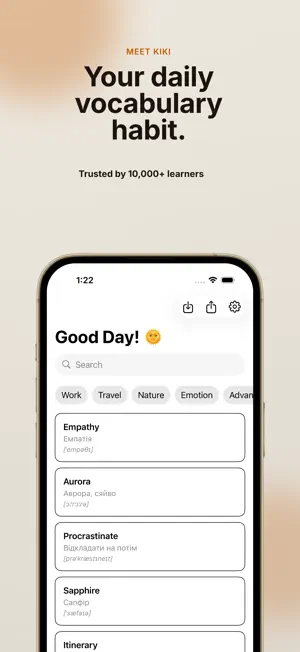
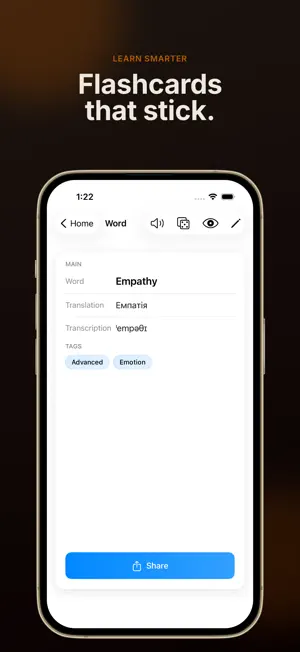
Save any word you meet — type it, scan it with your camera, or import a list you already have. Kiki keeps it and brings it back right before you forget. No account, no ads, no feed. ADD A WORD IN SECONDS, HOWEVER YOU MEET IT You meet a word once. If saving it takes more than a few seconds, it's gone. So Kiki gives you a way in from wherever you already are. Press and hold the Kiki icon on your Home Screen and land straight on a new word — no launch screen, no tapping through. Two fields and you're done. Or scan it with your camera instead. Or import a list you already keep somewhere else. On Mac, a keyboard shortcut. However you catch the word, it lands in the same place. You can also share selected text from another app to Kiki and open it in Translate, ready to save. TRANSLATE WITH YOUR CAMERA Point at any text: a book, a menu, a street sign. Kiki recognizes the words and gives you the translation, the transcription and four real usage examples. One tap adds it to your dictionary. Select a whole block, a single sentence or one word — and fix the recognized text before translating if the light was bad. Already have a photo or screenshot? Choose it from your library and translate the text inside. KEEP WORDS IN FRONT OF YOU A Home Screen widget shows a word from your own dictionary and quietly changes through the day — small, medium or large. Tap it to open the word. Nothing to check, nothing to dismiss. A new Lock Screen widget keeps words from your dictionary in view and changes them through the day. Tap a word to open it. BUILD A DICTIONARY THAT STAYS YOURS Add words with translations, transcriptions, notes and tags. Search across everything instantly. Organize by language, project, or however you learn. Bring in lists you already have from CSV or TXT, and export to PDF, CSV, JSON or Markdown any time. Your vocabulary is yours to take with you. LEARN WITH SPACED REPETITION Kiki uses the SM-2 algorithm to bring each word back right before you forget it. Five review modes that change as you improve: flashcards, multiple choice, typing, listening and matching. Streaks, XP and a learning calendar if you like watching the numbers move. HEAR EVERY WORD Download a natural voice once and it works offline, forever. Speech is generated on your device — no streaming, no account. Once you have downloaded a voice, tap the speaker on a flashcard or study question to hear its pronunciation. SYNC EVERYWHERE iCloud sync across iPhone, iPad and Mac. Works offline. No sign-up, no tracking, no ads. WHY KIKI Powerful flashcard apps make you configure them for an evening before you learn a single word. Study apps want an account and a feed. Camera translators forget the word the second you close them. Kiki is one quiet place where every word you meet lands, stays, and comes back. PERFECT FOR - English, Spanish, French, German, Japanese, Korean learners — any language - Students preparing for SAT, GRE, TOEFL, IELTS, JLPT, HSK - Polyglots maintaining several word lists at once - Travelers building a personal phrasebook - Anyone collecting words they meet while reading or living abroad Terms of Use (EULA): https://kiki-voc.web.app/pages/terms.html
What’s new
Version 3.1.0 · Updated October 2, 2026
Share selected text to Kiki — open it in Translate, ready to save. Translate from a photo — choose a screenshot or picture from your library. New Lock Screen widget — keep words from your dictionary in view throughout the day. Hear pronunciation while studying — tap the speaker on a flashcard or study question.
App privacy
The developer, Vadym Marchenko, reported these privacy practices to Apple.
Data Not Collected
The developer does not collect any data from this app.
Alternatives to Kiki: Vocabulary Notebook
Looking for apps like Kiki: Vocabulary Notebook? Here are 6 similar apps on the App Store. The highest rated is Word by Word: Vocabulary Diary (5.0/5), and all 6 are free to download.
-
 Word by Word: Vocabulary Diary
5.0
Word by Word: Vocabulary Diary
5.0
-
 KIKI
KIKI
-
 Wordnote: Vocabulary Notebook
5.0
Wordnote: Vocabulary Notebook
5.0
-
 随身单词本 - 记住遇见的单词|离线拍照识别|艾宾浩斯记忆
5.0
随身单词本 - 记住遇见的单词|离线拍照识别|艾宾浩斯记忆
5.0
-
 Word Notebook: Vocabulary
-
 Kelime Defteri
| App | Rating | Price | Last updated | Compare |
|---|---|---|---|---|
| Kiki: Vocabulary Notebook | – | Free | October 2, 2026 | |
| Word by Word: Vocabulary Diary | 5.0 / 5 (4) | Free | Jun 15, 2026 | Compare |
| KIKI | – | Free | Apr 10, 2025 | Compare |
| Wordnote: Vocabulary Notebook | 5.0 / 5 (8) | Free | Jun 16, 2026 | Compare |
| 随身单词本 - 记住遇见的单词|离线拍照识别|艾宾浩斯记忆 | 5.0 / 5 (4) | Free | Sep 28, 2026 | Compare |
| Word Notebook: Vocabulary | – | Free | Oct 19, 2026 | Compare |
| Kelime Defteri | – | Free | Jun 9, 2026 | Compare |