

CaveCanvas
Voice Activity Ltd Lifestyle iPhoneiPadiPod touch
CaveCanvas is a free Lifestyle app for iPhone and iPad by Voice Activity Ltd. Requires iOS 18.0. Updated July 5, 2026.
- Price
- Free
- on the App Store
- Size
- 7 MB
- Age 4+
- Updated
- Jul 5
- 2026 · v1.2
Screenshots


About CaveCanvas
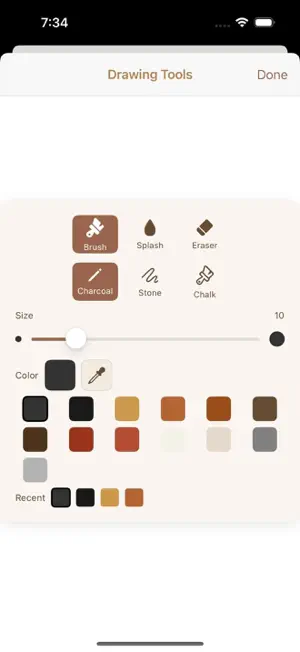
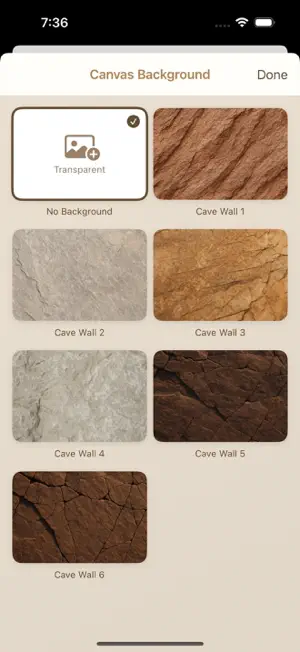
CaveCanvas – Relax, Draw, and Color Like It’s the Stone Age CaveCanvas is a calming, creative drawing app inspired by prehistoric cave art. Whether you’re sketching freely or arranging ancient shapes on a virtual rock wall, CaveCanvas brings mindful creativity to your screen — perfect for both adults and kids. Choose Your Cave Wall Canvas. Start by selecting your canvas background — from light limestone to dark slate. With a range of realistic cave wall textures, each drawing feels like it’s etched into ancient stone. Want to keep it clean? Use a transparent background for a modern twist. Inspired by the First Artists Draw like our earliest ancestors! CaveCanvas includes primitive symbols, stencils, and hand-drawn motifs based on real cave paintings. Drag and drop, resize, and layer them to create your own ancient masterpiece. Free Drawing Tools - Sketch freely with smooth brushes - Add and arrange cave-style shapes - Erase and undo with simple gestures - Export and print your finished art Designed for Relaxation CaveCanvas is a minimalist app for maximum calm. Whether you’re de-stressing after work or creating together with your kids, it’s a focused space for slow, satisfying drawing. For All Ages No ads. No complex menus. Just creativity. CaveCanvas is made for everyone, from young children to mindful adults looking for a digital escape. Print and Share Export your creations as high-resolution images for printing, sharing, or turning into unique gifts and keepsakes. Best on iPad While CaveCanvas works on all iOS devices, it truly shines on iPad — especially with Apple Pencil support and a full-screen workspace that feels like a real wall. Why You’ll Love It - Unique prehistoric art experience - Ideal for creative play and relaxation - Easy to use, beautifully designed - Great for classrooms, families, or solo sketching sessions - Looks and feels amazing on iPad Start your creative journey back in time. Download CaveCanvas and draw like it’s 6,000 BC. Terms of Use (EULA): https://www.apple.com/legal/internet-services/itunes/dev/stdeula/
What’s new
Version 1.2 · Updated July 5, 2026
A big update focused on smoother drawing and peace of mind: - NEW: Use your own photos as the canvas background — pick any picture from your library and draw right over it - Tap any artwork in your Gallery to continue working on it - Your unfinished drawing is now saved automatically — leave the app and pick up right where you left off - Drawing feels faster and smoother, especially on detailed artworks - Undo now follows the exact order of your actions, and clearing the canvas can be undone too - Moving or resizing a shape now undoes in a single step - What you see on the canvas now matches your exported image exactly - Fixed an issue where saving an artwork twice could create a duplicate - Clearer messages if something goes wrong while saving or sharing - Refreshed toolbar and tab bar for iOS 26 - Clearing the cache in Settings never touches your saved artworks Happy cave painting!
App privacy
The developer, Voice Activity Ltd, reported these privacy practices to Apple.
Data Not Collected
The developer does not collect any data from this app.
Alternatives to CaveCanvas
Looking for apps like CaveCanvas? Here are 6 similar apps on the App Store. The highest rated is Onestyle (5.0/5), and all 6 are free to download.
-
 Emoji Island
4.0
Emoji Island
4.0
-
 Onestyle
5.0
Onestyle
5.0
-
 Aquarium Widgets
4.5
Aquarium Widgets
4.5
-
 Babio: Baby Photo Editor
4.8
Babio: Baby Photo Editor
4.8
-
 Invitation Maker & RSVP Cards
4.6
Invitation Maker & RSVP Cards
4.6
-
 Camera Detector & Spy Finder
4.5
Camera Detector & Spy Finder
4.5
| App | Rating | Price | Last updated | Compare |
|---|---|---|---|---|
| CaveCanvas | – | Free | July 5, 2026 | |
| Emoji Island | 4.0 / 5 (1) | Free | Oct 8, 2026 | Compare |
| Onestyle | 5.0 / 5 (2) | Free | May 20, 2021 | Compare |
| Aquarium Widgets | 4.5 / 5 (31) | Free | Oct 23, 2026 | Compare |
| Babio: Baby Photo Editor | 4.8 / 5 (42) | Free | Oct 16, 2026 | Compare |
| Invitation Maker & RSVP Cards | 4.6 / 5 (55) | Free | Oct 19, 2026 | Compare |
| Camera Detector & Spy Finder | 4.5 / 5 (166) | Free | May 14, 2026 | Compare |
Compare CaveCanvas with the top alternatives: ratings, updates, ASO score and keyword gaps →