

Writease: AI Notes and Study
Applivent Education iPhoneiPadiPod touch
Writease: AI Notes and Study is a free Education app for iPhone and iPad by Applivent. Requires iOS 16.0. Updated October 6, 2026.
- Price
- Free
- on the App Store
- Size
- 69 MB
- Age 4+
- Updated
- Oct 6
- 2026 · v1.5.0
Screenshots


About Writease: AI Notes and Study
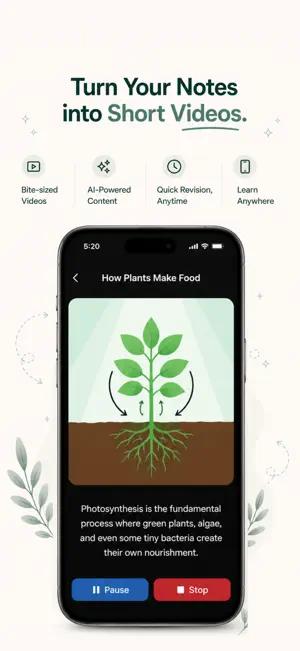
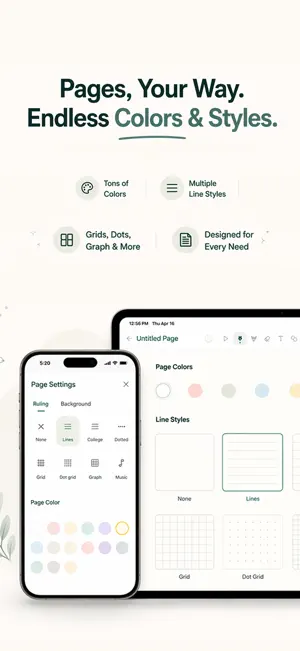
Writease is the ultimate AI-powered note-taking and study companion designed for students, professionals, and lifelong learners. Whether you are taking notes in a lecture, brainstorming ideas, or preparing for final exams, Writease transforms your static handwritten notes into an interactive, digital learning experience. By combining cutting-edge Artificial Intelligence with advanced Optical Character Recognition (OCR), Writease automates the tedious parts of studying so you can focus on understanding the material. Scan your notebooks, transcribe your lectures, and let Writease generate study materials instantly. DIGITIZE AND ORGANIZE YOUR WORK • Extract Text: Instantly convert your handwritten notes into editable, searchable digital text. • Transcribe Audio: Record lectures or meetings and generate clear, structured notes automatically. • Translate Audio & Notes: Break language barriers by translating your transcribed audio and text notes into multiple languages. • Dictate Notes: Convert your text back into spoken words for hands-free listening and revision on the go. POWERFUL AI STUDY TOOLS • Summarize Paragraphs & Create Notes: Turn lengthy texts into concise summaries and structured bullet points. • Make Flashcards: Automatically extract key concepts from your notes and convert them into flashcards for rapid revision and active recall. • Quiz with MCQs & Generate Q&As: Test your knowledge. Writease reads your notes and generates multiple-choice questions and long-form Q&A pairs for effective self-testing. Challenge friends with hosted quizzes. • Concept Explanation: Struggling with a difficult topic? Writease simplifies complex subjects from your notes into easy-to-understand explanations. • Create Mnemonics: Remember complex definitions faster by letting the AI transform your notes into catchy, easy-to-remember phrases. • Paragraph Puzzle: Test your writing memory by rearranging scrambled words from your paragraphs to rebuild the original text. • Learning Coach: Prepare for oral exams and presentations with a virtual AI teacher that reviews concepts and builds your confidence. VISUALIZE AND SOLVE • Solve Problems & Equations: Scan math problems, word equations, or scientific formulas to receive step-by-step solutions. • Generate Charts & Flowcharts: Automatically create visual flowcharts and concise data charts directly from your scanned text. • Create Timelines: Generate chronological timelines from your history or project notes for a better understanding of events. • Execute Code: Write, fix, and execute programming code directly within the app to review logic and see immediate outputs. ENHANCE AND EDIT • Correct Spelling & Grammar: Automatically identify and fix spelling mistakes and grammatical errors in your extracted text. • Enhance Paragraphs: Improve readability by rephrasing sentences and fixing structural mistakes. CREATIVE AND CORE FEATURES • Make a Podcast: Turn your study notes into an engaging two-person podcast. Listen and revise while commuting or working out. • Sketch Book: A limitless blank canvas. Doodle, sketch, and brainstorm using a variety of page styles, strokes, shapes, and colors. • Roadmap Tracker: Map out your curriculum, track your learning progress, and set daily reminders to study. • Save and Share: Export any page or generated study tool as a high-quality PDF and share it with classmates or colleagues. • Fully Offline Mode: AI generation requires an internet connection, but once your notes and tools are generated, access them anytime, completely offline. • Cloud Sync: Back up your entire notebook and seamlessly sync your progress across all your mobile and tablet devices. Download Writease today and experience the future of note-taking and exam preparation. Privacy Policy: https://writease.co/privacy-policy Terms of Use: https://writease.co/terms-and-conditions
What’s new
Version 1.5.0 · Updated October 6, 2026
• New Crossword Puzzle: Solve clues solo or host a game with live leaderboards, insights, and PDF exports. • New Buzzer Round: Bring teams together for fast-paced questions, ordered buzzes, and scored answers. • Learning reminders: Revisit ideas from your notes with automatic reminders and scheduled revision notifications. Tap a notification to open the relevant page.
App privacy
The developer, Applivent, reported these privacy practices to Apple.
Data Linked to You
The following data, which may be collected and linked to your identity, may be used for the following purposes:
- Contact Info: Email Address, Name
Used for: App Functionality
Data Not Linked to You
The following data, which may be collected but is not linked to your identity, may be used for the following purposes:
- Usage Data: Other Usage Data
- Diagnostics: Crash Data, Other Diagnostic Data
- User Content: Photos or Videos, Audio Data
Used for: Analytics, App Functionality
Alternatives to Writease: AI Notes and Study
Looking for apps like Writease: AI Notes and Study? Here are 6 similar apps on the App Store. The highest rated is Lotus: Flashcards & Recall (5.0/5), and all 6 are free to download.
-
 NaviNotes
-
 ScrollPaper
-
 Lotus: Flashcards & Recall
5.0
Lotus: Flashcards & Recall
5.0
-
 BrainDen: Lecture Note Taker
-
 Reliance School by Giga
-
 TMUA Prep
| App | Rating | Price | Last updated | Compare |
|---|---|---|---|---|
| Writease: AI Notes and Study | – | Free | October 6, 2026 | |
| NaviNotes | – | Free | Apr 22, 2026 | Compare |
| ScrollPaper | – | Free | Jul 15, 2026 | Compare |
| Lotus: Flashcards & Recall | 5.0 / 5 (1) | Free | Oct 14, 2026 | Compare |
| BrainDen: Lecture Note Taker | – | Free | Jul 14, 2026 | Compare |
| Reliance School by Giga | – | Free | Aug 17, 2026 | Compare |
| TMUA Prep | – | Free | Oct 9, 2026 | Compare |