

BizManage: Sales & Inventory
Kok Heng Business iPhoneiPadiPod touch
BizManage: Sales & Inventory is a free Business app for iPhone and iPad by Kok Heng. Requires iOS 15.1. Updated October 23, 2026.
- Price
- Free
- on the App Store
- Size
- 57 MB
- Age 12+
- Updated
- Oct 23
- 2026 · v2.10
Screenshots


About BizManage: Sales & Inventory
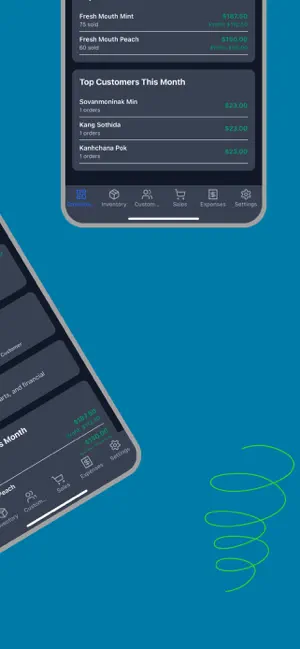
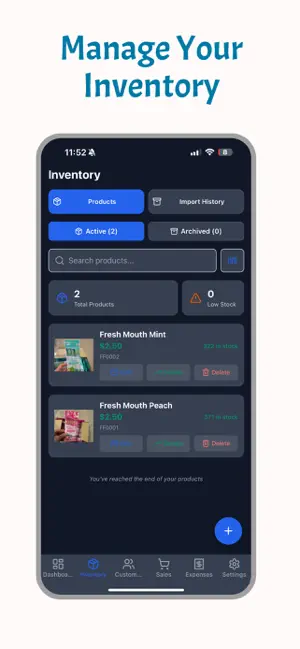
BizManage turns your phone into a complete shop-management system: scan barcodes to track stock, ring up sales with multiple carts, log expenses, and see your real profit — not just revenue. Built for small businesses. CORE FUNCTIONS INVENTORY MANAGEMENT - Product catalog with unlimited items - Track current stock levels with automatic updates - Set minimum stock level alerts - Barcode scanning for quick product lookup - Product images and detailed descriptions - Import batch tracking with cost allocation - Comprehensive cost management including shipping and import fees - Stock movement history and audit trail - Low stock alerts and notifications - Product archiving for discontinued items - Bulk import capabilities for large catalogs CUSTOMER MANAGEMENT - Unlimited customer profiles - Store contact information (name, phone, address) - Track customer platform preferences (Facebook, Instagram, Telegram, walk-in) - View complete purchase history per customer - Add custom notes and observations - Quick customer search and filtering - Identify top customers by purchase value - Track repeat purchase patterns - Platform analytics to identify best sales channels - Customer segmentation capabilities SALES MANAGEMENT - Multi-cart system for handling multiple customers simultaneously - Quick product selection with search and barcode scanning - Flexible discount options (percentage or fixed amount) - Item-level and cart-level discounts - Delivery cost tracking - Multiple payment methods (cash, card, transfer) - Complete sales history with detailed breakdowns - Sale voiding and refund capabilities - Partial returns with inventory restoration - Sales search and filtering by date, customer, payment method - Sales summary reports with revenue and profit EXPENSE TRACKING - Categorized expense management - Custom expense categories - Detailed expense descriptions and notes - Date-based expense recording - Expense filtering and search - Expense summaries by category - Time-period expense analysis - Visual expense breakdown charts REPORTING AND ANALYTICS - Dashboard with key business metrics - Daily, weekly, monthly sales summaries - Revenue and profit analysis - Best-selling products reports - Top customers by purchase value - Expense reports by category - Cash flow analysis and tracking - Income statement generation - Product performance comparison - Customer platform analytics - Date range filtering for all reports - Export capabilities for further analysis BUSINESS MANAGEMENT - Multi-business support (create and manage multiple businesses) - Business profile with logo and details - Team member invitation and management - Role-based access control (Admin and Staff roles) - Business switching for multi-business owners - Business-level data isolation and security USER MANAGEMENT - Secure user authentication with email and password - Enhanced password security with complexity requirements - User profile management - Session management with automatic refresh - Remember me functionality with encrypted storage - Password reset via email - Inactivity-based auto logout (7 days) - Rate limiting and brute force protection Terms of Use: https://www.apple.com/legal/internet-services/itunes/dev/stdeula/
What’s new
Version 2.10 · Updated October 23, 2026
What’s new in 2.9 Edit completed sales: add or remove products and change quantities. Stock, costs and totals update automatically. Edit history on every sale: who changed what, when and why. Subscription status is faster and always accurate, even after the app has been in the background.
App privacy
The developer, Kok Heng, reported these privacy practices to Apple.
Data Used to Track You
The following data may be used to track you across apps and websites owned by other companies:
- Purchases: Purchase History
- Identifiers: User ID, Device ID
- Usage Data: Product Interaction, Advertising Data
Data Linked to You
The following data, which may be collected and linked to your identity, may be used for the following purposes:
- Identifiers: Device ID, User ID
- Usage Data: Product Interaction, Advertising Data
- Purchases: Purchase History
- Contact Info: Email Address, Name
Used for: Third-Party Advertising, Developer’s Advertising or Marketing, Analytics, App Functionality
Data Not Linked to You
The following data, which may be collected but is not linked to your identity, may be used for the following purposes:
- Other Data: Other Data Types
- User Content: Photos or Videos
- Diagnostics: Crash Data
Used for: Analytics, App Functionality
Alternatives to BizManage: Sales & Inventory
Looking for apps like BizManage: Sales & Inventory? Here are 6 similar apps on the App Store.
-
 InSync Kiosk
-
 OpenChat Pro
-
 Invoice Maker:English & Arabic
-
 Profit Management
-
 Inveriok: Budgeting & Savings
-
 BuatInvois - Invoice Maker
| App | Rating | Price | Last updated | Compare |
|---|---|---|---|---|
| BizManage: Sales & Inventory | – | Free | October 23, 2026 | |
| InSync Kiosk | – | Free | Oct 30, 2023 | Compare |
| OpenChat Pro | – | Free | Sep 22, 2026 | Compare |
| Invoice Maker:English & Arabic | – | Free | Sep 30, 2026 | Compare |
| Profit Management | – | Free | Oct 2, 2026 | Compare |
| Inveriok: Budgeting & Savings | – | Free | Oct 14, 2026 | Compare |
| BuatInvois - Invoice Maker | – | Free | Sep 12, 2026 | Compare |