

TaskCard: Daily Planner & Todo
Cihat Salik Productivity iPhoneiPadiPod touchMac
TaskCard: Daily Planner & Todo is a free Productivity app for iPhone and iPad by Cihat Salik. Rated 5.0/5 from 2 ratings. Requires iOS 17.0.
- Rating
- 5.0
- 2 ratings
- Price
- Free
- on the App Store
- Size
- 11 MB
- Age 4+
- Updated
- Sep 17
- 2026 · v2.7.0
Screenshots


About TaskCard: Daily Planner & Todo
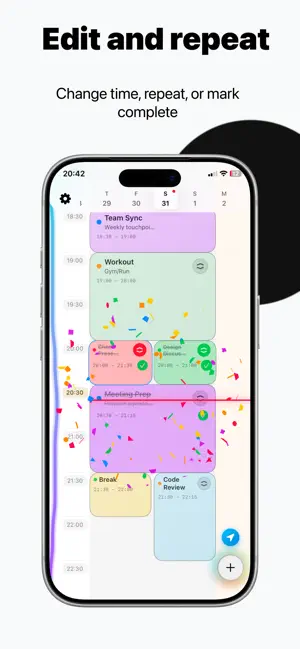
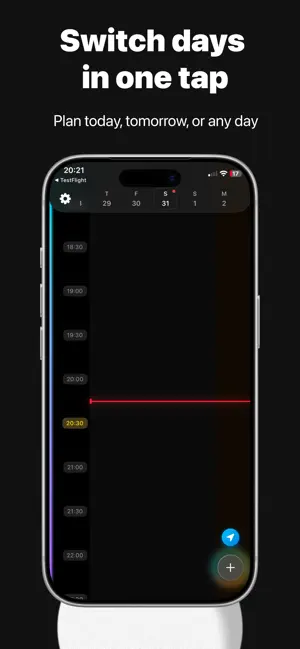
TaskCard turns your day into a visual time grid. Block out your hours, drag a card to a new time, and get reminded the moment a block starts. PLAN BY TIME, NOT BY LIST Add a task with a start time and a duration and it becomes a block on a 24-hour grid. The current time line is always visible, so you can see what is now and what is next at a glance. DRAG TO RESCHEDULE Plans change. Drag a card to a new hour, pull its edge to make it longer or shorter, and the rest of the day stays readable. Tasks that run past midnight stay visible on both days. MAKE THE CARDS YOURS Pick colors, gradients, fonts, patterns, icons and emoji for every card. Start from a preset library with ready-made tasks for work, study, fitness, home and daily routines. REMINDERS AND ALARMS Get a notification when a block starts or when time is up, plus an optional alarm for the blocks you cannot miss. A Live Activity keeps the countdown on your Lock Screen and Dynamic Island. REPEAT AND PRIORITIZE Repeat daily, on weekdays, weekly, or on your own pattern. Set a priority from low to urgent and spot what matters by color. WIDGETS AND SYNC Put today's schedule on your Home Screen and Lock Screen. With TaskCard Pro your plan syncs across iPhone and iPad over iCloud, and analytics show how much of each day you actually finish. BUILT TO STAY OUT OF THE WAY One main screen, no setup, no clutter. Create, complete, move, or delete from the same view. TaskCard is for anyone who thinks in time blocks: people protecting deep work, students planning study sessions, and anyone with ADHD who needs the day laid out visually instead of as an endless list. Privacy Policy: https://apps.cihat.dev/taskcard/privacy-policy/ Terms of Use: https://www.apple.com/legal/internet-services/itunes/dev/stdeula/
What’s new
Version 2.7.0 · Updated September 17, 2026
What's new in 2.7.0: • Tasks that run past midnight now stay visible on both days, so nothing disappears at the end of the day • Add an emoji to any card and choose from a wider set of card patterns • Card design changes preview live while you edit them • Creating a task opens full screen, with a clearer repeat picker • Overdue tasks keep their status when you reopen them • Much smoother scrolling, dragging, and resizing on the time grid Thank you for using TaskCard. Wishing you calm, focused, and productive days.
App privacy
The developer, Cihat Salik, reported these privacy practices to Apple.
Data Not Collected
The developer does not collect any data from this app.
Alternatives to TaskCard: Daily Planner & Todo
Looking for apps like TaskCard: Daily Planner & Todo? Here are 6 similar apps on the App Store. The highest rated is ADHD Tool - Do This (5.0/5), and 4 of the 6 are free to download.
-
 ADHD Tool - Do This
5.0
ADHD Tool - Do This
5.0
-
 Tally Counter: iTally
5.0
Tally Counter: iTally
5.0
-
 Daily Organizer: Easy Planner
-
 Dumai: AI Voice Notes & Chat
5.0
Dumai: AI Voice Notes & Chat
5.0
-
 Share Done
-
 Day Planner - Time Blokker
5.0
Day Planner - Time Blokker
5.0
| App | Rating | Price | Last updated | Compare |
|---|---|---|---|---|
| TaskCard: Daily Planner & Todo | 5.0 / 5 (2 ratings) | Free | September 17, 2026 | |
| ADHD Tool - Do This | 5.0 / 5 (5) | 3.99 USD | Jul 1, 2026 | Compare |
| Tally Counter: iTally | 5.0 / 5 (2) | 1.99 USD | Mar 18, 2026 | Compare |
| Daily Organizer: Easy Planner | – | Free | Jul 1, 2026 | Compare |
| Dumai: AI Voice Notes & Chat | 5.0 / 5 (1) | Free | Nov 11, 2025 | Compare |
| Share Done | – | Free | Jul 23, 2025 | Compare |
| Day Planner - Time Blokker | 5.0 / 5 (2) | Free | Jun 25, 2026 | Compare |