

Wren: AI Whiteboard & Notes
NOTENEST LLC Productivity iPhoneiPadiPod touch
Wren: AI Whiteboard & Notes is a free Productivity app for iPhone and iPad by NOTENEST LLC. Rated 5.0/5 from 22 ratings. Requires iOS 16.6.
- Rating
- 5.0
- 22 ratings
- Price
- Free
- on the App Store
- Size
- 105 MB
- Age 4+
- Updated
- Oct 21
- 2026 · v1.5.4
Screenshots



About Wren: AI Whiteboard & Notes
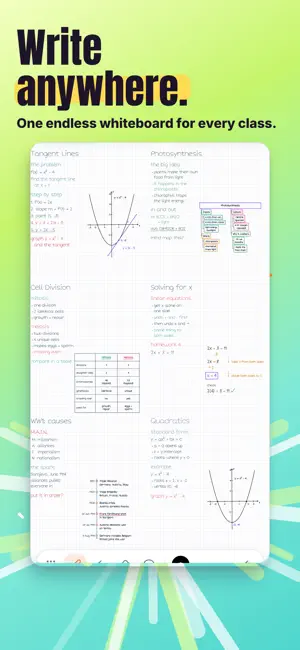
You write the question. Wren's AI writes the answer back in neat handwriting, right on your page. It adds step-by-step math solves, function graphs, mind maps, tables, flowcharts and timelines in clean ink. On iPad, write a request with Apple Pencil, pause, and tap Keep. Or ask Study Buddy and tap Add to note. Most AI talks back in a chat window. Wren talks back in handwriting, on the same page you're taking notes on. Stuck at 11pm on a problem you can't crack? Write it on your board and ask. Wren writes the answer right next to your work, by hand: the graph, the steps, the mind map. No chat window. No copy and paste. Just your board, filling in. ONE ENDLESS WHITEBOARD Open a whiteboard note and you get one board with no pages and no edges. Work a problem in one corner. Sketch a cell in another. Zoom out and the whole topic sits on one screen. Want structure instead? Wren also has Notebooks with real pages and Documents for typed work. INK, NOT CARDS Wren's AI writes with real pen strokes, the same kind of ink you write with. It can put any of these on your board: • A few lines of text, like a definition or a short explanation • Graphs of the function you are working on • Diagrams and flowcharts • Mind maps that branch out from one idea • Timelines, from cell division to the Cold War • Checklists for what to do next • Formulas • Tables that line facts up side by side It all comes out in Wren's own neat hand, so it reads clearly next to your notes. THREE WAYS TO ASK Study Buddy. Open the chat, ask your question, and tap Add to note. The answer is written onto your page by hand. AI Tutor. Pin a Tutor answer you like, then add it to your page. It goes on as ink. Pen pause, on iPad. Write what you want with Apple Pencil, like "graph y = x^2 + 1" or "mind map the causes of World War I", then pause. A preview appears on your page. Keep it or discard it. YOU DECIDE WHAT STAYS On iPad, every pen pause starts as a preview. Tap Keep and it becomes ink on your board. Tap Discard and it is gone. Your board stays yours. ONE NIGHT AT THE BOARD 9pm, calculus. You write the function and ask for its graph. The curve shows up on the board next to your work. 10pm, biology. You ask Study Buddy for the stages of mitosis and tap Add to note. A timeline is written beside your sketch of the cell. 11pm, history. On iPad you write "mind map the causes of World War I" and pause your Apple Pencil. The preview shows the causes branching out. You keep it. Midnight, chemistry. You ask for a table comparing ionic and covalent bonds. It is written in neat rows, right on the board. Then you zoom out, and the whole night of studying is one board you can actually read. WRITE ON IPAD OR IPHONE On iPad, Wren works with Apple Pencil, with pressure and palm rejection, and pen pause is there whenever you stop to think. On iPhone, write with your finger and use Study Buddy's Add to note to bring answers onto your page. Your notes sync across your devices. WHY WE BUILT IT We're a brother and sister, both in college. We take notes every day, and we were tired of copying answers out of a chat window and into our notes. So we made the notes answer back. We are our own users, and Wren is the whiteboard we wanted. Wren is free to download. Some features are part of an optional subscription, billed to your Apple ID. It renews automatically unless you cancel at least 24 hours before the current period ends. You can manage or cancel it anytime in your App Store account settings. Terms of Use: https://www.getnotenest.com/terms Privacy Policy: https://www.getnotenest.com/privacy
Ratings & reviews
5.0
22 ratings
What’s new
Version 1.5.4 · Updated October 21, 2026
Most AI talks back in a chat window. Wren now talks back in handwriting, right on the page you're writing on. Ask Study Buddy a question and tap Add to note. The answer is written onto your page by hand. You can also pin an AI Tutor answer and add it to your page. On iPad, write something like "graph y = x^2 + 1" with Apple Pencil and pause. A preview appears. Keep it or discard it. Wren can write text, graphs, diagrams, flowcharts, mind maps, timelines, checklists, formulas and tables. Bug fixes and small improvements.
App privacy
The developer, NOTENEST LLC, reported these privacy practices to Apple.
Data Linked to You
The following data, which may be collected and linked to your identity, may be used for the following purposes:
- Identifiers: User ID
- Usage Data: Product Interaction
- Diagnostics: Crash Data
Used for: App Functionality
Alternatives to Wren: AI Whiteboard & Notes
Looking for apps like Wren: AI Whiteboard & Notes? Here are 6 similar apps on the App Store. The highest rated is CanvasNote (5.0/5), and all 6 are free to download.
-
 Nook - Study Spot Finder
4.7
Nook - Study Spot Finder
4.7
-
 CanvasNote
5.0
CanvasNote
5.0
-
 Inky Notes: Good Note taker
4.6
Inky Notes: Good Note taker
4.6
-
 UltraNotes - Note Taking & PDF
4.6
UltraNotes - Note Taking & PDF
4.6
-
 Inkflow Visual Notebook
4.6
Inkflow Visual Notebook
4.6
-
 Notebook: Notes & Journal
4.3
Notebook: Notes & Journal
4.3
| App | Rating | Price | Last updated | Compare |
|---|---|---|---|---|
| Wren: AI Whiteboard & Notes | 5.0 / 5 (22 ratings) | Free | October 21, 2026 | |
| Nook - Study Spot Finder | 4.7 / 5 (9) | Free | Mar 22, 2026 | Compare |
| CanvasNote | 5.0 / 5 (2) | Free | Feb 20, 2025 | Compare |
| Inky Notes: Good Note taker | 4.6 / 5 (18) | Free | Aug 7, 2026 | Compare |
| UltraNotes - Note Taking & PDF | 4.6 / 5 (187) | Free | Oct 15, 2026 | Compare |
| Inkflow Visual Notebook | 4.6 / 5 (1,869) | Free | Oct 21, 2026 | Compare |
| Notebook: Notes & Journal | 4.3 / 5 (523) | Free | Sep 13, 2026 | Compare |