

Swipe Album Cleaner - AI Clean
孔目湖(北京)科技有限公司 Photo & Video iPhoneiPadiPod touch
Swipe Album Cleaner - AI Clean is a free Photo & Video app for iPhone and iPad by 孔目湖(北京)科技有限公司. Requires iOS 15.0. Updated September 3, 2026.
- Price
- Free
- on the App Store
- Size
- 94 MB
- Age 12+
- Updated
- Sep 3
- 2026 · v1.3.1
Screenshots

About Swipe Album Cleaner - AI Clean
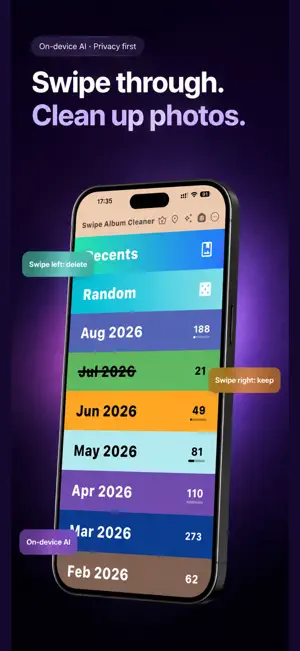
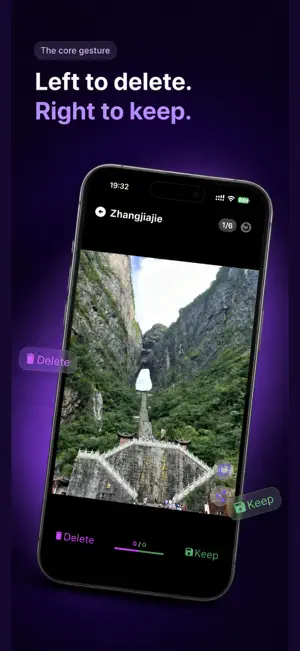
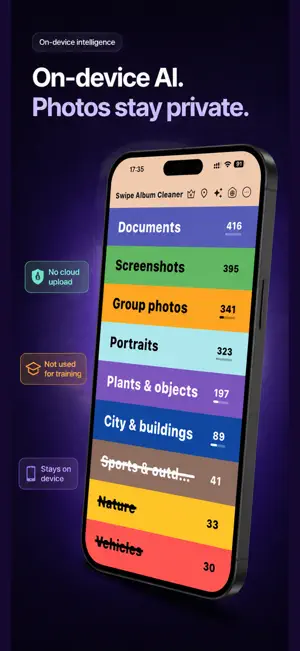
On-device AI sorts your camera roll into selfies, pets, food, screenshots, and receipts. Group travel shots by city. Tap Similar Photos to gather bursts and near-copies, then swipe. Swipe left to delete, right to keep. Pinch to zoom first. Photos are not uploaded. See space freed right away. Swipe Album Cleaner is not another Photos app. It lets you tidy like a feed: find what to delete by what’s in the photo, gather a trip by city, then clear look-alikes in one pass. • ON-DEVICE AI ALBUMS Your library is grouped into portraits, group shots, pets, food, landscapes, city scenes, screenshots, documents, vehicles, plants & still life, art, and sports. Open Screenshots to clear screenshots. Open Pets to clear pets. No more hunting month by month. Classification runs on your iPhone. Photos are not uploaded and are not used to train a model. • PLACES BY CITY Shots from Hangzhou, Tokyo, or New York land in city groups. The line under the name shows state/region and country, so identical city names stay apart. Photos without GPS go to Unknown place. No map. No itinerary. Open a city and swipe as usual. • SIMILAR PHOTOS Twenty burst frames, eight plates of the same dish, one view from a few angles—tap Similar Photos and look-alikes gather in one stack. Keep one, swipe the rest away. You can loosen or tighten the match. We would rather miss a twin than grab unrelated shots. • SWIPE LEFT TO DELETE, RIGHT TO KEEP AI albums, cities, similar sets, and months all use the same gesture. Pinch or double-tap to zoom photos and videos, then pan. Long-press for time, device, aperture, shutter, and location. Decide when you can see it. • MONTHS, SYSTEM ALBUMS, VIDEOS The timeline is still there. Recents, screenshots, and videos can be cleaned on their own. AI albums and Places are extra paths, not replacements. • SIMPLIFIED CHINESE, TRADITIONAL CHINESE, ENGLISH Follow the system or pick a language in the menu. Album names switch with the UI. • STATS YOU CAN SEE See how many items you removed and how much space you freed. When you finish, share a short report. GOOD FOR • Screenshots and chat images filling the roll • A burst of the same road or the same dish, and you only want one • Travel photos scattered everywhere—clean one city at a time • Clearing only pets or only receipts, not the whole year • Privacy: you do not want a cloud AI to see your camera roll WHAT PEOPLE SAY “Swipe left to declutter, swipe right to keep. Cleaning the roll at night is also how I revisit the day.” “Similar Photos beats scrolling bursts. Keep one in the set and you’re done.” “It classifies on the phone. That’s why I trust it.” PRIVACY Photo access is for browsing, classifying, grouping by city, finding look-alikes, and deleting. Classification and similar matching run on-device. To name cities, only coordinates are sent to Apple Maps; photo files are not uploaded. Deletion uses the system prompt. Recover mistakes in Recently Deleted. Start with this month, Screenshots, a city, or Similar Photos. When you stop, the keepers are still there—and the space is already back.
What’s new
Version 1.3.1 · Updated September 3, 2026
Update promotional visuals
App privacy
The developer, 孔目湖(北京)科技有限公司, reported these privacy practices to Apple.
Data Linked to You
The following data, which may be collected and linked to your identity, may be used for the following purposes:
- Identifiers: User ID
Used for: App Functionality
Alternatives to Swipe Album Cleaner - AI Clean
Looking for apps like Swipe Album Cleaner - AI Clean? Here are 6 similar apps on the App Store. The highest rated is iCleanShot - For Lazy People (5.0/5), and 5 of the 6 are free to download.
-
 iCleanShot - For Lazy People
5.0
iCleanShot - For Lazy People
5.0
-
 Rainbow Motion Video Filters
4.0
Rainbow Motion Video Filters
4.0
-
 favo - Pick Best Photos
5.0
favo - Pick Best Photos
5.0
-
 PocketBox: Video Compressor
4.9
PocketBox: Video Compressor
4.9
-
 Swish Clear: Photo Organizer
4.8
Swish Clear: Photo Organizer
4.8
-
 New Year Wishes & Cards
5.0
New Year Wishes & Cards
5.0
| App | Rating | Price | Last updated | Compare |
|---|---|---|---|---|
| Swipe Album Cleaner - AI Clean | – | Free | September 3, 2026 | |
| iCleanShot - For Lazy People | 5.0 / 5 (2) | 0.99 USD | Jun 24, 2026 | Compare |
| Rainbow Motion Video Filters | 4.0 / 5 (82) | Free | Aug 27, 2026 | Compare |
| favo - Pick Best Photos | 5.0 / 5 (2) | Free | Oct 10, 2026 | Compare |
| PocketBox: Video Compressor | 4.9 / 5 (7) | Free | Oct 16, 2026 | Compare |
| Swish Clear: Photo Organizer | 4.8 / 5 (41) | Free | Oct 18, 2026 | Compare |
| New Year Wishes & Cards | 5.0 / 5 (2) | Free | Dec 27, 2025 | Compare |