

Scan Docs: Photos to/from pdf
TROTHMATRIX Utilities iPhoneiPadiPod touch
Scan Docs: Photos to/from pdf is a free Utilities app for iPhone and iPad by TROTHMATRIX. Requires iOS 17.0. Updated September 24, 2026.
- Price
- Free
- on the App Store
- Size
- 14 MB
- Age 17+
- Updated
- Sep 24
- 2026 · v1.2.2
Screenshots

About Scan Docs: Photos to/from pdf
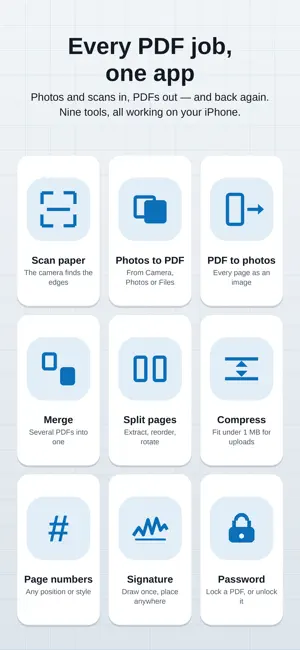
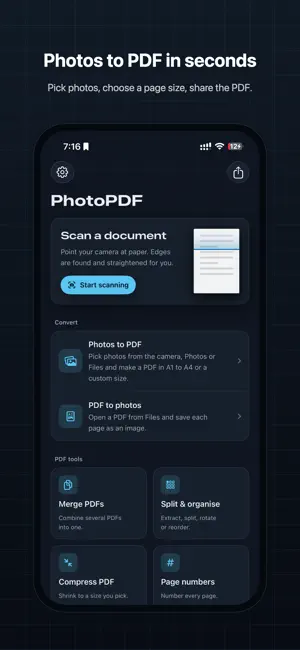
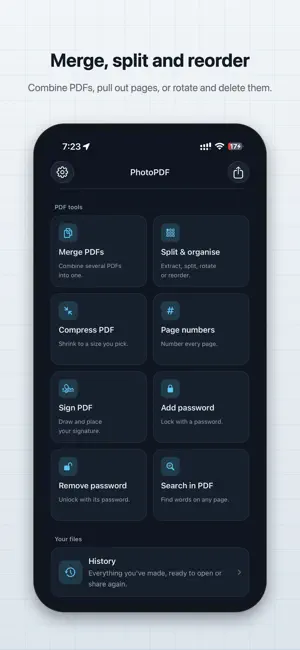
Turn photos and paper into PDFs, turn PDFs back into photos, and do everything in between — merge, split, compress, number, sign and lock — right on your iPhone. PHOTOS AND SCANS TO PDF Add photos from the camera, your Photo Library or Files Scan paper with the built-in document scanner: edges are found and straightened for you Reorder pages by dragging, and edit any photo before it goes in Choose A1, A2, A3, A4, Letter or Legal, in portrait or landscape Set left/right and top/bottom margins in millimetres Fit or fill each photo, resize it and place it anywhere on the page Put 1, 2, 4 or 6 photos on a single page See the finished page while you set it up, then name and save your PDF PDF TO PHOTOS Every page saved as a sharp image at up to 300 dpi Pick only the pages you want, or take them all Share as named files, or save straight to your Photo Library Rotated and landscape pages come out the right way round PDF TOOLS Merge several PDFs into one, in the order you choose Split by page ranges or every few pages Extract pages into a new PDF, or one PDF per page Rotate, delete and reorder pages Compress to a size you pick, such as under 1 MB for upload forms Add page numbers in the position and style you want Sign with your finger or Apple Pencil, then place the signature on any page Lock a PDF with a password, or remove a password you know Search the text inside a PDF and jump to every match EVERYTHING IN ONE PLACE History keeps every PDF and photo you make, ready to open, share, copy or delete Search your files by name Share to the app from anywhere: send a PDF to make photos, or send photos to make a PDF Full light and dark mode, Dynamic Type and VoiceOver support WORKS OFFLINE, STAYS ON YOUR IPHONE Your documents are converted on the device. Nothing is uploaded to a server, and no account is needed. GOOD FOR Receipts and invoices, school and college submissions, government and job application forms with strict file-size limits, ID and address proofs, contracts you need to sign, handouts, photo albums and anything you'd rather keep as one tidy PDF. PREMIUM The app is free to use, with ads. Premium removes the ads and unlocks unlimited PDFs and conversions, compression to any size, signatures and password protection. Choose a monthly subscription or pay once for lifetime access. Payment is charged to your Apple Account at confirmation. A monthly subscription renews automatically unless cancelled at least 24 hours before the end of the period. Manage or cancel your subscription in Settings. A note on compression: to make a PDF much smaller, its pages are saved as images, so text in a compressed PDF can't be selected or searched. Your original PDF is never changed — every tool saves a new file. Questions or an idea for the next update? Send feedback from Settings. I read everything and most updates start there. If you have any feedback or app improvements ideas, please mail us at [email protected] Terms of Use: https://www.apple.com/legal/internet-services/itunes/dev/stdeula/ Privacy Policy: https://www.trothmatrix.com/
What’s new
Version 1.2.2 · Updated September 24, 2026
The biggest update yet — a new design and a full set of PDF tools. NEW TOOLS - Merge several PDFs into one - Split by ranges or every few pages, and extract pages - Rotate, delete and reorder pages - Compress a PDF to fit a size limit, like under 1 MB - Add page numbers in any position and style - Sign with your finger or Apple Pencil - Lock a PDF with a password, or remove one you know - Search the text inside a PDF BETTER PDFs - A1, A2 and A3 added to A4, Letter and Legal, in portrait or landscape - Margins in real millimetres, set next to a live preview - Fit, fill, resize and place each photo, or put 2, 4 or 6 on a page - Photos now go into PDFs at up to 300 dpi, so text and details stay sharp - Pages from PDFs come out much sharper too, and rotated pages face the right way REDESIGNED - A clean new look with full dark mode support - Home, History, Settings and every step rebuilt - Share, save or delete several files at once in History
App privacy
The developer, TROTHMATRIX, reported these privacy practices to Apple.
Data Used to Track You
The following data may be used to track you across apps and websites owned by other companies:
- Identifiers: Device ID
Data Not Linked to You
The following data, which may be collected but is not linked to your identity, may be used for the following purposes:
- Identifiers: Device ID
- User Content: Photos or Videos
Used for: Third-Party Advertising, App Functionality
Alternatives to Scan Docs: Photos to/from pdf
Looking for apps like Scan Docs: Photos to/from pdf? Here are 6 similar apps on the App Store. The highest rated is Image Compressor ° CompressKit (5.0/5), and all 6 are free to download.
-
 Image Compressor ° CompressKit
5.0
Image Compressor ° CompressKit
5.0
-
 QRBarcode
-
 Photo Compressor - Pick a Size
-
 Geeta Residency
-
 Photos to PDF: Scan & Convert
-
 AI Lotto number generator
| App | Rating | Price | Last updated | Compare |
|---|---|---|---|---|
| Scan Docs: Photos to/from pdf | – | Free | September 24, 2026 | |
| Image Compressor ° CompressKit | 5.0 / 5 (2) | Free | Jul 28, 2025 | Compare |
| QRBarcode | – | Free | Jan 9, 2026 | Compare |
| Photo Compressor - Pick a Size | – | Free | Aug 21, 2026 | Compare |
| Geeta Residency | – | Free | Aug 17, 2026 | Compare |
| Photos to PDF: Scan & Convert | – | Free | Jan 29, 2026 | Compare |
| AI Lotto number generator | – | Free | Aug 10, 2026 | Compare |