

CC31: Neon Calendar
shogo isaji Productivity iPhoneiPadiPod touch
CC31: Neon Calendar is a free Productivity app for iPhone and iPad by shogo isaji. Rated 4.5/5 from 2 ratings. Requires iOS 18.0. Updated October 19, 2026.
- Rating
- 4.5
- 2 ratings
- Price
- Free
- on the App Store
- Size
- 35 MB
- Age 4+
- Updated
- Oct 19
- 2026 · v2.2.1
Screenshots


About CC31: Neon Calendar
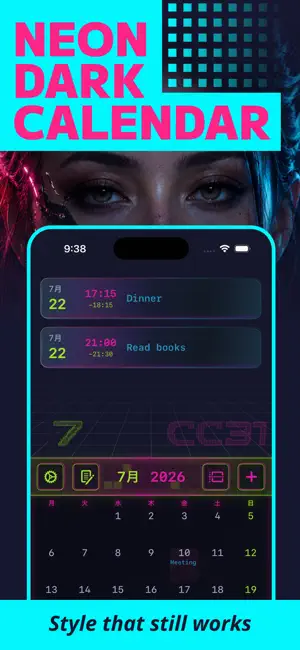
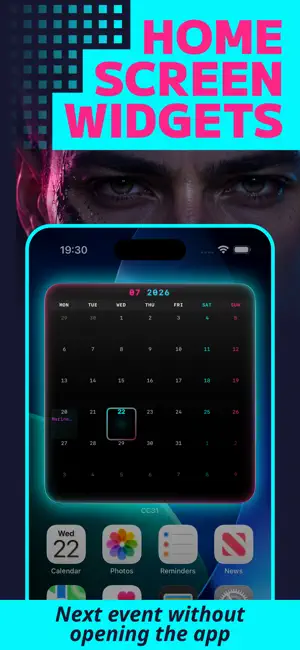
Keep your existing iPhone Calendar events—no migration or re-entering your schedule. Edit your plans, check what's next with Home Screen widgets, and keep notes in a neon dark UI. Bored of plain default calendars? CC31 is a practical calendar planner for people who want their everyday schedule to feel more personal, with a cyberpunk look that stands out. ◆ Key Features [ Edit Your Existing Calendar Events ] View and edit events from your standard iOS Calendar. Your existing schedule is ready without migration, re-entry, or extra setup. [ Home Screen Widgets ] Check upcoming events without opening the app. Keep your schedule visible from the Home Screen with dark-mode widgets. [ Month Calendar ] See your month at a glance, select a date, and quickly review the events planned for that day. [ Timeline and Agenda Views ] Use Timeline when you want to follow the flow of your day. Switch to Agenda for a clean list of upcoming events. [ Quick Notes ] Capture ideas, reminders, and small tasks alongside your schedule. You can now copy and share memos, too. [ Neon Dark UI ] Deep blacks and vivid neon make CC31 stand out from plain calendar apps while keeping your schedule easy to scan. CC31 is for people who want practical calendar tools, existing-event editing, and a stronger sense of style in one place. --- Note: Calendar access is used to display and edit your schedule. Event data is handled on your device and iCloud. Identifiers, usage, or diagnostics may be processed via third-party services for app improvement or ads. See the Privacy Policy for details. - Privacy Policy: https://page.isajiappdev.workers.dev/en/privacy?app_id=80c97385 - Terms of Service: https://page.isajiappdev.workers.dev/en/terms?app_id=80c97385
What’s new
Version 2.2.1 · Updated October 19, 2026
- Unified the design of buttons, sliders, and other controls. - Adjusted the layouts of the event entry screen and calendar. - Improved progress animations on the home screen.
App privacy
The developer, shogo isaji, reported these privacy practices to Apple.
Data Used to Track You
The following data may be used to track you across apps and websites owned by other companies:
- Location: Coarse Location
- Identifiers: Device ID
- Usage Data: Product Interaction, Advertising Data
- Diagnostics: Crash Data, Performance Data
Data Linked to You
The following data, which may be collected and linked to your identity, may be used for the following purposes:
- Location: Coarse Location
- Identifiers: Device ID
- Usage Data: Product Interaction, Advertising Data
- Diagnostics: Performance Data
Used for: Third-Party Advertising
Data Not Linked to You
The following data, which may be collected but is not linked to your identity, may be used for the following purposes:
- Diagnostics: Crash Data
Used for: Third-Party Advertising
Alternatives to CC31: Neon Calendar
Looking for apps like CC31: Neon Calendar? Here are 6 similar apps on the App Store. The highest rated is Qurancy Calendar (5.0/5), and all 6 are free to download.





| App | Rating | Price | Last updated | Compare |
|---|---|---|---|---|
| CC31: Neon Calendar | 4.5 / 5 (2 ratings) | Free | October 19, 2026 | |
| Qurancy Calendar | 5.0 / 5 (3) | Free | Oct 7, 2026 | Compare |
| Airport Time & Attendance App | – | Free | Mar 20, 2024 | Compare |
| Horizon25 | – | Free | Mar 11, 2026 | Compare |
| CellNotes | – | Free | Jul 23, 2026 | Compare |
| Ma Calendar | 5.0 / 5 (1) | Free | Apr 21, 2026 | Compare |
| GS FOCUS | – | Free | Aug 22, 2026 | Compare |