

Money Counter: balance
Vittorio D'Alfonso Finance iPhoneiPadiPod touch
Money Counter: balance is a free Finance app for iPhone and iPad by Vittorio D'Alfonso. Requires iOS 15.5. Updated October 11, 2026.
- Price
- Free
- on the App Store
- Size
- 57 MB
- Age 4+
- Updated
- Oct 11
- 2026 · v2.0.22
Screenshots


About Money Counter: balance
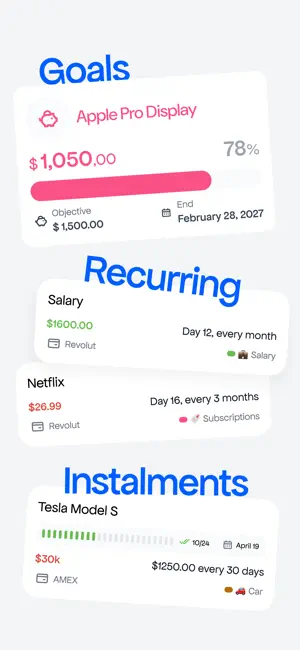
balance brings your income, expenses and balance together in one place, helping you understand how you manage your money and make more informed decisions. • Track spending in a few taps Add a transaction in just a few steps: amount, category and account. No spreadsheets or mental math. Just a simple way to keep track of your income and expenses. • A budget that’s easy to follow Set a monthly budget for each category and follow your progress in real time. See how much you’ve spent, how much is left and which categories are getting close to their limit. • All your accounts, together Organize your current account, cards, cash and savings. Each account has its own balance, color and icon. View everything together or check one account at a time. • Savings goals Planning a holiday, an emergency fund or a big purchase? Create a goal, choose an amount and a date, then keep track of your progress. • Installments and recurring expenses With the installment tracker, see what you pay each month, how many payments you’ve made and how many are left. You can also set up recurring income and expenses, such as salary, rent, subscriptions and bills. balance records them at the frequency you choose. • Spending charts and heatmap Explore your spending by category with charts, and use the daily heatmap to see when you spend more and when you manage to save. • And finally, metrics to help you understand your finances. balance turns your data into useful answers: Runway Months: how long could you cover your expenses without income? Savings Rate: what percentage of your income are you able to set aside? Net Worth: what do you own after subtracting your debts? Debt Index: how much of your salary is already committed to fixed payments? • Can I afford it? Enter an expense, whether it’s one-time, recurring or in installments, and see straight away how it would affect your runway, debt index, monthly expenses and net worth. • A forecast based on your habits See how your balance could change over the next 30, 90, 180 or 365 days. The forecast considers your spending and seasonal changes to help you understand where you’re heading. • Your monthly summary, made clear At the end of each month, review your income, expenses, savings, changes in wealth and spending by category. A clear picture of where your money went. Privacy and security Get quick access with Face ID. balance doesn’t connect to your bank or access your accounts directly. Your data is never shared or sold. You can delete your account and data at any time. balance subscription Try balance free for 3 days. Then choose the weekly plan at €2.99 or the annual plan at €29.99, saving over 80%. Your subscription renews automatically unless you cancel at least 24 hours before the current period ends. You can manage or cancel it in your Apple ID account settings. Privacy Policy: https://trybalance.eu/privacy Terms of Use: https://trybalance.eu/terms Payment will be charged to your Apple ID account at confirmation of purchase. Subscription automatically renews unless canceled at least 24 hours before the end of the current period. You can manage or cancel your subscription anytime in your Account Settings. Any unused portion of a free trial will be forfeited upon purchasing a subscription. Terms of Use: https://www.apple.com/legal/internet-services/itunes/dev/stdeula/
What’s new
Version 2.0.22 · Updated October 11, 2026
Bug fix and other improvements
App privacy
The developer, Vittorio D'Alfonso, reported these privacy practices to Apple.
Data Used to Track You
The following data may be used to track you across apps and websites owned by other companies:
- Contact Info: Email Address
- User Content: Gameplay Content
- Identifiers: User ID
Data Linked to You
The following data, which may be collected and linked to your identity, may be used for the following purposes:
- Contact Info: Email Address
- User Content: Gameplay Content
- Identifiers: User ID
Used for: Developer’s Advertising or Marketing, Analytics, App Functionality
Alternatives to Money Counter: balance
Looking for apps like Money Counter: balance? Here are 6 similar apps on the App Store.
-
 Family Budget: Spend & Save
-
 Money Counter: Cash & Coins
-
 SBLO - Gestione Spese
-
 Nimora
-
 SKA SafeOne Vault
-
 Expense Pro+
| App | Rating | Price | Last updated | Compare |
|---|---|---|---|---|
| Money Counter: balance | – | Free | October 11, 2026 | |
| Family Budget: Spend & Save | – | Free | Sep 2, 2026 | Compare |
| Money Counter: Cash & Coins | – | Free | Sep 27, 2026 | Compare |
| SBLO - Gestione Spese | – | Free | Oct 6, 2026 | Compare |
| Nimora | – | Free | Oct 12, 2026 | Compare |
| SKA SafeOne Vault | – | Free | Dec 22, 2025 | Compare |
| Expense Pro+ | – | Free | Oct 3, 2026 | Compare |