

EmojiPinKeyboard
Mitchell Moss Entertainment iPhoneiPadiPod touch
EmojiPinKeyboard is a free Entertainment app for iPhone and iPad by Mitchell Moss. Requires iOS 15.0. Updated June 23, 2025.
- Price
- Free
- on the App Store
- Size
- 2 MB
- Age 4+
- Updated
- Jun 23
- 2025 · v1.0
Screenshots

About EmojiPinKeyboard
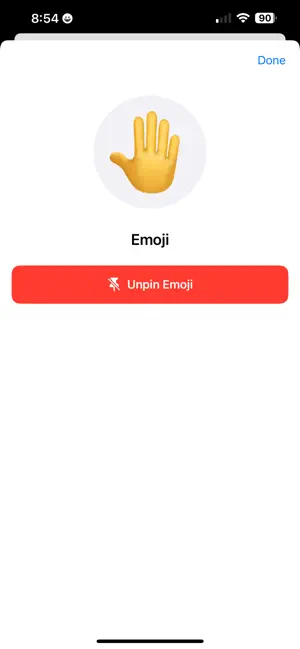
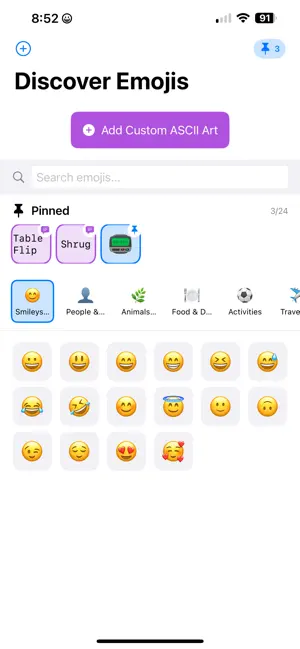
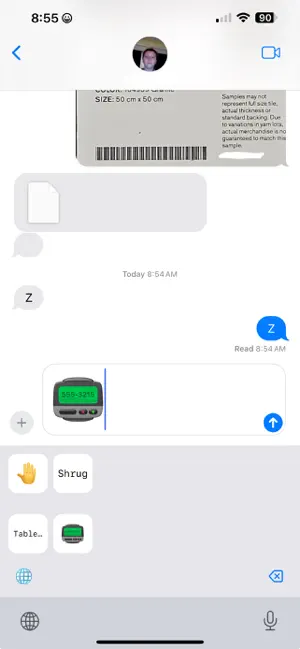
EmojiPinKeyboard is the fastest way to reach your favorite emoji on any iPhone or iPad. FEATURES • One tap to pin an emoji to your Favorites bar • Favorites stay fixed above Recents so you never waste time scrolling • Works in every app that uses the standard keyboard • Smart search finds any emoji by name or keyword • Zero data collection. We do not store or transmit keystrokes. HOW TO START 1. Install the app and open Settings 2. Go to General > Keyboard > Keyboards > Add New Keyboard 3. Select EmojiPinKeyboard 4. While typing, switch to EmojiPinKeyboard, long-press any emoji, and choose Pin IDEAL FOR • Power texters who reuse the same reactions all day • Social media managers • Anyone who prefers typing to hunting for icons Download EmojiPinKeyboard today and make your messages faster and more fun.
App privacy
The developer, Mitchell Moss, reported these privacy practices to Apple.
Data Not Collected
The developer does not collect any data from this app.
Alternatives to EmojiPinKeyboard
Looking for apps like EmojiPinKeyboard? Here are 6 similar apps on the App Store. The highest rated is Sound Healing For Star Seeds (5.0/5), and all 6 are free to download.
-
 Emoji Color: Cool Emojis & Art
3.0
Emoji Color: Cool Emojis & Art
3.0
-
 CuteMoji - AI Emoji Generator
4.7
CuteMoji - AI Emoji Generator
4.7
-
 Emoji.ly: Emoji fun moji merge
4.3
Emoji.ly: Emoji fun moji merge
4.3
-
 Sound Healing For Star Seeds
5.0
Sound Healing For Star Seeds
5.0
-
 Combine Emoji - Layered Emoji
1.0
Combine Emoji - Layered Emoji
1.0
-
 Emoji Mixer: Sticker Maker
| App | Rating | Price | Last updated | Compare |
|---|---|---|---|---|
| EmojiPinKeyboard | – | Free | June 23, 2025 | |
| Emoji Color: Cool Emojis & Art | 3.0 / 5 (2) | Free | Oct 13, 2026 | Compare |
| CuteMoji - AI Emoji Generator | 4.7 / 5 (3) | Free | Jul 23, 2026 | Compare |
| Emoji.ly: Emoji fun moji merge | 4.3 / 5 (11) | Free | Feb 29, 2024 | Compare |
| Sound Healing For Star Seeds | 5.0 / 5 (1) | Free | Aug 6, 2025 | Compare |
| Combine Emoji - Layered Emoji | 1.0 / 5 (2) | Free | Apr 22, 2024 | Compare |
| Emoji Mixer: Sticker Maker | – | Free | Oct 7, 2026 | Compare |
Compare EmojiPinKeyboard with the top alternatives: ratings, updates, ASO score and keyword gaps →