

Noise Diary
Christopher Lamb Utilities iPhoneiPadiPod touch
Noise Diary is a paid Utilities app for iPhone and iPad by Christopher Lamb. Requires iOS 13.0. Updated February 25, 2026.
- Price
- 0.99 USD
- on the App Store
- Size
- 25 MB
- Age 4+
- Updated
- Feb 25
- 2026 · v12
Screenshots


About Noise Diary
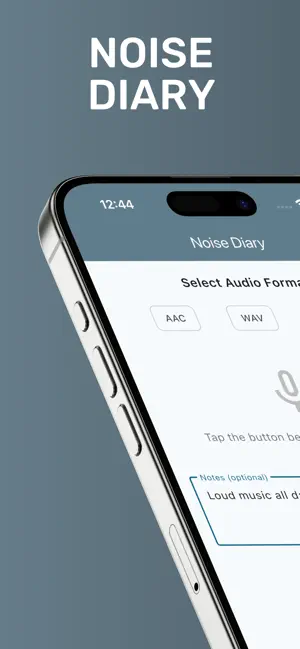
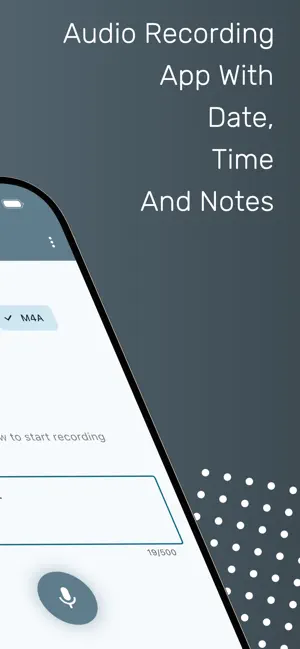
An application for recording audio with real-time noise level monitoring and calendar-based organisation. Created for anyone with noise nuisance issues who needs to keep a noise diary. Features: - Audio Recording with Format Selection: Choose between AAC, WAV, and M4A audio formats. Real-time audio recording is handled with microphone permission, and high-quality audio capture is achieved at a 44.1kHz sample rate. (Note: MP3 is not supported; AAC provides better quality at the same file size.) - Noise Level Meter: Visualise real-time audio amplitude with a noise meter displaying a decibel-like scale (0-120 dB). Colour-coded visualisation (green to red based on volume) and animated waves that respond to audio input enhance the experience. Level descriptions include Very Quiet, Quiet, Moderate, Loud, Very Loud, and Extremely Loud. - File Management: Automatic saving with date and time stamps ensures recordings are saved in the app documents directory. Organised recordings are stored with metadata using SQLite, and recording duration tracking and maximum amplitude tracking for each recording are available. - Notes Functionality: Add notes to recordings during or after recording, and edit notes at any time. Include start and end times, a description of the noise and how it affects you. Notes are stored with recording metadata. - Calendar View: An interactive calendar displays days with recordings, allowing you to tap any date to view recordings from that day. Visual indicators for dates with recordings and an organised monthly view with easy navigation enhance the calendar experience. - Audio Playback: Built-in audio playback for each recording includes a progress bar with a time display, play/pause controls, and seek functionality. - Sharing Capabilities: Share recordings and PDF diary via email, messaging, or any installed sharing app. Export recordings to cloud services like Dropbox or Google Drive, and share with notes included as text. - Additional Features: Delete recordings with confirmation, display recording duration, and add format labels on each recording. The app features a modern Material Design 3 UI and a dark-themed noise meter. Bottom navigation allows easy switching between Record and Calendar views.
What’s new
Version 12 · Updated February 25, 2026
Bug fixes and performance improvements.
App privacy
The developer, Christopher Lamb, reported these privacy practices to Apple.
Data Not Collected
The developer does not collect any data from this app.
Alternatives to Noise Diary
Looking for apps like Noise Diary? Here are 6 similar apps on the App Store. The highest rated is Typeless Keyboard: AI Snippets (4.4/5), and 5 of the 6 are free to download.
-
 Loked - Avoid Photo Swiping
-
 Typeless Keyboard: AI Snippets
4.4
Typeless Keyboard: AI Snippets
4.4
-
 Wakeflow - Alarm Clock,Sleep
-
 Radiator Calculator Pro
-
 Save to Calendar
-
 Tape Measure:3D Scanner
| App | Rating | Price | Last updated | Compare |
|---|---|---|---|---|
| Noise Diary | – | 0.99 USD | February 25, 2026 | |
| Loked - Avoid Photo Swiping | – | Free | Sep 3, 2025 | Compare |
| Typeless Keyboard: AI Snippets | 4.4 / 5 (5) | Free | Sep 17, 2026 | Compare |
| Wakeflow - Alarm Clock,Sleep | – | Free | Dec 29, 2025 | Compare |
| Radiator Calculator Pro | – | Free | May 15, 2026 | Compare |
| Save to Calendar | – | 0.99 USD | Feb 12, 2025 | Compare |
| Tape Measure:3D Scanner | – | Free | Apr 22, 2026 | Compare |
Compare Noise Diary with the top alternatives: ratings, updates, ASO score and keyword gaps →