

Strobe Light – RPM
Zain Saeed Mughal Utilities iPhoneiPadiPod touch
Strobe Light – RPM is a free Utilities app for iPhone and iPad by Zain Saeed Mughal. Rated 2.0/5 from 1 ratings. Requires iOS 15.0.
- Rating
- 2.0
- 1 ratings
- Price
- Free
- on the App Store
- Size
- 25 MB
- Age 4+
- Updated
- Sep 12
- 2026 · v1.2
Screenshots

About Strobe Light – RPM
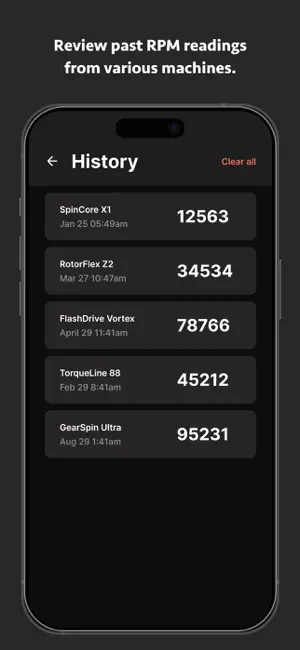
Strobe Light - RPM turns your phone into a powerful tool for measuring the speed of rotating objects. The app works like a digital tachometer and offers two measurement modes: Strobe Light and Camera. You can measure the RPM of fans, motors, wheels, and other rotating devices without touching them. In both modes, the same stroboscopic principle is used. When the flash rate or camera frame rate matches the speed of the object, it creates the illusion that the object is standing still. This helps you visually determine the exact rotational speed of the object with high accuracy. Strobe Light Mode Using your phone's flashlight, this mode flashes light at the object in a specific pattern. It works best in a dark or low-light environment and is ideal when you want a quick RPM reading with the built-in flashlight. How to Use (Strobe Light): Mark the rotating object with something visible (a sticker or tape works well). Point your phone's flashlight toward the object. Turn on the strobe using the power button. Adjust the strobe speed using the + and - buttons until the object looks still. The RPM shown on the screen is the object's rotation speed. You can save the reading for later reference. Camera Mode Camera mode uses your phone's camera to show a live preview at a set frame rate (FPM — Frames Per Minute). When the frame rate matches the object's RPM, the rotating object appears frozen on screen. This mode is useful in well-lit conditions when you want to see the object clearly while tuning the speed. How to Use (Camera): Open Camera mode from the home screen and allow camera permission. Point the camera at the rotating object. Adjust the frame rate using the + and - buttons until the object looks still. The value shown on the screen is the object's RPM. Use the flash button if you need extra light in darker areas. Save or reset your reading anytime from the bottom buttons. Where It's Useful: Mechanics: Test fans, engines, or motors by measuring RPM. Education: Ideal for physics experiments that require RPM measurements. Industrial Use: Check the condition of rotating machinery. Calibration: Ensure rotating devices are running at the correct speed. Maintenance: Compare readings over time using saved history. Key Features: Two Measurement Modes: Choose Strobe Light or Camera from the home screen based on your environment and preference. Adjustable Strobe Speed: Set the strobe from 1 to 10,000 RPM for accurate measurements. Camera Frame Rate Control: Set camera preview from 30 to 14,400 FPM for precise visual tuning. Quick Adjustment Buttons: Easily change the speed with buttons for +1, +10, +50, or +100 RPM increments in both modes. Flash Sync (Strobe Light): Ensures the light flashes at the correct frequency for accurate RPM readings. Built-in Camera Flash (Camera Mode): Toggle the flash on or off for better visibility in low light. Save and Reset: Save current RPM readings with a custom title or reset to default anytime. History Tracking: Save and review your RPM data anytime for easy access from the menu. Works in Different Lighting: Strobe Light works best in the dark; Camera mode works well in normal and low-light conditions. Simple and Energy-Efficient: The app's interface is easy to use and designed to be practical for everyday measurements. Visual Tachometer: Acts just like a real tachometer using visual strobe techniques with your phone's flashlight or camera. Strobe Light - RPM makes it simple to measure RPM without any special tools or equipment. Whether you prefer the classic flashlight strobe method or the new live camera preview, this app gives you flexible and accurate RPM measurement in one place. Perfect for mechanics, hobbyists, students, and professionals alike. Contact us at: [email protected] Terms of use: Terms of Use: https://www.apple.com/legal/internet-services/itunes/dev/stdeula/
What’s new
Version 1.2 · Updated September 12, 2026
- New Camera feature added - Bug Fixes
App privacy
The developer, Zain Saeed Mughal, reported these privacy practices to Apple.
Data Used to Track You
The following data may be used to track you across apps and websites owned by other companies:
- Identifiers: Device ID
Data Not Linked to You
The following data, which may be collected but is not linked to your identity, may be used for the following purposes:
- Identifiers: Device ID
Used for: Third-Party Advertising, Developer’s Advertising or Marketing
Alternatives to Strobe Light – RPM
Looking for apps like Strobe Light – RPM? Here are 6 similar apps on the App Store. The highest rated is Strobe Light Party (5.0/5), and all 6 are free to download.
-
 Strobe tachometer (RPM meter)
4.3
Strobe tachometer (RPM meter)
4.3
-
 Video tachometer
4.6
Video tachometer
4.6
-
 Camera RPM Meter - StrobeLight
2.2
Camera RPM Meter - StrobeLight
2.2
-
 Strobe Light Party
5.0
Strobe Light Party
5.0
-
 SoundTach
3.5
SoundTach
3.5
-
 FlashAlert Flashlight & Strobe
5.0
FlashAlert Flashlight & Strobe
5.0
| App | Rating | Price | Last updated | Compare |
|---|---|---|---|---|
| Strobe Light – RPM | 2.0 / 5 (1 rating) | Free | September 12, 2026 | |
| Strobe tachometer (RPM meter) | 4.3 / 5 (83) | Free | Aug 26, 2026 | Compare |
| Video tachometer | 4.6 / 5 (84) | Free | Aug 22, 2026 | Compare |
| Camera RPM Meter - StrobeLight | 2.2 / 5 (35) | Free | Jul 15, 2026 | Compare |
| Strobe Light Party | 5.0 / 5 (4) | Free | Jun 20, 2024 | Compare |
| SoundTach | 3.5 / 5 (8) | Free | Apr 29, 2026 | Compare |
| FlashAlert Flashlight & Strobe | 5.0 / 5 (1) | Free | Aug 3, 2026 | Compare |
Compare Strobe Light – RPM with the top alternatives: ratings, updates, ASO score and keyword gaps →