

Site Inspection: Inspectr+
Lab Architect Business iPhoneiPadiPod touch
Site Inspection: Inspectr+ is a free Business app for iPhone and iPad by Lab Architect. Requires iOS 15.0. Updated October 29, 2026.
- Price
- Free
- on the App Store
- Size
- 84 MB
- Age 4+
- Updated
- Oct 29
- 2026 · v5.1.0
Screenshots


About Site Inspection: Inspectr+
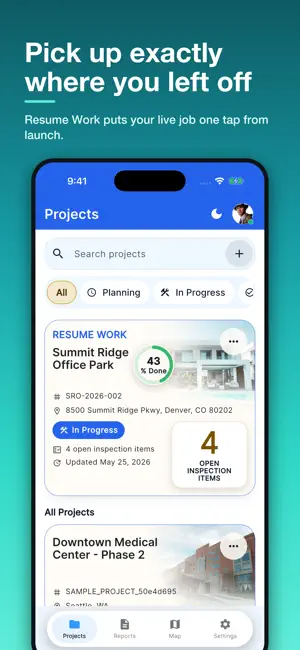
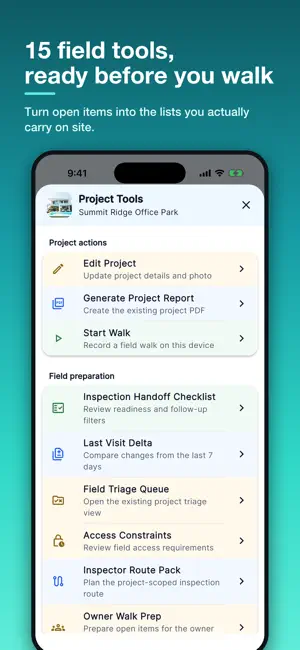
Inspectr+ is the professional construction inspection app built for field teams. Create projects, run inspections, capture photos, and generate PDF reports — all from your iPhone or iPad. Version 5 is a complete redesign. Every screen has been rebuilt on a new design system, with light and dark themes tuned for bright sun and dim interiors, a searchable project portfolio, a project workspace built around the work in front of you, and a set of field tools that turn open items into the lists you actually walk with. Guided wizards walk you through creating projects and inspection items step by step, with voice input on every field. BUILT FOR AEC PROFESSIONALS Unlike generic project management apps, Inspectr+ understands the unique needs of the architecture, engineering, and construction industry. Our platform uses industry-specific terminology and workflows that construction professionals rely on daily. KEY FEATURES: Project Portfolio • Search, filter, and sort your entire portfolio from one screen • A Resume Work card puts you back into the project you were last in • Project map with address geocoding to see where the work is • Track project status, timelines, and team assignments • Support for diverse project types: healthcare, residential, commercial, historic renovation, and industrial Field Tools • Field preparation: Inspection Handoff Checklist, Last Visit Delta, Field Triage Queue, Access Constraints, Inspector Route Pack, Owner Walk Prep • Quality and closeout: Asset Tag Coverage, Closeout Forecast, Reinspection Route, Deficiency Clusters, Repeat Defect Radar, Deficiency Aging • Trade and contractor: Contractor Follow-Up, Trade Readiness, Contractor Scorecard Inspection Items • State-first layout: status, readiness, and follow-up before you edit • Details, Photos, Comments, and Evidence in one record • Evidence Score shows whether an item is documented well enough to leave the site • Readiness checks flag items missing a description, an assignee, or a photo Visual Documentation • Capture high-quality photos directly within inspection items • Add detailed descriptions and priority levels • Organize documentation by location and inspection type • Offline capability for field work without internet connectivity Team Collaboration • Real-time comments and updates from team members • Assign inspection items to specific contractors or team members • Professional user profiles with credentials (AIA, PE, etc.) • Role-based access control for different team members Professional Reporting • Generate comprehensive PDF inspection reports instantly • Professional formatting suitable for client presentations • Include photos, descriptions, team comments, and project details • Easy sharing via email or cloud storage Designed For The Field • Light and dark themes applied consistently on every screen • Large touch targets and screen reader support throughout • Optimized for iPhone and iPad, with sidebar navigation on tablet Enterprise Security • Easy sign-in with Apple ID or Google account • Multi-factor authentication (MFA) for enhanced security • SOC 2 compliant data protection • Secure cloud synchronization across devices • Professional-grade privacy controls PERFECT FOR: • Architects conducting design reviews • Structural engineers performing inspections • Construction inspectors documenting compliance • Project managers tracking quality control • General contractors managing subcontractor work SUBSCRIPTION PLANS: • 3-day free trial available on weekly plans • Professional Plan: Advanced features for teams and enterprises including a magic link to access a website dashboard Download Inspectr+ today and transform your construction inspection workflow. Terms of Use: https://inspectrplus.com/terms
What’s new
Version 5.1.0 · Updated October 29, 2026
What's new in 5.1.0 • Help & guides: short how-to videos inside the app, made for phone, tablet and the web app. • Settings is now split into Help & guides and Feedback & support, so help is easier to find. • A quick intro on first launch shows you around. Tap Skip any time.
App privacy
The developer, Lab Architect, reported these privacy practices to Apple.
Data Linked to You
The following data, which may be collected and linked to your identity, may be used for the following purposes:
- Purchases: Purchase History
- Location: Precise Location
- Contact Info: Email Address
- User Content: Photos or Videos, Other User Content
- Identifiers: User ID
- Usage Data: Product Interaction
- Diagnostics: Crash Data, Performance Data
Used for: App Functionality
Alternatives to Site Inspection: Inspectr+
Looking for apps like Site Inspection: Inspectr+? Here are 6 similar apps on the App Store. The highest rated is InspectrPlus (5.0/5), and 5 of the 6 are free to download.
-
 InspectrPlus
5.0
-
 Inspection Report - Tradie
-
 Remodel Helper
-
 ConstruLog – Document with AI
-
 SynckSnap
-
 APQ Reports
| App | Rating | Price | Last updated | Compare |
|---|---|---|---|---|
| Site Inspection: Inspectr+ | – | Free | October 29, 2026 | |
| InspectrPlus | 5.0 / 5 (3) | Free | Sep 24, 2026 | Compare |
| Inspection Report - Tradie | – | Free | May 17, 2026 | Compare |
| Remodel Helper | – | 0.99 USD | Jun 14, 2024 | Compare |
| ConstruLog – Document with AI | – | Free | Oct 16, 2026 | Compare |
| SynckSnap | – | Free | May 20, 2026 | Compare |
| APQ Reports | – | Free | Dec 9, 2023 | Compare |