

Frame Grabber – Video Snapshot
LUKAS TRAGAN Photo & Video iPhoneiPadiPod touch
Frame Grabber – Video Snapshot is a free Photo & Video app for iPhone and iPad by LUKAS TRAGAN. Rated 5.0/5 from 1 ratings. Requires iOS 17.6.
- Rating
- 5.0
- 1 ratings
- Price
- Free
- on the App Store
- Size
- 13 MB
- Age 4+
- Updated
- Jul 14
- 2026 · v1.0.3
Screenshots


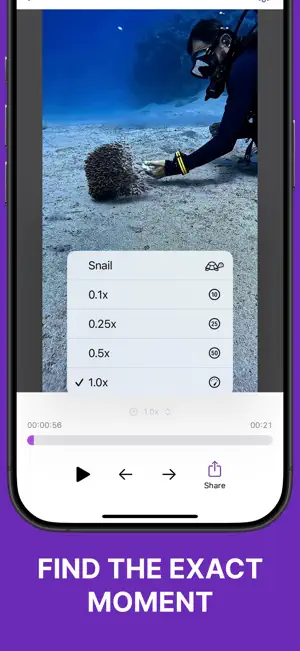
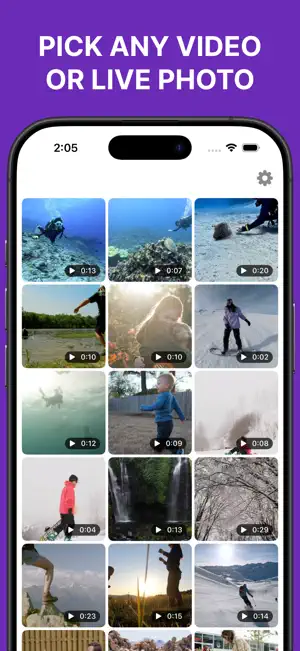
About Frame Grabber – Video Snapshot
Turn the perfect moment from any video or Live Photo into a high-quality photo. Frame Grabber is a precise video snapshot and photo extraction tool for moments that are difficult to capture with an ordinary screenshot. Open a video or Live Photo, navigate frame by frame, choose the exact instant you want, and export it as a sharp image. Whether you are saving a family memory, capturing sports movement, creating content, studying technique, or finding a better moment inside a Live Photo, Frame Grabber gives you control over frame selection and image output. CAPTURE THE EXACT FRAME A fraction of a second can make the difference between a missed moment and the perfect photo. Precise controls help you locate it without repeatedly pausing and replaying your video. • Browse videos and Live Photos from your library • Preview media directly inside the app • Scrub through the visual frame timeline • Move backward or forward with precise controls • Pause on expressions, movement, and action • Adjust playback speed for easier inspection • Export the selected frame when it looks right HIGH-QUALITY PHOTO EXPORT Save a chosen video frame as a standalone photo while retaining detail from the source media. Instead of capturing the interface, Frame Grabber extracts the selected image from the media itself. Choose the output format that fits your workflow: • JPEG for broad compatibility and adjustable file size • HEIF for efficient, high-quality image storage • PNG for full-quality, lossless output Adjust JPEG and HEIF quality in small increments to balance image quality and file size. PNG exports always use full quality. KEEP USEFUL PHOTO INFORMATION When available in the source media, Frame Grabber can preserve metadata such as the original creation date, GPS location, and other details. Turn metadata preservation on or off whenever you need. SAVE OR SHARE YOUR WAY Save the finished photo directly to your photo library, or open the system share sheet to send it through AirDrop, Messages, Mail, social apps, cloud storage, editing tools, and other compatible destinations. MADE FOR REAL MOMENTS Frame Grabber is useful anywhere the best photo is hidden inside moving footage: • Family and travel — save a natural smile, celebration, first step, holiday memory, or candid expression • Sports and fitness — capture the exact point of a jump, swing, trick, finish, or workout • Pets and wildlife — turn unpredictable motion into a clear standalone photo • Social media — extract an eye-catching image for a post, story, cover, or thumbnail • Creators and filmmakers — save reference frames, continuity images, compositions, and inspiration • Coaches and students — examine technique one moment at a time and keep important positions • Dance and performance — capture poses and gestures that happen too quickly for a normal photo • Product and craft videos — save a result, process step, or detail for documentation • Live Photos — explore the movement around the default key photo and choose another moment PRIVATE BY DESIGN Your videos and photos should remain personal. Frame Grabber processes media locally on your device without unnecessary tracking. • No third-party analytics • No advertising • No account required • No uploads to an external processing service • Local processing on your device • Offline operation for media already available locally NO RECURRING SUBSCRIPTION Unlock all premium features forever with one simple, one-time purchase. There are no recurring subscription fees and no advertising. FIND THE MOMENT YOU ALMOST MISSED Stop replaying videos, struggling with the pause button, and settling for interface screenshots. Explore videos and Live Photos, select the frame you really want, customize its format and quality, preserve available metadata, and export a photo ready to save or share. Privacy Policy: https://nocted.com/framegrabber/privacy/ Terms of Use: https://www.apple.com/legal/internet-services/itunes/dev/stdeula/
What’s new
Version 1.0.3 · Updated July 14, 2026
• The app is now available in 30 languages. • Added zoom support in the editor
App privacy
The developer, LUKAS TRAGAN, reported these privacy practices to Apple.
Data Not Linked to You
The following data, which may be collected but is not linked to your identity, may be used for the following purposes:
- Purchases: Purchase History
Used for: Analytics, App Functionality
Alternatives to Frame Grabber – Video Snapshot
Looking for apps like Frame Grabber – Video Snapshot? Here are 6 similar apps on the App Store. The highest rated is Frame Grabber Video to Frames (5.0/5), and all 6 are free to download.
-
 Frame Grabber Video to Frames
5.0
Frame Grabber Video to Frames
5.0
-
 Video Snapshot: Frame Grabber
-
 Frame Grabber Pro
-
 Frame Picker – Video to Photo
5.0
Frame Picker – Video to Photo
5.0
-
 Frame Grabber - TrueFrame
5.0
Frame Grabber - TrueFrame
5.0
-
 Grab Photo,Capture Video Frame
| App | Rating | Price | Last updated | Compare |
|---|---|---|---|---|
| Frame Grabber – Video Snapshot | 5.0 / 5 (1 rating) | Free | July 14, 2026 | |
| Frame Grabber Video to Frames | 5.0 / 5 (1) | Free | Dec 9, 2025 | Compare |
| Video Snapshot: Frame Grabber | – | Free | Jun 20, 2026 | Compare |
| Frame Grabber Pro | – | Free | Apr 2, 2025 | Compare |
| Frame Picker – Video to Photo | 5.0 / 5 (1) | Free | Apr 22, 2025 | Compare |
| Frame Grabber - TrueFrame | 5.0 / 5 (5) | Free | Oct 8, 2026 | Compare |
| Grab Photo,Capture Video Frame | – | Free | Oct 27, 2025 | Compare |