

Electronic & Signature Creator
Burak Gomec Business iPhoneiPadiPod touch
Electronic & Signature Creator is a free Business app for iPhone and iPad by Burak Gomec. Rated 4.7/5 from 18 ratings. Requires iOS 16.0.
- Rating
- 4.7
- 18 ratings
- Price
- Free
- on the App Store
- Size
- 29 MB
- Age 4+
- Updated
- Dec 14
- 2025 · v1.0.3
Screenshots


About Electronic & Signature Creator
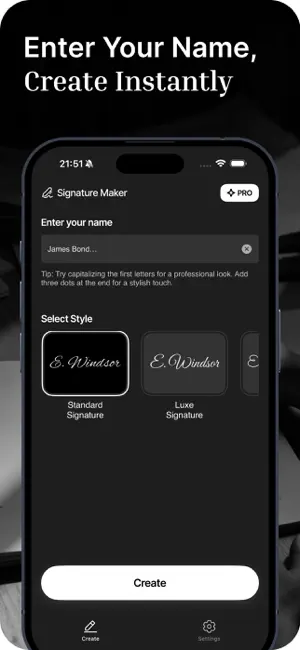
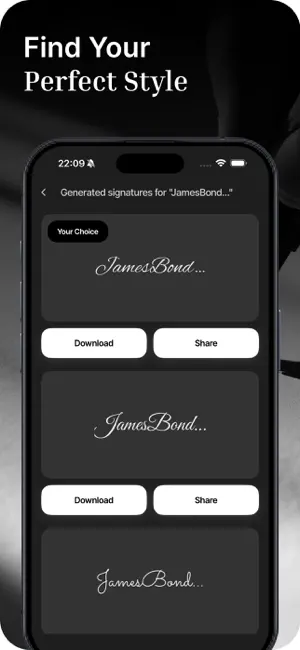
Create Your Signature with Ease Looking for a custom signature maker and electronic signature app that’s simple and practical? Our app helps you create your signature effortlessly. Whether you need a stylish signature for official documents or a custom design for personal use, this app is built to make the process easy for everyone. With our signature maker and electronic signature tools, you can draw, design, and generate your signature in seconds. Say goodbye to complicated software and enjoy a clean, user-friendly experience. Key Features • Quick and easy signature creation • Multiple signature styles and formats • User-friendly tools for designing signatures • Supports electronic signatures for documents • Custom signature generator with advanced options • All-in-one solution for daily signature needs • Text-based signature creation for a professional look • Designed to meet professional autograph needs • Simple and secure digital signing • Free electronic signature option • Auto-signature feature for convenience • Stylish signature stamps for documents and images • Create your own custom signature with your name • Personalized signature stamp builder • Key signature features for all document types • Picture signature support for images and social media • Save and share your signature within seconds • Add your electronic signature to contracts and forms • Fast signing tools for professional use Why Choose Our App? This app is perfect for anyone who needs a signature quickly and easily. No design skills or technical knowledge required. Whether you prefer a handwritten or digital signature, this app makes it possible. Perfect For: • Signing official documents • Creating stylish social media signatures • Making personalized signature stamps • Designing professional digital signatures • Quickly signing contracts and forms How It Works 1. Open the app 2. Choose between handwriting or text options 3. Design your signature using the available tools 4. Save your signature as an image or stamp 5. Apply your signature to documents or pictures You can create and save multiple signature styles for different uses. The app supports both personal and professional needs. Professional Quality in Every Signature Enjoy complete control over the look and feel of your signature. Whether it’s a handwritten sign, text-based design, or bold digital signature, you can create a polished result in minutes. Forget printing and scanning—just generate a digital signature and apply it to any document or image instantly. Custom Signatures and More Design a custom signature, build a personalized stamp, or apply your signature to pictures and social media posts. It’s ideal for freelancers, professionals, students, or anyone wanting a unique signature style. Simple and Practical We created this app to make signature creation fast, easy, and accessible. With just a few taps, you can design a signature that looks clean and professional. Add it to your files without any extra steps. Your Signature, Your Way With tools like signature generator, auto-signature, document signing, and professional autograph creation, this app provides everything you need to manage your signatures. Download Now Get started with your custom signature maker and electronic signature app today. Create your signature, apply it to your documents, and stay prepared for any signing need. Terms of Use: https://www.apple.com/legal/internet-services/itunes/dev/stdeula/
Ratings & reviews
4.7
18 ratings
What’s new
Version 1.0.3 · Updated December 14, 2025
Hi all, What's new in this version: • We have made technical improvements to the app and we strongly recommend that you update the app. • We keep working on the app for your best experience. Thank you for using the application. • You can support the development of the application by reviewing it.
App privacy
The developer, Burak Gomec, reported these privacy practices to Apple.
Data Used to Track You
The following data may be used to track you across apps and websites owned by other companies:
- Purchases: Purchase History
- Identifiers: Device ID
- Usage Data: Product Interaction, Advertising Data
Data Not Linked to You
The following data, which may be collected but is not linked to your identity, may be used for the following purposes:
- Purchases: Purchase History
- Identifiers: Device ID
- Usage Data: Advertising Data, Product Interaction
- Diagnostics: Crash Data, Performance Data, Other Diagnostic Data
Used for: Third-Party Advertising, Developer’s Advertising or Marketing, Analytics, Product Personalization, App Functionality
Alternatives to Electronic & Signature Creator
Looking for apps like Electronic & Signature Creator? Here are 6 similar apps on the App Store. The highest rated is InspireNote: Prompt Deck Note (5.0/5), and all 6 are free to download.
-
 InspireNote: Prompt Deck Note
5.0
InspireNote: Prompt Deck Note
5.0
-
 BeanLedger: Expense Tracker
5.0
BeanLedger: Expense Tracker
5.0
-
 Yesan, Genea
-
 AI Podcast Maker
3.6
AI Podcast Maker
3.6
-
 Daily Planner - Habit Builder
4.6
Daily Planner - Habit Builder
4.6
-
 Invoice Maker: InvoiceFactory
4.8
Invoice Maker: InvoiceFactory
4.8
| App | Rating | Price | Last updated | Compare |
|---|---|---|---|---|
| Electronic & Signature Creator | 4.7 / 5 (18 ratings) | Free | December 14, 2025 | |
| InspireNote: Prompt Deck Note | 5.0 / 5 (3) | Free | Mar 23, 2026 | Compare |
| BeanLedger: Expense Tracker | 5.0 / 5 (2) | Free | Oct 27, 2026 | Compare |
| Yesan, Genea | – | Free | Jan 3, 2026 | Compare |
| AI Podcast Maker | 3.7 / 5 (20) | Free | Jan 22, 2026 | Compare |
| Daily Planner - Habit Builder | 4.6 / 5 (36) | Free | Mar 18, 2026 | Compare |
| Invoice Maker: InvoiceFactory | 4.8 / 5 (38) | Free | Oct 29, 2026 | Compare |