

Gridley - Image Grid Generator
Emerson Design Utilities iPhoneiPadiPod touch
Gridley - Image Grid Generator is a free Utilities app for iPhone and iPad by Emerson Design. Rated 5.0/5 from 3 ratings. Requires iOS 17.6.
- Rating
- 5.0
- 3 ratings
- Price
- Free
- on the App Store
- Size
- 17 MB
- Age 4+
- Updated
- Aug 18
- 2025 · v1.0
Screenshots


About Gridley - Image Grid Generator
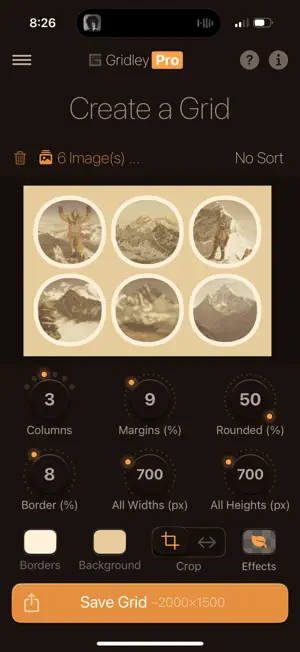
Gridley – Create Beautiful Photo Grids **Special Launch Pricing!** Get started with Gridley Pro at a special introductory rate: just $1.99 for the first month (regularly $2.99) or $12.99 lifetime. These prices available for a limited time! Gridley makes it simple to turn a few images—or a whole collection—into clean, high-resolution grids in seconds. Whether you’re a designer, photographer, or just organizing screenshots, Gridley helps you control spacing, layout, borders, backgrounds, and more. Preview changes instantly and export your grid as an image or PDF at full quality. --- Why Gridley Stands Out --- * Combine up to 5 images per grid for Free, or up to 30 with Gridley Pro. * Adjust spacing, borders, corners, and other grid settings * Live preview — see edits as you make them * Export sharp images or PDFs * Save or share as photos, PDFs, or zipped PDF files * Available in 8 languages: English, Japanese, Chinese, French, Hindi, German, Korean, Russian --- Powerful Layout Options --- * Set columns (images per row) * Customize margins, borders, corners, and fixed image sizes * Crop or stretch images to fit your grid * Change background and border colors with a full HSB color picker with opacity controls * Apply an image effect from options like Vibrant Pop, Warm, Dramatic, Pixelated, Color Leak, Black & White… and more. * Global opacity settings --- Designed for Flexibility --- * Export grids up to 1,000 px in Free mode and up to 15,000 px with Gridley Pro * Set all images to a fixed width or height, from 200 px up to 3,000 px * Sort images by date, name, or size * Responsive UI with smooth, animated controls * Choose from a variety of light and dark app themes to suit your style --- Go Gridley Pro Your Way --- * Work with up to 30 images per grid * Export at maximum resolution — up to 15,000 px * Unlock all image filters, including Pixelated effect * Access the full list of 15 app themes to fully customize your interface * Save grids as Photos, PDFs, or zipped PDFs * Access full control of all grid settings * Optionally remove the watermark * Upgrade with either a one-time Lifetime purchase or a flexible monthly subscription — choose what fits you best --- Perfect For --- * Designers previewing layouts * Quickly stitching photos together or consolidating multiple screenshots * Making collages, visual summaries, or storyboards * Students, bloggers, or teams organizing images efficiently * Photographers sharing polished sets or print-ready photo grids * Content creators making social posts or marketing visuals * Anyone who wants clean, high-resolution grids in seconds --- Download Gridley and start building your perfect grid today. --- Terms of Use: https://www.apple.com/legal/internet-services/itunes/dev/stdeula
App privacy
The developer, Emerson Design, reported these privacy practices to Apple.
Data Not Collected
The developer does not collect any data from this app.
Alternatives to Gridley - Image Grid Generator
Looking for apps like Gridley - Image Grid Generator? Here are 6 similar apps on the App Store. The highest rated is TossKeep (5.0/5), and all 6 are free to download.
-
 Exiflow
-
 TossKeep
5.0
-
 Video Lite: Compress & Resize
-
 Bookly - app
5.0
-
 Simple Video Resizer
3.0
-
 SealSkin
| App | Rating | Price | Last updated | Compare |
|---|---|---|---|---|
| Gridley - Image Grid Generator | 5.0 / 5 (3 ratings) | Free | August 18, 2025 | |
| Exiflow | – | Free | Apr 10, 2026 | Compare |
| TossKeep | 5.0 / 5 (3) | Free | Feb 21, 2026 | Compare |
| Video Lite: Compress & Resize | – | Free | Jun 24, 2026 | Compare |
| Bookly - app | 5.0 / 5 (1) | Free | Oct 25, 2024 | Compare |
| Simple Video Resizer | 3.0 / 5 (2) | Free | Nov 15, 2025 | Compare |
| SealSkin | – | Free | Oct 21, 2026 | Compare |