

miniPal studio
Yusuf Mohsinally Utilities iPhoneiPadiPod touch
miniPal studio is a free Utilities app for iPhone and iPad by Yusuf Mohsinally. Rated 5.0/5 from 1 ratings. Requires iOS 15.6. Updated May 18, 2026.
- Rating
- 5.0
- 1 ratings
- Price
- Free
- on the App Store
- Size
- 12 MB
- Age 4+
- Updated
- May 18
- 2026 · v2.0.5
Screenshots


About miniPal studio
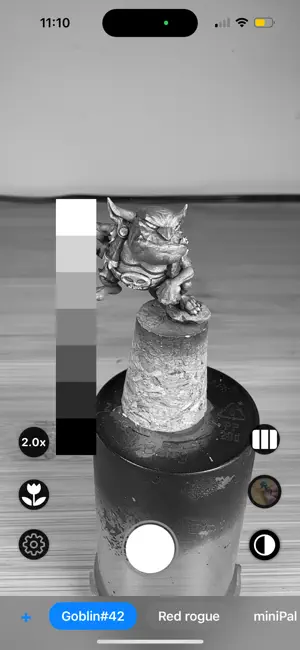
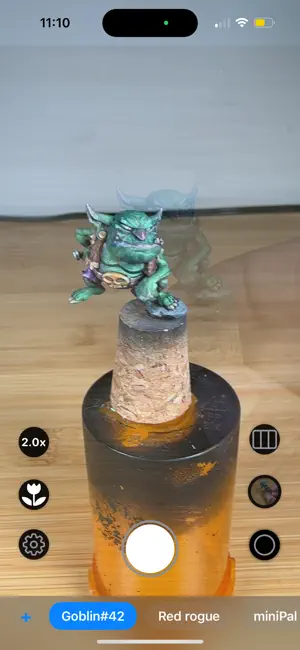
Your Pocket Assistant for Miniature Painting, Maker and Hobby Projects. Capture, compare, and catalog your minis and other maker projects like never before. miniPal helps track progress, quickly access helpful tools, and take perfectly framed photos—all in one sleek, easy-to-use app. Whether you’re a hobbyist or pro, miniPal keeps your projects journey organized, visual, and inspiring. ––––– FEATURE HIGHLIGHTS • Onion-Skin Overlay Ghost the last photo in the selected album on top of the live view for pixel-perfect before-and-after alignment. • Grayscale Preview De-saturate the live feed to judge values and contrast before you commit paint or ink. • Dedicated Macro Mode One tap dials in an ultra-wide lens (or locked near-focus fallback) for razor-sharp close-ups. • Quick-Zoom Presets Toggle instantly between 0.5×, 1×, 2× (and more where available) without fiddling with pinch gestures. • Album Bar & Instant Organisation Make photo organization ultra fast with the Album bar. Create albums, switch between them, and auto-save each shot to the selected collection—perfect for tracking different projects or commissions. • High-Resolution Capture Shoots in full quality and stores photos directly in your Photo Library; no cloud account or sign-in required. ––––– WHY MINIATURE ARTISTS LOVE MINIPAL • Keeps camera controls simple and right-hand–friendly, so you can hold your model with the other hand. • Lets you see mistakes early by overlaying your previous layer or color pass. • Saves you from clutter by dropping images straight into dedicated albums. ––––– PRIVACY FIRST miniPal NEVER collects personal data or uploads your images. All photos stay on your device and in your iCloud Photos (if enabled). ––––– JOIN THE COMMUNITY • Discord: discord.gg/DNpfN95f • Support us on Patreon: patreon.com/geekmoniker • Website & support: geekmoniker.com/minipal
What’s new
Version 2.0.5 · Updated May 18, 2026
Improved photo capture quality, including macro shots. Fixed saved photos appearing pixelated or lower resolution. Improved autofocus behavior in macro and normal camera modes. Macro mode now correctly appears as an active camera setting. Grayscale mode preserves the original full-color photo data for future editing and viewing.
App privacy
The developer, Yusuf Mohsinally, reported these privacy practices to Apple.
Data Not Collected
The developer does not collect any data from this app.
Alternatives to miniPal studio
Looking for apps like miniPal studio? Here are 6 similar apps on the App Store. The highest rated is MiniMatch - Paint Manager (3.5/5), and all 6 are free to download.
-
 Grey Tide
-
 Hobby Bench
-
 TinPot
-
 MiniMatch - Paint Manager
3.5
MiniMatch - Paint Manager
3.5
-
 Hobby Rack - Paint Tracker
-
 Mini Paint Recipe Manager
| App | Rating | Price | Last updated | Compare |
|---|---|---|---|---|
| miniPal studio | 5.0 / 5 (1 rating) | Free | May 18, 2026 | |
| Grey Tide | – | Free | Oct 12, 2026 | Compare |
| Hobby Bench | – | Free | Jun 9, 2026 | Compare |
| TinPot | – | Free | Oct 1, 2026 | Compare |
| MiniMatch - Paint Manager | 3.5 / 5 (2) | Free | Mar 26, 2026 | Compare |
| Hobby Rack - Paint Tracker | – | Free | Oct 4, 2026 | Compare |
| Mini Paint Recipe Manager | – | Free | Oct 27, 2026 | Compare |
Compare miniPal studio with the top alternatives: ratings, updates, ASO score and keyword gaps →