

OSomeWidgets - Health Tools
平 王 Graphics & Design iPhoneiPadiPod touch
OSomeWidgets - Health Tools is a free Graphics & Design app for iPhone and iPad by 平 王. Rated 5.0/5 from 2 ratings. Requires iOS 17.0.
- Rating
- 5.0
- 2 ratings
- Price
- Free
- on the App Store
- Size
- 303 MB
- Age 4+
- Updated
- Oct 1
- 2026 · v1.1.7
Screenshots



About OSomeWidgets - Health Tools
OSomeWidgets — Personalize Your iPhone Home Screen Create a customized iOS home screen experience with this powerful and beautiful all-in-one widget toolbox. OSomeWidgets is a highly customizable widget app for iOS, covering a wide range of practical categories including Time, Health, Music, Weather, Countdown, Water Tracking, and more. It helps you live more efficiently, express your style, and enhance your home screen with ease.Fully optimized for iOS 26, OSomeWidgets supports the latest liquid glass effects and now brings widgets to CarPlay for an even smarter in-car experience. 1. Supported Widget Categories: Time: Multiple clock styles including flip, digital, and analog to match your aesthetic. Health: Display daily steps, heart rate, and calories burned, with customizable goals. Music: Supports Apple Music, showing currently playing tracks in real-time. Countdown: Track important dates, events, or holidays with countdown reminders. Weather: Get clear, at-a-glance weather updates. Photos: Showcase your favorite memories right on your screen. Device Panel: View battery level, storage usage, and network status in one place. Water Tracking: Log your daily water intake, set hydration goals, and build healthy habits. CarPlay Widgets: Access essential widgets directly on your car’s display for seamless driving convenience.. Lip Color Monitor uses the front camera to sample the lip area, compare the captured color with reference lip tones, and provide a simple color score. The app includes nine common reference types: pale lips, pink lips, cool dark lips, warm dark lips, blackened lips, rose purple lips, dark purple lips, mixed lips, and mottled lips. You can add small or medium Lip Color Monitor widgets from the Health category, then jump directly into the monitor screen. The monitor view includes live color feedback, lip alignment guidance, reference color notes, and one-tap result screenshot saving. Results are for color reference only and are not medical diagnosis or health advice. 2. Fully Customizable Widgets: Font Colors: Choose from various color palettes to match your wallpaper. Background Color / Image: Use solid colors, gradients, or transparent styles. Foreground Styling: Emphasize key information or create a minimal look. Goal Setting: Set and track goals for health and hydration widgets. 3. Why Choose OSomeWidgets? Individually customizable widgets for a truly personalized setup. Minimalist design combining functionality with visual elegance. Flexible layouts and font styles to suit any home screen aesthetic. Lightweight and smooth performance for a seamless experience. 4. Pricing Options: Early Bird Membership: Unlock all features at an exclusive, limited-time price. This is our most cost-effective plan, only available during the product launch phase. Once expired, it will no longer be offered. Lifetime Membership: One-time payment to unlock all widgets and features permanently. Monthly Subscription: Enjoy full access to all features with a convenient auto-renewing monthly plan. Cancel anytime. Family Sharing is not supported. 5. Payment Information: Once you've selected a purchase plan and confirmed payment, the corresponding fee will be charged to your iTunes account. Purchased memberships support Family Sharing. 6. Privacy Policy & User Agreement: Privacy Policy: https://www.mileeapp.com/privacy_en.html User Agreement: https://www.mileeapp.com/useragreement_en.html
What’s new
Version 1.1.7 · Updated October 1, 2026
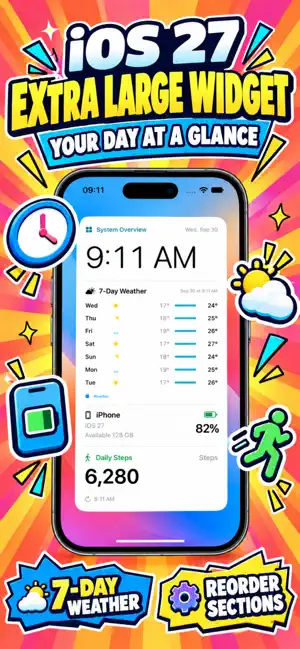
Added the new extra-large System Overview widget for iOS 27 Added digital time and date Added a 7-day weather forecast Added device model, system version, battery, and available storage Added daily step count Added customizable section ordering Added support for saving multiple layouts and selecting them from the widget Added Light and Dark Mode support Improved layouts for iOS 27 and resizable displays Fixed an app launch crash on newer system versions
App privacy
The developer, 平 王, reported these privacy practices to Apple.
Data Not Linked to You
The following data, which may be collected but is not linked to your identity, may be used for the following purposes:
- Usage Data: Product Interaction
- Diagnostics: Crash Data
Used for: Analytics
Alternatives to OSomeWidgets - Health Tools
Looking for apps like OSomeWidgets - Health Tools? Here are 6 similar apps on the App Store. The highest rated is Background Text-AI Text Editor (5.0/5), and all 6 are free to download.
-
 Background Text-AI Text Editor
5.0
Background Text-AI Text Editor
5.0
-
 Live Helper-live wallpapers
5.0
Live Helper-live wallpapers
5.0
-
 BetterShots - Edit Screenshots
5.0
BetterShots - Edit Screenshots
5.0
-
 EZ Image Tools
5.0
EZ Image Tools
5.0
-
 Color Palette Analysis
4.5
Color Palette Analysis
4.5
-
 Poster Maker Flyer Maker Posta
4.8
Poster Maker Flyer Maker Posta
4.8
| App | Rating | Price | Last updated | Compare |
|---|---|---|---|---|
| OSomeWidgets - Health Tools | 5.0 / 5 (2 ratings) | Free | October 1, 2026 | |
| Background Text-AI Text Editor | 5.0 / 5 (2) | Free | May 8, 2026 | Compare |
| Live Helper-live wallpapers | 5.0 / 5 (26) | Free | Dec 27, 2025 | Compare |
| BetterShots - Edit Screenshots | 5.0 / 5 (2) | Free | Sep 13, 2026 | Compare |
| EZ Image Tools | 5.0 / 5 (2) | Free | Sep 4, 2025 | Compare |
| Color Palette Analysis | 4.5 / 5 (12) | Free | Dec 14, 2025 | Compare |
| Poster Maker Flyer Maker Posta | 4.8 / 5 (47) | Free | Jan 24, 2026 | Compare |