

GPS Map Cam: Photo Location
AvnTech Inc. Photo & Video iPhoneiPadiPod touch
GPS Map Cam: Photo Location is a free Photo & Video app for iPhone and iPad by AvnTech Inc. Requires iOS 15.0. Updated October 13, 2025.
- Price
- Free
- on the App Store
- Size
- 154 MB
- Age 4+
- Updated
- Oct 13
- 2025 · v1.2.20251010
Screenshots


About GPS Map Cam: Photo Location
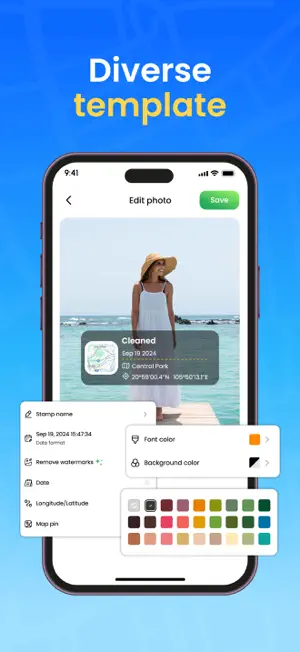
GPS Map Cam: Photo Location Tag every photo with precision. Capture moments that tell the full story. Capture photos with accurate GPS coordinates embedded. The app automatically detects your current location and saves it to each photo as you take it. Whether you’re traveling, exploring nature, or documenting your work, you’ll always know exactly where each photo was taken. Record videos with real-time GPS tagging. Location data is embedded directly into the video file while you film. Ideal for travel vlogs, outdoor adventures, or professional use where exact location reference is important. Customize your media with detailed GPS templates. Choose from various overlay styles to show date, time, latitude, longitude, and more. Your photos become both informative and visually unique, blending style with context. Edit location and time data anytime. You can manually change GPS coordinates, date, or timestamp for any saved photo or video. Gain full control over your memories and ensure every detail is accurate. Browse your photos and videos in a clean, organized gallery. Use the built-in map view to explore your media by location or filter by time and place. Rediscover your past experiences in the most intuitive and meaningful way. Add context and clarity to your memories. Download GPS Map Cam: Photo Location and start capturing your world with location-based precision.
What’s new
Version 1.2.20251010 · Updated October 13, 2025
Fix current location determination error, Optimize display of available templates
App privacy
The developer, AvnTech Inc., reported these privacy practices to Apple.
Data Used to Track You
The following data may be used to track you across apps and websites owned by other companies:
- Identifiers: Device ID
- Usage Data: Advertising Data
- Diagnostics: Crash Data
Data Not Linked to You
The following data, which may be collected but is not linked to your identity, may be used for the following purposes:
- Identifiers: Device ID
- Usage Data: Advertising Data
- Diagnostics: Crash Data
- Location: Precise Location
- Contact Info: Physical Address
- User Content: Photos or Videos, Audio Data
Used for: Third-Party Advertising, Developer’s Advertising or Marketing, Analytics, App Functionality
Alternatives to GPS Map Cam: Photo Location
Looking for apps like GPS Map Cam: Photo Location? Here are 6 similar apps on the App Store. The highest rated is GPS Camera: Map Navigation (5.0/5), and all 6 are free to download.
-
 GPS Camera: Map Navigation
5.0
-
 GPS Map Camera - Timestamp
4.6
-
 GPS Map Camera Lite: Timestamp
4.5
-
 Timestamp - GPS Map Camera
4.7
-
 GPS Geotag Map Camera - Tagofy
4.5
-
 GPS Map Camera: Geo-Timestamp
4.6
| App | Rating | Price | Last updated | Compare |
|---|---|---|---|---|
| GPS Map Cam: Photo Location | – | Free | October 13, 2025 | |
| GPS Camera: Map Navigation | 5.0 / 5 (3) | Free | Sep 23, 2026 | Compare |
| GPS Map Camera - Timestamp | 4.6 / 5 (190) | Free | Oct 6, 2026 | Compare |
| GPS Map Camera Lite: Timestamp | 4.5 / 5 (219) | Free | Mar 26, 2026 | Compare |
| Timestamp - GPS Map Camera | 4.7 / 5 (146) | Free | Jul 10, 2026 | Compare |
| GPS Geotag Map Camera - Tagofy | 4.5 / 5 (663) | Free | Oct 31, 2026 | Compare |
| GPS Map Camera: Geo-Timestamp | 4.6 / 5 (8,233) | Free | Oct 29, 2026 | Compare |