

PicPDF: Convert picture to pdf
Muze LT MB Productivity iPhoneiPadiPod touch
PicPDF: Convert picture to pdf is a free Productivity app for iPhone and iPad by Muze LT MB. Rated 5.0/5 from 41 ratings. Requires iOS 18.0.
- Rating
- 5.0
- 41 ratings
- Price
- Free
- on the App Store
- Size
- 14 MB
- Age 4+
- Updated
- Aug 22
- 2025 · v1.1.0
Screenshots


About PicPDF: Convert picture to pdf
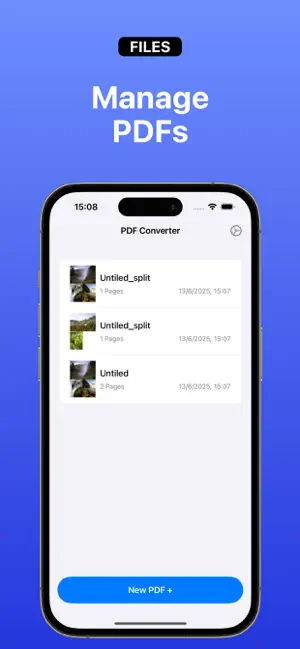
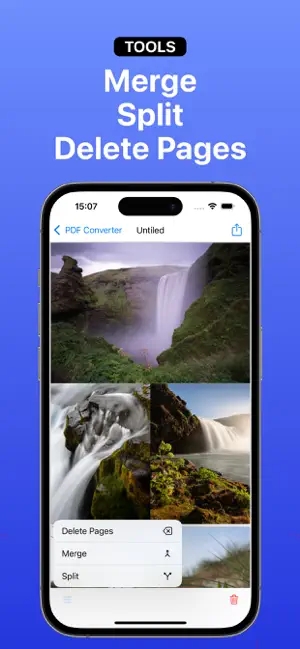
PicPDF is your complete solution for creating, editing, and managing PDF files directly from your iPhone or iPad. Designed for both casual users and professionals, PicPDF offers a seamless and efficient way to turn your photos, scanned documents, or existing PDFs into customized, high-quality PDF files. With PicPDF, you can effortlessly generate PDF documents from your camera or photo library. Whether you’re digitizing paper documents, converting class notes, saving receipts, or creating multi-page reports, PicPDF makes the process fast and simple. Key Features: - Generate PDF from Pictures: Select one or more images from your camera roll or take new photos to instantly convert them into a single PDF file. - Scan Documents: Use your device's camera to scan paper documents with auto-detection and perspective correction for professional results. - Import Existing PDFs: Open and edit PDF files already stored on your device or in cloud storage apps. - Custom Layout System: Arrange, crop, rotate, or resize images before converting. Use the layout system to fit images exactly how you want them in your final PDF. - PDF Management Tools: Edit your PDFs with built-in tools that allow you to split large documents, merge multiple PDFs into one, or delete specific pages with ease. PicPDF is ideal for students, business professionals, freelancers, or anyone who deals with PDFs regularly. It’s designed to give you complete control over your documents without needing a computer or expensive software. Take your productivity to the next level with PicPDF – the all-in-one PDF creator and editor in your pocket. The app includes a one-year subscription for full access to all features. Privacy Policy: https://muze.lt/privacy-policy-for-picpdf Terms & Conditions: https://muze.lt/terms-and-condition-for-picpdf
Ratings & reviews
5.0
41 ratings
What’s new
Version 1.1.0 · Updated August 22, 2025
• PDF file size shown before export • Fixed crashes when creating PDF • General performance improvements
App privacy
The developer, Muze LT MB, reported these privacy practices to Apple.
Data Not Collected
The developer does not collect any data from this app.
Alternatives to PicPDF: Convert picture to pdf
Looking for apps like PicPDF: Convert picture to pdf? Here are 6 similar apps on the App Store. The highest rated is Bubble Level - Spirit Tool (4.8/5), and all 6 are free to download.
-
 PDFy: The PDF Converter Apр
4.6
PDFy: The PDF Converter Apр
4.6
-
 Bubble Level - Spirit Tool
4.8
Bubble Level - Spirit Tool
4.8
-
 Minimalist Launcher: LessPhone
4.8
Minimalist Launcher: LessPhone
4.8
-
 Omni: AI Chatbot Assistant
4.2
Omni: AI Chatbot Assistant
4.2
-
 Daily Planner - Habit Builder
4.6
Daily Planner - Habit Builder
4.6
-
 Cue: Script Reader
4.6
Cue: Script Reader
4.6
| App | Rating | Price | Last updated | Compare |
|---|---|---|---|---|
| PicPDF: Convert picture to pdf | 5.0 / 5 (41 ratings) | Free | August 22, 2025 | |
| PDFy: The PDF Converter Apр | 4.6 / 5 (82) | Free | Apr 29, 2026 | Compare |
| Bubble Level - Spirit Tool | 4.8 / 5 (60) | Free | Jul 10, 2025 | Compare |
| Minimalist Launcher: LessPhone | 4.8 / 5 (61) | Free | Sep 10, 2026 | Compare |
| Omni: AI Chatbot Assistant | 4.2 / 5 (64) | Free | Sep 24, 2026 | Compare |
| Daily Planner - Habit Builder | 4.6 / 5 (37) | Free | Mar 18, 2026 | Compare |
| Cue: Script Reader | 4.6 / 5 (64) | Free | Nov 19, 2025 | Compare |