

Teleprompter Script Reader
sylvain loirat Photo & Video iPhoneiPadiPod touch
Teleprompter Script Reader is a free Photo & Video app for iPhone and iPad by sylvain loirat. Rated 5.0/5 from 2 ratings. Requires iOS 14.0.
- Rating
- 5.0
- 2 ratings
- Price
- Free
- on the App Store
- Size
- 82 MB
- Age 4+
- Updated
- Aug 3
- 2026 · v1.1.0
Screenshots



About Teleprompter Script Reader
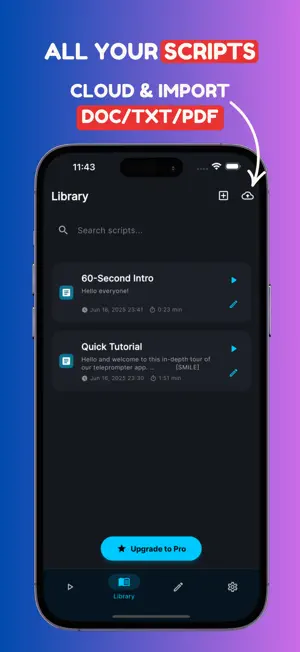
Stop memorizing scripts and losing your place. ProPromptor turns your iPhone or iPad into a complete teleprompter and video studio, so you can look at the camera, speak with confidence, and record polished videos in fewer takes. CREATE BETTER VIDEOS, FASTER Read your script beside the camera while ProPromptor scrolls at your pace. Fine-tune the speed in exact WPM, choose a target duration, adjust the text size and margins, and use a countdown to get ready before recording. RECORD WHILE YOU READ Capture video directly in ProPromptor in portrait or landscape. Choose the quality that fits your workflow, up to 4K when supported by your device. NEW: YOUR TAKES, ORGANIZED Every successful take is saved in your Takes library with its thumbnail, script, date, duration, and file size. Watch it, rename it, share it, save it to Photos, or tap Retake to record again immediately, without deleting the previous version. SMOOTH, COMFORTABLE READING • Smooth continuous scrolling • Exact WPM and target-duration modes • Adjustable font size, margins, colors, and reading guide • Mirror and vertical flip for teleprompter glass • Portrait and landscape support • Countdown and saved settings for each script • Pagination mode for a page-by-page workflow IMPORT AND FORMAT YOUR SCRIPTS Import PDF, DOCX, TXT, Markdown, and other supported files. Write directly in the rich text editor and use headings, bold, italics, lists, and colors to make emphasis and delivery cues easy to see. HANDS-FREE CONTROL Use supported Bluetooth keyboards, presentation remotes, and game controllers to play, pause, restart, or adjust your prompt without touching the screen. MADE FOR • YouTube, TikTok, Reels, and Shorts • Tutorials and online courses • Speeches, sermons, and presentations • Sales, training, and business updates • Podcasts, voice-overs, and self-tapes • Coaches, teachers, creators, founders, and teams WHY PROPROMPTOR? Because the best take is the one where you sound like yourself. ProPromptor helps you keep eye contact, stay on message, and recover quickly when you want another attempt. No watermark. Less memorizing. More confident takes. Download ProPromptor and turn your iPhone or iPad into a teleprompter studio you can take anywhere. Some features require an optional ProPromptor Premium subscription. SUBSCRIPTION TERMS Payment is charged to your Apple ID account when your purchase is confirmed. Subscriptions renew automatically unless canceled at least 24 hours before the end of the current period. Your account is charged for renewal within 24 hours before the end of the current period. Manage or cancel your subscription in your App Store account settings. Any unused portion of a free trial, if offered, is forfeited when you purchase a subscription. Privacy Policy: https://propromptor.com/privacy-policy Terms of Use: https://propromptor.com/terms
What’s new
Version 1.1.0 · Updated August 3, 2026
Welcome to Teleprompter 1.1.0 : built to help you record with more confidence and keep every take organized. NEW TAKES LIBRARY • Find every recorded take in one place • See its thumbnail, script, date, duration, and file size • Play, rename, share, save to Photos, or delete a take • Select and manage several takes at once INSTANT RETAKE • Review your recording as soon as it is saved • Tap Retake to restart the countdown and record again • Your previous take is always preserved • Retakes in the same shooting session do not use another free session SAFER RECORDING • Improved finalization when the app is interrupted or sent to the background • Recover compatible recordings saved by earlier versions • A new “Finalizing take…” state prevents accidental double actions STORAGE CONTROL • See how much space your takes use • Free space safely by removing ProPromptor copies already exported to Photos • Clear confirmation before any deletion ALSO IMPROVED • New five-tab Liquid Glass navigation • Shorter labels for better readability on small iPhones • A smoother workflow between Prompter, preview, and Takes • Updated wording in all six supported languages • General stability and camera-quality persistence improvements
App privacy
The developer, sylvain loirat, reported these privacy practices to Apple.
Data Used to Track You
The following data may be used to track you across apps and websites owned by other companies:
- Identifiers: User ID, Device ID
- Usage Data: Advertising Data
Data Linked to You
The following data, which may be collected and linked to your identity, may be used for the following purposes:
- Identifiers: Device ID, User ID
- Usage Data: Advertising Data, Product Interaction
- Purchases: Purchase History
- Diagnostics: Crash Data, Performance Data
- Contact Info: Email Address
- User Content: Other User Content
Used for: Developer’s Advertising or Marketing, Analytics, App Functionality
Alternatives to Teleprompter Script Reader
Looking for apps like Teleprompter Script Reader? Here are 6 similar apps on the App Store.
-
 Teleprompter-Go
-
 Teleprompter: Video · Kern
-
 FastPrompter
-
 Souffleo Teleprompter
-
 WatchPrompter
-
 Teleprompter for Video: Voice
| App | Rating | Price | Last updated | Compare |
|---|---|---|---|---|
| Teleprompter Script Reader | 5.0 / 5 (2 ratings) | Free | August 3, 2026 | |
| Teleprompter-Go | – | Free | Jul 23, 2026 | Compare |
| Teleprompter: Video · Kern | – | Free | Oct 26, 2026 | Compare |
| FastPrompter | – | Free | Oct 25, 2025 | Compare |
| Souffleo Teleprompter | – | Free | Sep 22, 2026 | Compare |
| WatchPrompter | – | Free | Aug 21, 2026 | Compare |
| Teleprompter for Video: Voice | – | Free | May 20, 2026 | Compare |