

Surface Time
Neel Makhecha Utilities iPhoneiPadiPod touch
Surface Time is a free Utilities app for iPhone and iPad by Neel Makhecha. Rated 5.0/5 from 3 ratings. Requires iOS 17.6. Updated September 16, 2025.
- Rating
- 5.0
- 3 ratings
- Price
- Free
- on the App Store
- Size
- 17 MB
- Age 4+
- Updated
- Sep 16
- 2025 · v1.1.1
Screenshots

About Surface Time
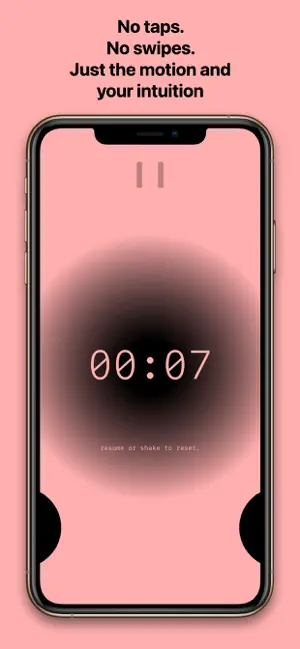
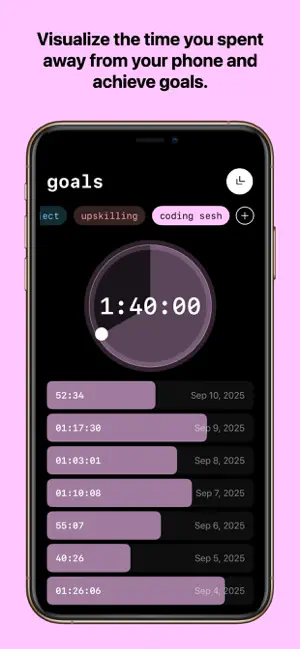
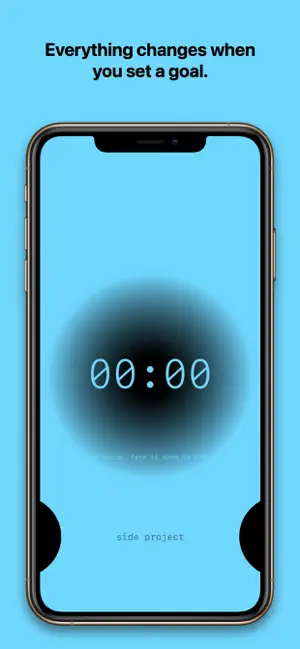
Timer apps are usually always simple with few buttons, but Surface takes this simplicity to the next level. With no buttons, taps, or swipes, the timer just turns on and off. It is designed to intuitively encourage you to put your phone down. The timer values peek from a small circle, and as you move your iPhone across angles, the circle expands with subtle haptics, nudging you to keep going and rest your phone on the surface facing down. The hidden yet visible options for Settings and Goals are not only designed to prevent opening when you might accidentally touch or swipe when flipping your phone, but are also intentionally uninviting for you to interact. However, the moment you choose to do interact, it transforms itself into a beautiful control. A control that encourages you to make a gesture and intentionally reveal the hidden features. The app is mainly aimed to help you stay focused in your work while keeping your phone at arms reach. But it is truly versatile, and I personally found myself using this everywhere. For instance in the kitchen, when my hands are dirty and I don't want to touch the screen or shout at my voice assistants, or to monitor my workouts with intervals. I'm sure there are many more ways to use this! For basic timer features, you'll never have to touch the screen or press any buttons. Just flip your iPhone back up to reveal the screen and the timer pauses. Then, you can shake to reset or flip back down to resume. Notifications: Surface uses backside LED flash to signal when timer begins. You can also set periodic notifications using LED flash or using calming sounds, such as of Himalayan Bowl or Guitar Strum to keep rough track of duration without looking at your timer. Goals: By default, your surface time per day is always saved and visible from the Goals view. You can adjust this goal to whatever duration you want. Plus, you can create custom everyday color-coded goals for different tasks and monitor your everyday progress.
What’s new
Version 1.1.1 · Updated September 16, 2025
- Bug fixes and minor improvements
App privacy
The developer, Neel Makhecha, reported these privacy practices to Apple.
Data Not Linked to You
The following data, which may be collected but is not linked to your identity, may be used for the following purposes:
- Purchases: Purchase History
Used for: Analytics, App Functionality
Alternatives to Surface Time
Looking for apps like Surface Time? Here are 6 similar apps on the App Store. The highest rated is FlipTimer - Flip & Focus (5.0/5), and all 6 are free to download.
-
 Fill-Timer
-
 TapCount® - Tally Counter
-
 FlipTimer - Flip & Focus
5.0
-
 Track Attendance: Classes
-
 GRID AI Mobile
-
 Minimal Hourglass - Sand Timer
| App | Rating | Price | Last updated | Compare |
|---|---|---|---|---|
| Surface Time | 5.0 / 5 (3 ratings) | Free | September 16, 2025 | |
| Fill-Timer | – | Free | Oct 23, 2026 | Compare |
| TapCount® - Tally Counter | – | Free | Aug 20, 2026 | Compare |
| FlipTimer - Flip & Focus | 5.0 / 5 (1) | Free | Sep 26, 2026 | Compare |
| Track Attendance: Classes | – | Free | Oct 8, 2025 | Compare |
| GRID AI Mobile | – | Free | Oct 22, 2026 | Compare |
| Minimal Hourglass - Sand Timer | – | Free | Aug 7, 2026 | Compare |
Compare Surface Time with the top alternatives: ratings, updates, ASO score and keyword gaps →