

Reshade: Your Screen Time
OVAS LLC Productivity iPhoneiPadiPod touch
Reshade: Your Screen Time is a free Productivity app for iPhone and iPad by OVAS LLC. Requires iOS 18.5. Updated July 6, 2026.
- Price
- Free
- on the App Store
- Size
- 265 MB
- Age 4+
- Updated
- Jul 6
- 2026 · v2.1.0
Screenshots
About Reshade: Your Screen Time
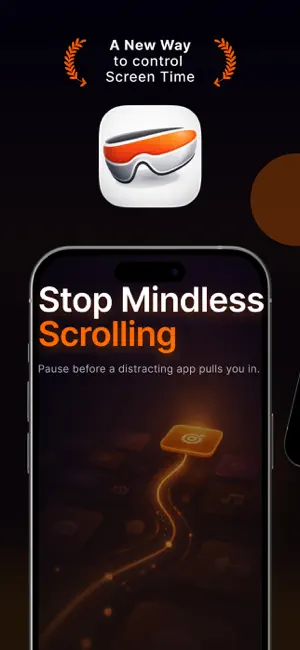
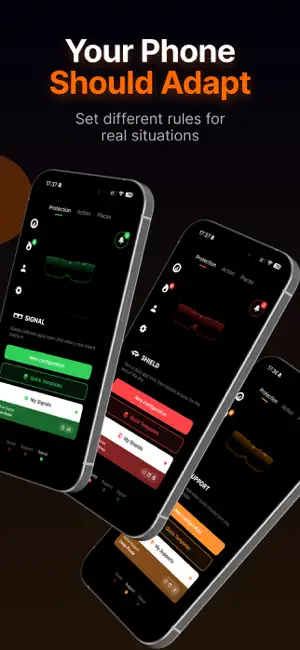
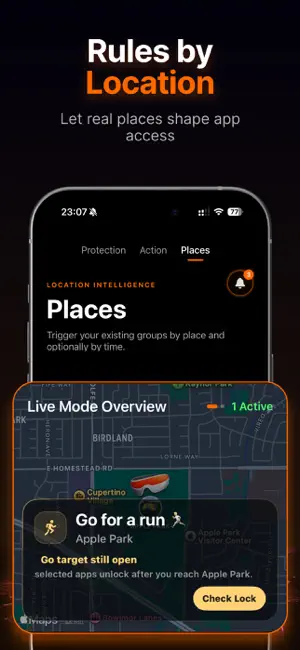
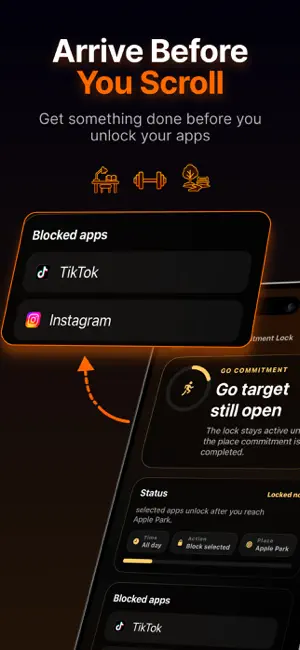
Reshade helps you stop opening apps on autopilot and build screen time limits that fit real life. Most app blockers only ask: should this app be blocked or not? Reshade goes further. It gives you hard limits, soft pauses, intent checks, and place-based app rules, so your phone can react to your real day instead of treating every moment the same. Your phone should fit your life. Not steal your time. APP LIMITS FOR REAL LIFE Create rules for apps, websites, and app groups that pull you into scrolling, checking, doomscrolling, and repeat-use loops. Use Reshade to protect work, study, workouts, focus sessions, creative projects, real-life commitments, calmer phone habits, and intentional breaks. PLACES: APP RULES BY LOCATION Your phone should not behave the same everywhere. With Places, you can create app rules for real locations like your office, gym, study space, home, commute, or other important places in your life. When location access is enabled, Reshade can recognize saved places in the background and help your rules activate around the places you choose. No need to rebuild your limits every time your context changes. Examples: - keep social media away during work - protect study spaces from entertainment apps - reduce scroll loops around workouts - allow useful apps where they help - change access when you arrive or leave COMMITMENT PLACES Some goals only work when you actually show up. Set a commitment, such as reaching the gym, arriving at your study spot, or getting to work. Reshade can keep distracting apps locked until you reach the place you committed to. If you do not show up, your distractions stay closed. SHIELD: HARD DAILY LIMITS Shield sets a daily time budget for distracting apps. Once your limit is used, selected apps stay blocked until the next day. No endless “just one more minute” loops. SUPPORT: PAUSES FOR DOOMSCROLLING LOOPS Support is for moments when you only wanted to check something quickly, but the app keeps pulling you back in. Instead of fully blocking access, Support interrupts repeat-use loops with a pause. After the wait time you choose, access can unlock again automatically. A softer way to slow doomscrolling and quick-check habits. SIGNAL: OPEN APPS WITH INTENT Signal adds a conscious step before selected apps open. Add a short pause, a reason, a reminder, or daily minute credits before access. Turn opening an app into a small decision instead of an automatic reflex. REDIRECT THE MOMENT When you try to open a protected app, Reshade can guide you toward a better next step instead of leaving you stuck. Open a useful app, start a focused action, reflect for a moment, or choose something that fits what you wanted to do. UNDERSTAND YOUR SCREEN TIME Reshade Lens helps you see your patterns more clearly: protection behavior, pressure moments, redirects, screen time context, and progress signals. BUILT FOR INTENTIONAL PHONE USE Use Reshade as a screen time app, app blocker, focus tool, digital wellbeing companion, productivity system, and a practical way to stop app loops before they take over. Reshade also includes Targets for goals, Journal for writing things down, Telescope for clarity before the next step, and Resona for audio-based resets with binaural beats. Less autopilot. More intention. Download Reshade and build app limits for real life. Terms of Use (EULA): https://www.apple.com/legal/internet-services/itunes/dev/stdeula/ Reshade Terms of Use: https://reshade.app/terms Privacy Policy: https://reshade.app/privacy
What’s new
Version 2.1.0 · Updated July 6, 2026
This update introduces Reshade widgets. Add Reshade to your Home Screen or Lock Screen with new widgets for your current protection state, Focus Sessions, and quick recovery moments. The new widget hub in Settings lets you preview each widget, check its setup, and see how to add it. We also improved Pause behavior with smarter budget escalation options, clearer pause scope controls for multi-target groups, more reliable picker recovery after leaving and returning to the app, and several flow, onboarding, and localization refinements across Reshade.
App privacy
The developer, OVAS LLC, reported these privacy practices to Apple.
Data Used to Track You
The following data may be used to track you across apps and websites owned by other companies:
- Purchases: Purchase History
- Identifiers: Device ID
- Usage Data: Product Interaction
Data Linked to You
The following data, which may be collected and linked to your identity, may be used for the following purposes:
- Purchases: Purchase History
- Identifiers: User ID, Device ID
- Usage Data: Product Interaction
- User Content: Customer Support
- Contact Info: Email Address, Name
- Diagnostics: Other Diagnostic Data
Used for: Developer’s Advertising or Marketing, Analytics, App Functionality
Alternatives to Reshade: Your Screen Time
Looking for apps like Reshade: Your Screen Time? Here are 6 similar apps on the App Store. The highest rated is Gentle Screen Time (5.0/5), and all 6 are free to download.
-
 Self Mail: Note To Myself
4.0
Self Mail: Note To Myself
4.0
-
 Flocus: Screen Time Blocker
-
 Gentle Screen Time
5.0
Gentle Screen Time
5.0
-
 ScrollKarma Family Screen Time
-
 Pact: Screen Time & Focus
-
 UpHill: App & Web Blocker
| App | Rating | Price | Last updated | Compare |
|---|---|---|---|---|
| Reshade: Your Screen Time | – | Free | July 6, 2026 | |
| Self Mail: Note To Myself | 4.0 / 5 (1) | Free | May 27, 2026 | Compare |
| Flocus: Screen Time Blocker | – | Free | Jun 6, 2026 | Compare |
| Gentle Screen Time | 5.0 / 5 (2) | Free | Sep 17, 2026 | Compare |
| ScrollKarma Family Screen Time | – | Free | Aug 24, 2026 | Compare |
| Pact: Screen Time & Focus | – | Free | Sep 18, 2026 | Compare |
| UpHill: App & Web Blocker | – | Free | Jul 25, 2026 | Compare |