

PDFCraft
Varsha Patel Business iPhoneiPadiPod touch
PDFCraft is a free Business app for iPhone and iPad by Varsha Patel. Requires iOS 16.0. Updated October 17, 2026.
- Price
- Free
- on the App Store
- Size
- 17 MB
- Age 4+
- Updated
- Oct 17
- 2026 · v4.3
Screenshots



About PDFCraft
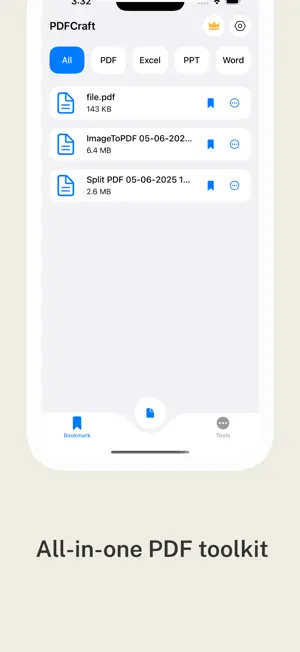
Create, convert, and manage your PDFs with ease using PDFCraft – your all-in-one PDF toolkit! PDFCraft is the ultimate PDF utility app designed for productivity and simplicity. Whether you're a student, professional, or everyday user, PDFCraft gives you powerful tools to work with your documents on the go. With a sleek and intuitive interface, managing PDFs has never been this easy! ===== Key Features ===== • Image to PDF: Convert multiple images into a high-quality PDF file in seconds. Rearrange, crop, and preview before exporting. • Scan to PDF: Turn your camera into a document scanner. Auto-detect edges, enhance image quality, and create PDFs from physical documents instantly. • PDF to Image: Extract all images from any PDF document or convert each page of a PDF into separate high-resolution image files. • Merge PDF: Combine two or more PDF documents into a single file with just a few taps. Organize and reorder before merging. • Split PDF: Need only a few pages? Easily split large PDFs into smaller, more manageable parts based on page range or selection. ANNOTATE & FILL FORMS (Premium) • Highlight, underline and strike through text • Draw freehand with the pen, add text notes, erase marks, undo • Fill in PDF forms right in the reader and save them AI SUMMARY (Premium) • Get a quick on-device summary of any PDF with Apple Intelligence. Your document never leaves your iPhone. SMARTER READER • Read Aloud: listen to your PDF with natural voices, adjustable speed and word-by-word follow-along • Pick up where you left off: documents reopen on the last page you read WORKS WITH YOUR iPHONE • Home Screen & Lock Screen widgets: scan in one tap and open recent files • Siri & Shortcuts: "Scan to PDF with PDFCraft", extract text from PDFs, merge PDFs in your shortcuts • Share to PDFCraft: send PDFs, images and Office files from any app • Spotlight: find your saved PDFs, even by words inside them, right from iPhone search PRIVACY • App Lock: protect PDFCraft with Face ID, Touch ID or your passcode Why Choose PDFCraft? Easy-to-use interface built for speed and efficiency High-quality output with customizable settings Works offline—no internet required for conversions Lightweight and fast, no ads or hidden charges No watermark on your output files Whether you’re working on reports, scanning receipts, managing class notes, or organizing office files, PDFCraft is your go-to app to handle all your PDF needs. Perfect for students, teachers, business professionals, and anyone who deals with documents on a daily basis. Download PDFCraft now and take full control of your PDF workflow. SUBSCRIPTION AND TERMS: You may purchase an auto-renewing subscription through an In-App Purchase to enjoy all App Features without Ads: • Auto-renewable subscription • Weekly, 1 month and 1-year durations • Your subscription will be charged to your iTunes account at confirmation of purchase and will automatically renew (at the duration selected) unless auto-renew is turned off at least 24 hours before the end of the current period. • Current subscription may not be canceled during the active subscription period; however, you can manage your subscription and/or turn off auto-renewal by visiting your iTunes Account Settings after purchase. Privacy Policy : https://sites.google.com/view/pdfcraft-privacypolicy Terms of use : https://sites.google.com/view/pdfcraft-termsconditions EULA : https://sites.google.com/view/pdfcraft-eula
What’s new
Version 4.3 · Updated October 17, 2026
- Annotate & form filling: open any PDF from Home, tap the pencil icon (Premium). - AI Summary: sparkles icon in the PDF reader (Premium; requires an Apple Intelligence–capable device; hidden on others). - Redact PDF and PDF to Text: Tools tab. - Widget: long-press Home Screen > add "PDFCraft" widget. - Siri: "Scan to PDF with PDFCraft". Shortcuts app shows Extract Text from PDF and Merge PDFs. - App Lock: Settings > App Lock (Face ID). - Read Aloud: reader ⋯ menu. All processing (OCR, summary, speech, redaction) happens on device.
App privacy
The developer, Varsha Patel, reported these privacy practices to Apple.
Data Used to Track You
The following data may be used to track you across apps and websites owned by other companies:
- Usage Data: Advertising Data
Data Not Linked to You
The following data, which may be collected but is not linked to your identity, may be used for the following purposes:
- Location: Coarse Location
- Identifiers: User ID, Device ID
- Usage Data: Advertising Data
- Diagnostics: Crash Data
Used for: Third-Party Advertising, Developer’s Advertising or Marketing, Product Personalization
Alternatives to PDFCraft
Looking for apps like PDFCraft? Here are 6 similar apps on the App Store. The highest rated is Truklex (5.0/5), and all 6 are free to download.
-
 PdfCraft: PDF Scanner
-
 Pdf Craft Tools
-
 SmartScan PDF
-
 MarketRally - Creator Picks
-
 Managed Review Deployment
-
 Truklex
5.0
Truklex
5.0
| App | Rating | Price | Last updated | Compare |
|---|---|---|---|---|
| PDFCraft | – | Free | October 17, 2026 | |
| PdfCraft: PDF Scanner | – | Free | Dec 2, 2025 | Compare |
| Pdf Craft Tools | – | Free | Oct 11, 2026 | Compare |
| SmartScan PDF | – | Free | Nov 15, 2025 | Compare |
| MarketRally - Creator Picks | – | Free | Jul 1, 2026 | Compare |
| Managed Review Deployment | – | Free | Oct 8, 2026 | Compare |
| Truklex | 5.0 / 5 (2) | Free | Oct 9, 2025 | Compare |
Compare PDFCraft with the top alternatives: ratings, updates, ASO score and keyword gaps →