

HelpUSee – Help You See
Li-Ren Lin Utilities iPhoneiPadiPod touch
HelpUSee – Help You See is a free Utilities app for iPhone and iPad by Li-Ren Lin. Rated 5.0/5 from 3 ratings. Requires iOS 18.0. Updated October 27, 2025.
- Rating
- 5.0
- 3 ratings
- Price
- Free
- on the App Store
- Size
- 1.2 GB
- Age 4+
- Updated
- Oct 27
- 2025 · vV1.38.3
Screenshots
About HelpUSee – Help You See
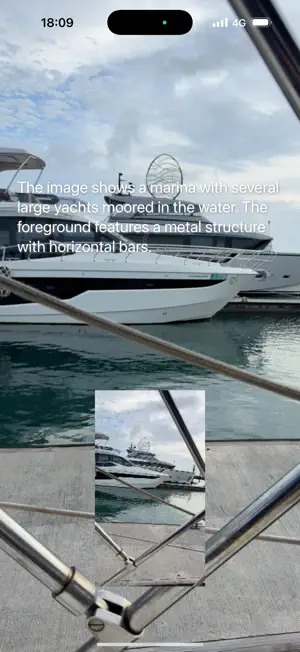
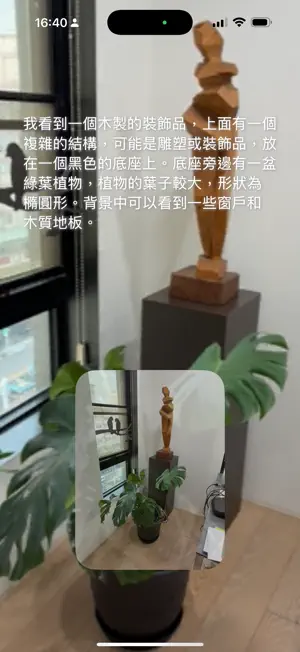
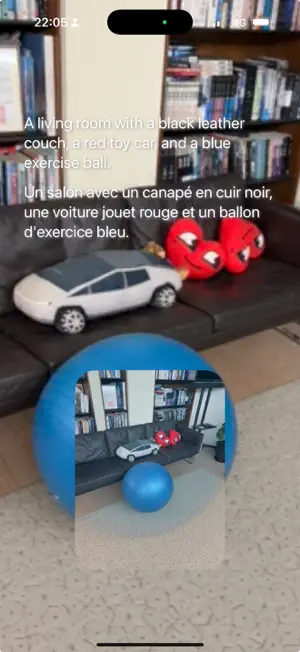
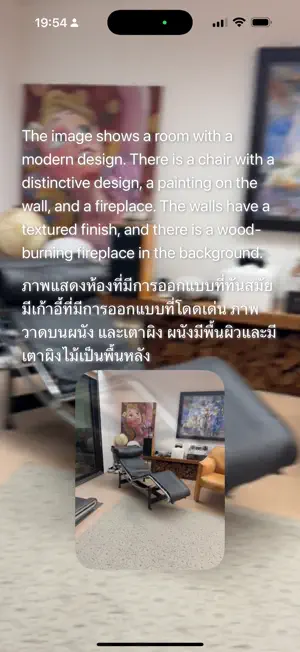
HelpUSee is an app built for people with vision impairments. We value privacy for our users, the app uses offline AI to describe scenes, recognize clothing colors, and read text from images. Once fully installed, it works entirely offline—no internet or cloud needed. Usage is unlimited and the app is entirely free. Key Features: 1. Camera Mode, tap once to get a description of what’s ahead 2. Continuous Selfie Mode, ideal for checking clothing color: • You can flip or reverse your phone (e.g. hang it upside down) for hands-free color checks. • This feature was inspired by a request from the developer’s mother. 3. Continuously search text, and speak words near your finger • If text appears in front of the camera, you will be alerted. • Point your finger at the text you want to read • Going a step further, you can take snapshots to get even more detailed information. • If a snap contains text, you'll be notified. Triple-tap to reveal all the text. • A long slide on the screen enters the Text Mode Reader. 4. Text mode reader, Designed like a Braille-display experience: • Long slide screen to enter this mode if snapshop have text. • Tap or slide your finger on the screen to read aloud the text (like touching Braille). • Double-tap reads an image description; triple-tap reads all text. • Use two fingers to zoom or pan the content. • Long slide again to exit this mode. 5. iPad Support, text mode reader works well on iPad by larger screen helps. • To have better experience, position your iPad on a stand like a book holder. 6. Receive Images from External Sources - Want to know photo on your phone? "Share" it to this app. - Want to check what's on your screen at any time? Even pictures sent by friends? • In the "Shortcurs app", press "+" to start creating a shortcut. • Search action "Take screenshot" and clicking "i" on right and add it as the first step. • Search action "HelpUSee", then pickup "Receive Image" by clicking "i" on right. • Also press "+Add" to add the second item, then LONG press "Choose" on right. • Pick up the first item "Select Variable", and click a middle icon "Screenshot" for input. • Rename top of screen as a "magic words" you like. • Call Siri and speak magic words, it will take snapshot anytime and ask this app to work. 7. Quick Access via Siri • In the "Shortcurs app", press "+" to start creating a shortcut. • Search action "HelpUSee", then pickup "Look at this" by clicking "i" on right. • Also press "+Add" to add the second item • Check top of screen and rename it as a "magic words" you like, or keep it as is. • Call Siri and speak your magic words, or say "Hi Siri, look at his" if you keep as is at last step. • The app will pop up, count down and take a snapshot, speak a description, and then close. • If you want to continue using it, touch to take another snapshot before closing. 8. Quick Close, flip the phone face down to close the app quickly. Setup & Device Requirements: * This app needs A14 Bionic chip above to process, that is iPhone 12 or newer. For iPad, that is iPad 10, iPad Air (4th) or newer. Thank you for sharing this app to your loved ones, I built this app out of love — to help my mother, and now, to help many more people around the world.
What’s new
Version V1.38.3 · Updated October 27, 2025
V1.38.3 1. Magnifying glass, use two fingers to zoom in and out. 2. Switch the level of detail in the photo description by swiping screen up or down.
App privacy
The developer, Li-Ren Lin, reported these privacy practices to Apple.
Data Not Collected
The developer does not collect any data from this app.
Alternatives to HelpUSee – Help You See
Looking for apps like HelpUSee – Help You See? Here are 6 similar apps on the App Store. The highest rated is VisionAI: visual assistance (5.0/5), and all 6 are free to download.
-
 Perception Assist
3.7
Perception Assist
3.7
-
 Be Your Eyes
-
 VisionAI: visual assistance
5.0
VisionAI: visual assistance
5.0
-
 EchoBox Player
5.0
EchoBox Player
5.0
-
 Smart Eyes Pro
4.3
Smart Eyes Pro
4.3
-
 يسر
4.8
يسر
4.8
| App | Rating | Price | Last updated | Compare |
|---|---|---|---|---|
| HelpUSee – Help You See | 5.0 / 5 (3 ratings) | Free | October 27, 2025 | |
| Perception Assist | 3.7 / 5 (3) | Free | Oct 21, 2026 | Compare |
| Be Your Eyes | – | Free | Jul 10, 2024 | Compare |
| VisionAI: visual assistance | 5.0 / 5 (1) | Free | Sep 11, 2026 | Compare |
| EchoBox Player | 5.0 / 5 (2) | Free | Mar 19, 2026 | Compare |
| Smart Eyes Pro | 4.3 / 5 (3) | Free | Oct 6, 2026 | Compare |
| يسر | 4.8 / 5 (8) | Free | Aug 13, 2026 | Compare |