

Jotley: Private AI Notes
Protomota, LLC Productivity iPhoneiPadiPod touch
Jotley: Private AI Notes is a free Productivity app for iPhone and iPad by Protomota, LLC. Rated 5.0/5 from 2 ratings. Requires iOS 27.0.
- Rating
- 5.0
- 2 ratings
- Price
- Free
- on the App Store
- Size
- 7 MB
- Age 4+
- Updated
- Oct 17
- 2026 · v2.0
Screenshots



About Jotley: Private AI Notes
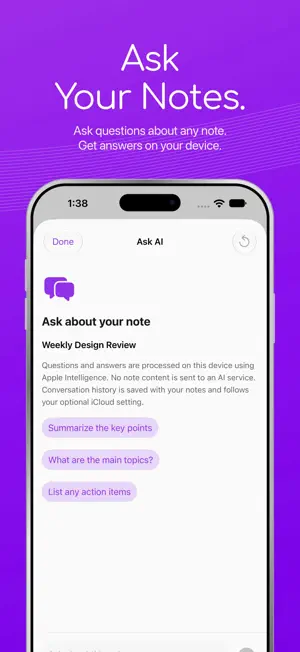
Jotley is completely free to use — a voice notes app for iPhone or iPad, built natively for Apple Intelligence. Transcribe your voice live and create useful summaries right on your device. No audio files are saved. WORKS OFFLINE Once Apple's on-device models are ready, no internet connection is required to transcribe, summarize, ask about a note, edit, search or organize your notes. Use Jotley without Wi-Fi or cellular data. No Jotley account, subscription or remote AI service is required. YOUR NOTES AND TRANSCRIPTS — PROCESSED ON YOUR DEVICE Your microphone input is transcribed live on your iPhone or iPad using Apple's on-device speech models; audio is processed in memory and is never saved as a recording. Every summary, automatically generated note title and Ask AI answer is created locally with Apple Intelligence. Your audio, notes, transcripts and summaries are never sent to Jotley servers, remote AI providers or cloud AI services for processing. With iCloud sync turned off, your notes, transcripts, summaries and Ask AI conversations stay on that device too — Jotley does not send them anywhere unless you choose to share or export them. If you leave iCloud sync enabled, note content, including transcripts, summaries and Ask AI conversations, syncs to your private Apple iCloud account. This optional sync is on by default; it is separate from transcription and summarization, which always happen on-device. TRANSCRIBE LIVE Capture voice notes, meetings, lectures, interviews and ideas directly from your microphone. Watch your transcript update as you speak. Pause, resume, or use Continue Transcription to add words to an existing note. Jotley saves your transcript, not an audio file. SUMMARIZE WITH APPLE INTELLIGENCE Turn transcripts into concise summaries, meeting notes or study notes with Apple's installed on-device model. Untitled notes receive a descriptive title when you summarize them. ASK AI ABOUT YOUR NOTE Ask questions about a transcript and get answers from Apple Intelligence on your device. Keep the conversation with your note, copy or share an answer, and clear chat history whenever you want. Long notes use relevant excerpts; no remote AI service processes your questions or note content. TRANSCRIPTION WIDGETS AND LIVE ACTIVITIES Start a voice note from a Jotley Home Screen widget. See your live transcription timer on the Lock Screen and in the Dynamic Island on supported iPhones, with pause, resume and stop controls. KEEP YOUR NOTES ORGANIZED Tap + to start transcribing immediately. Stop to open your saved transcript note. Organize notes with folders and tags, search your library, and share or export notes, transcripts and summaries. On iPad, view your note list and selected note side by side. ONE-TIME MODEL SETUP Speech uses a separate Apple model for your selected language. If it is missing, choose Set Up On-Device Speech in Jotley's Settings while connected to the internet. This one-time setup installs the model from Apple; transcription then works offline. Summaries require Apple Intelligence enabled with its on-device model ready. Speech setup must finish before live transcription starts. Existing notes remain saved if a model is unavailable. This update removes previous iPhone and iPad audio files while preserving notes, transcripts and summaries. REQUIREMENTS Requires iOS or iPadOS 27 or later and Apple Intelligence-capable hardware: iPhone 15 Pro/Pro Max, iPhone 16 or newer, iPhone Air, iPad with M1 or later, or iPad mini with A17 Pro. COMPLETELY FREE No subscriptions, in-app purchases or paid features. Use Jotley freely for personal notes or paid work. Source code is available on GitHub: https://github.com/protomota/jotley Jotley’s source-available license permits use, modification and noncommercial redistribution; commercial distribution requires permission from Protomota, LLC. Third-party components retain their own licenses.
What’s new
Version 2.0 · Updated October 17, 2026
Ask AI Copy and Share now use much smaller action chips. Their icons, labels and subtle backgrounds follow your selected theme color, with comfortable touch areas around the compact controls. Live transcription now starts at the top of the page and grows downward. Once the page is full, it scrolls to keep the newest timestamped words visible at the bottom. This applies to both iPhone and iPad. No audio files are saved. The Summary tab now shows Ask AI, and the Transcript tab shows Continue Transcription. Your template and Generate/Regenerate Summary controls stay available. Clearly styled Copy and Share buttons make Ask AI answers easier to use on iPhone and iPad. Edit Summary now has a pencil icon in the More menu. Finish Editing Summary shows a checkmark. Long summaries use token-aware sections to reduce unnecessary model passes without truncating the transcript. Private intermediate extraction avoids rendering work, while the final summary still streams live. Leaving a note or backgrounding the app no longer cancels its summary. Jotley requests Apple’s continued background processing time and checkpoints completed sections locally. If iOS suspends or expires the job, it resumes when you return without rereading completed sections. Cancel Generation still cancels explicitly. Background runtime depends on system conditions; force quitting or OS suspension can prevent continuous execution. Summary generation now shows progress while Apple Intelligence reviews a long transcript, including the number of sections reviewed. The summary appears as it is written, with Cancel Generation always available. Regenerate Summary starts immediately without a confirmation pop-up. A clear vertical divider separates the iPad notes list from the note detail, in both light and dark appearance. Updated iPad screenshots show the current interface. Summary generation follows new words and keeps Cancel Generation visible. Long notes now produce one consolidated summary. Repeating output is stopped, and generation has a time limit. A native animated waveform keeps live transcription smoother while text updates are grouped to reduce rendering work. Stop or Close to finish transcription and save your words automatically. The completed note stays still, and Close saves directly without another prompt. Continue Transcription is available on the Transcript tab and in More. Live words now appear in timestamped cards that scroll to the latest words. A more sensitive waveform shows quieter input while keeping room for louder input. Edit your transcript from the note’s More menu, with Save and Cancel controls. Edit Summary appears only once a summary exists. The template selector keeps a steady size when you switch templates, so Generate Summary no longer shifts. Larger folder and filter icons, a taller folder-name field and a clear Create Folder button make organizing notes easier. Live transcription opens without the brief introductory text flash. Jotley now transcribes live on your iPhone or iPad, without saving audio files. Tap + to start immediately, watch the live waveform and transcript, then pause, resume or stop. Use Continue Transcription to add words to an existing note. Home Screen widgets and the Lock Screen/Dynamic Island show your active session. Words are saved as they arrive. Saved-audio playback and retranscription have been removed; previous iPhone and iPad audio files are deleted while notes, transcripts and summaries are preserved. Speech setup must finish before listening starts. Generate summaries and note titles with on-device Apple Intelligence, choose Auto or a summary template, and ask AI about your notes from Summary or More. Completely free, with no login, subscription or remote AI service. Optional private iCloud note sync remains available. Requires iOS/iPadOS 27 and Apple Intelligence-capable hardware.
App privacy
The developer, Protomota, LLC, reported these privacy practices to Apple.
Data Not Collected
The developer does not collect any data from this app.
Alternatives to Jotley: Private AI Notes
Looking for apps like Jotley: Private AI Notes? Here are 6 similar apps on the App Store. The highest rated is Whisprly - Voice Journal (5.0/5), and 5 of the 6 are free to download.
-
 Whisprly - Voice Journal
5.0
-
 Calarm
2.8
-
 Taskdown.md
2.5
-
 Journee AI Voice Journal
4.4
-
 Journo: AI Voice Journal
4.3
-
 YapThread: AI Voice Notes
4.5
| App | Rating | Price | Last updated | Compare |
|---|---|---|---|---|
| Jotley: Private AI Notes | 5.0 / 5 (2 ratings) | Free | October 17, 2026 | |
| Whisprly - Voice Journal | 5.0 / 5 (3) | Free | Jan 19, 2026 | Compare |
| Calarm | 2.8 / 5 (13) | 1.99 USD | Apr 11, 2026 | Compare |
| Taskdown.md | 2.5 / 5 (2) | Free | Mar 23, 2026 | Compare |
| Journee AI Voice Journal | 4.4 / 5 (12) | Free | Oct 22, 2025 | Compare |
| Journo: AI Voice Journal | 4.3 / 5 (27) | Free | Aug 20, 2026 | Compare |
| YapThread: AI Voice Notes | 4.5 / 5 (29) | Free | Mar 6, 2025 | Compare |