

AI Calendar Planner: ProntoCal
YUTO OKURA Productivity iPhoneiPadiPod touch
AI Calendar Planner: ProntoCal is a free Productivity app for iPhone and iPad by YUTO OKURA. Rated 5.0/5 from 1 ratings. Requires iOS 26.0.
- Rating
- 5.0
- 1 ratings
- Price
- Free
- on the App Store
- Size
- 63 MB
- Age 4+
- Updated
- Oct 8
- 2026 · v2.3.0
Screenshots



About AI Calendar Planner: ProntoCal
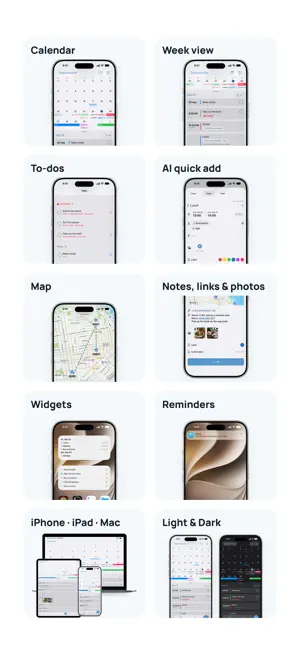
ProntoCal is the simple, powerful all-in-one AI calendar, to-do list, planner and reminders app for iPhone, iPad and Mac. Type a plan the way you'd say it, and AI fills in the time and place. Entering plans by hand is a chore, so you forget. ProntoCal fixes that: events and to-dos on one screen, overdue to-dos in red with a reminder, your day on a map, and notes, links and photos attached to any plan. SOUND FAMILIAR? - Setting the date and time for every event is tedious, so you put it off - Your calendar and your to-do list live in different apps, and things slip through - You look up the same place on the map every time - You want the shopping list or the transit screenshot right next to the plan WHAT YOU CAN DO WITH PRONTOCAL - AI quick add: type "Lunch at Ferry Building tomorrow 1pm" and it goes on the calendar for tomorrow at 1pm with the place filled in - See events and to-dos on one screen: today's list sits under the month view. Swipe up for the week - Never lose an overdue to-do: it stays red until it's done, and reminds you - See your day on a map, in order - Attach notes, links and photos to any event or to-do - Check off to-dos right from the Home Screen widget - Sync across iPhone, iPad and Mac, in light or dark mode PERFECT FOR - Anyone who forgets plans because entering them feels like a chore - People who don't want to switch between a calendar and a to-do app - Keeping reminders on the calendar without a separate reminders app - Keeping photos and notes with your plans Never "oh no, I forgot" again. ProntoCal remembers for you and lets you know. Privacy Policy: https://blossom-railway-09b.notion.site/20f37c58801d80e9bbc9d54f41e5dfa2 Terms of Use: https://blossom-railway-09b.notion.site/20f37c58801d80baadddd1583742142a
What’s new
Version 2.3.0 · Updated October 8, 2026
- AI input now also tells whether it's an event or a to-do - See your completed to-dos anytime in a list - Fixed the To-do tab sometimes appearing blank, and other bugs
App privacy
The developer, YUTO OKURA, reported these privacy practices to Apple.
Data Linked to You
The following data, which may be collected and linked to your identity, may be used for the following purposes:
- Purchases: Purchase History
- Location: Coarse Location
- User Content: Other User Content, Photos or Videos
- Search History: Search History
- Browsing History: Browsing History
- Identifiers: User ID, Device ID
- Usage Data: Product Interaction, Advertising Data, Other Usage Data
- Diagnostics: Crash Data, Performance Data, Other Diagnostic Data
Used for: Product Personalization, App Functionality
Alternatives to AI Calendar Planner: ProntoCal
Looking for apps like AI Calendar Planner: ProntoCal? Here are 6 similar apps on the App Store. The highest rated is Calendar Planner App (5.0/5), and all 6 are free to download.
-
 Calendar Planner App
5.0
Calendar Planner App
5.0
-
 Roomy Calendar: Simple Planner
5.0
Roomy Calendar: Simple Planner
5.0
-
 Calendarize - Your Calendar
4.0
Calendarize - Your Calendar
4.0
-
 Vertical Calendar - Planner
5.0
Vertical Calendar - Planner
5.0
-
 Linear Calendar - Chronos
4.2
Linear Calendar - Chronos
4.2
-
 Calendar Pro: Daily Planner
5.0
Calendar Pro: Daily Planner
5.0
| App | Rating | Price | Last updated | Compare |
|---|---|---|---|---|
| AI Calendar Planner: ProntoCal | 5.0 / 5 (1 rating) | Free | October 8, 2026 | |
| Calendar Planner App | 5.0 / 5 (2) | Free | Sep 17, 2024 | Compare |
| Roomy Calendar: Simple Planner | 5.0 / 5 (1) | Free | Oct 17, 2026 | Compare |
| Calendarize - Your Calendar | 4.0 / 5 (2) | Free | Jun 10, 2026 | Compare |
| Vertical Calendar - Planner | 5.0 / 5 (3) | Free | Oct 15, 2026 | Compare |
| Linear Calendar - Chronos | 4.2 / 5 (5) | Free | Apr 29, 2026 | Compare |
| Calendar Pro: Daily Planner | 5.0 / 5 (1) | Free | Sep 17, 2026 | Compare |