

Video Audio Stem Splitter
Future Moments Photo & Video iPhoneiPadiPod touchMac
Video Audio Stem Splitter is a free Photo & Video app for iPhone and iPad by Future Moments. Rated 4.6/5 from 138 ratings. Requires iOS 17.6.
- Rating
- 4.6
- 138 ratings
- Price
- Free
- on the App Store
- Size
- 99 MB
- Age 4+
- Updated
- Oct 22
- 2026 · v1.9
Screenshots
About Video Audio Stem Splitter
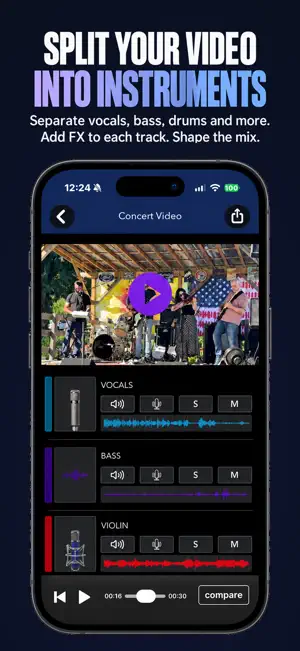
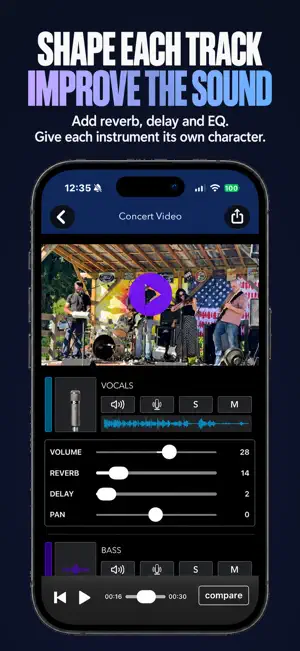
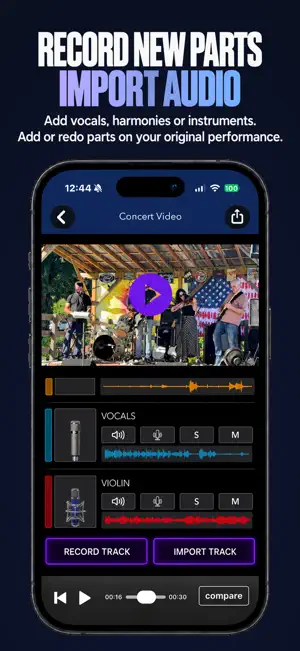
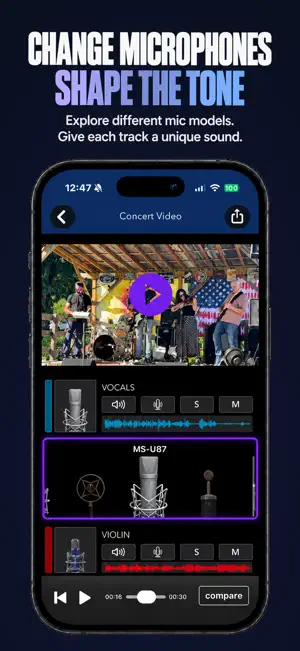
Instantly remix the sound of any video with advanced AI. Video Audio Splitter: MSV Remix is the ultimate audio post-production studio right in your pocket. Using cutting-edge AI stem separation, you can instantly split the audio from any video into clean, editable tracks—isolating vocals, instruments, background ambience, and noise. Whether you need to remove distracting background chatter, boost the bass, or extract a specific instrument, MSV Remix gives you total control over your sound. Remix, rebalance, add studio-quality effects, and make your videos sound more professional than ever. SEPARATE & ISOLATE AUDIO STEMS AI Stem Splitter: Instantly break down your video’s audio into distinct, independent tracks (Vocals, Drums, Bass, Instruments, and Noise). No Duration Limits: Split and edit the audio of any video, no matter how long. REMIX & ENHANCE YOUR SOUND Total Mix Control: Boost the tracks that matter and mute the ones that don’t. Studio FX: Add professional-grade Reverb and Delay to individual stems to create depth and space. Mic Modeling Technology: Change the tone and timbre of any track using the built-in MicSwap microphone modeler. RECORD & LAYER NEW AUDIO Add fresh voiceovers, narrations, or reaction audio right inside the app. Layer new music or sound effects over your separated stems for a completely new mix. PERFECT FOR EVERY CREATOR: Musicians & Bands: Extract the drums, isolate the bass, or pull the exact stem of a vintage electric piano from a live gig to create the perfect remix, backing track, or acapella. Comedians & Live Performers: Clean up the audio from a live open mic set filmed in a dark, noisy club by dropping the background crowd chatter and boosting your vocals. Filmmakers & Vloggers: Isolate dialogue, remove unwanted wind or street noise, and rebuild your sound design from scratch. Content Creators: Enhance overall clarity so your audience never misses a word. EXPORT EXACTLY WHAT YOU NEED Seamlessly export your finished project however you want it: Save the newly mixed Video to your camera roll. Export just the remixed Audio track. Export the individual, isolated Stems for use in your favorite DAW or editing software. Simple enough for beginners. Powerful enough for pros. Stop letting bad audio ruin great videos. Download MSV Remix today and take total control of your sound! MicSwap Video Remix is built to be intuitive for everyday users and robust enough for creators, musicians, teachers, podcasters, comedians, and filmmakers. Why It’s Different: This is the first and only app that combines AI audio separation, remixing, enhancement, and multi-track export for videos — all in one easy tool. We offer 3 subscription plans: 1 Week $4.99 USD 1 Month $9.99 USD 6 Months $19.99 USD 1 Year $29.99 USD Future Moments privacy policy: http://future-moments.com/faq Future Moments terms of use: http://future-moments.com/faq ALSO BY FUTURE MOMENTS: Jam Recorder You Jam. We Split into Stems Podcast Cleaner Remove Noise from Audio Video Audio Splitter MSV Remix Remix the Audio of Your Video MicSwap Remix AI Audio Stem Separator Audio Cleaner AI Audio Cleanup Magic MAIVE AI Video Generator VideoVerb Add Reverb to Your Videos Hear Boost Get Super Hearing & Recording MicSwap Mic Modeler & Recorder MicSwap MultiTrack Multitrack Mic Modeler & Recorder MicSwap Video Edit Video Audio with Mic Models & FX MicSwap Camera The Best Sounding Video Camera AudioFix Denoise & Clean the Sound of Your Video VideoMaster Instant Audio Post-Production for Videos AudioVerb Add Reverb & Delay to Your Audio AudioMaster Audio Mastering for Podcasts & Music Volume Booster Easily Boost the Sound of Your Audio or Video
Ratings & reviews
4.6
138 ratings
What’s new
Version 1.9 · Updated October 22, 2026
Import videos of any duration and they get split into multitracks. You can then mix, solo, edit, add fx to each track. Record or import audio to add it to your video, Lots of features! Hey Creators! We’re at it again… New App - Jam Recorder! You Jam, We Give you a Multitrack Recording. A new way to record band practice! Check out ‘Future Moments’ on the App Store! Any features you'd like us to add? We're listening! Please email us through the side menu of the app! www.Future-Moments.com
App privacy
The developer, Future Moments, reported these privacy practices to Apple.
Data Not Linked to You
The following data, which may be collected but is not linked to your identity, may be used for the following purposes:
- Diagnostics: Crash Data, Performance Data, Other Diagnostic Data
Used for: Analytics, App Functionality
Alternatives to Video Audio Stem Splitter
Looking for apps like Video Audio Stem Splitter? Here are 6 similar apps on the App Store. The highest rated is Timestamp Camera: GPS, Photo (4.8/5), and all 6 are free to download.
-
 Timestamp Camera: GPS, Photo
4.8
Timestamp Camera: GPS, Photo
4.8
-
 3D Scanner: Sapling
4.4
3D Scanner: Sapling
4.4
-
 Presets for Lightroom: Preseto
4.7
Presets for Lightroom: Preseto
4.7
-
 Video Editor ®
4.6
Video Editor ®
4.6
-
 KLIN: AI Video Sound Cleaner
4.7
KLIN: AI Video Sound Cleaner
4.7
-
 Denoise.FX for Audio & Video
4.5
Denoise.FX for Audio & Video
4.5
| App | Rating | Price | Last updated | Compare |
|---|---|---|---|---|
| Video Audio Stem Splitter | 4.6 / 5 (138 ratings) | Free | October 22, 2026 | |
| Timestamp Camera: GPS, Photo | 4.8 / 5 (26) | Free | Sep 15, 2026 | Compare |
| 3D Scanner: Sapling | 4.4 / 5 (55) | Free | Oct 16, 2026 | Compare |
| Presets for Lightroom: Preseto | 4.7 / 5 (108) | Free | Oct 31, 2025 | Compare |
| Video Editor ® | 4.6 / 5 (2,146) | Free | Aug 13, 2026 | Compare |
| KLIN: AI Video Sound Cleaner | 4.7 / 5 (521) | Free | Oct 13, 2026 | Compare |
| Denoise.FX for Audio & Video | 4.5 / 5 (426) | Free | Jun 10, 2026 | Compare |