

Pastin Clipboard Manager
Bahattin Duran Utilities iPhoneiPadiPod touch
Pastin Clipboard Manager is a free Utilities app for iPhone and iPad by Bahattin Duran. Rated 3.0/5 from 2 ratings. Requires iOS 18.5.
- Rating
- 3.0
- 2 ratings
- Price
- Free
- on the App Store
- Size
- 17 MB
- Age 4+
- Updated
- Aug 26
- 2026 · v1.27
Screenshots


About Pastin Clipboard Manager
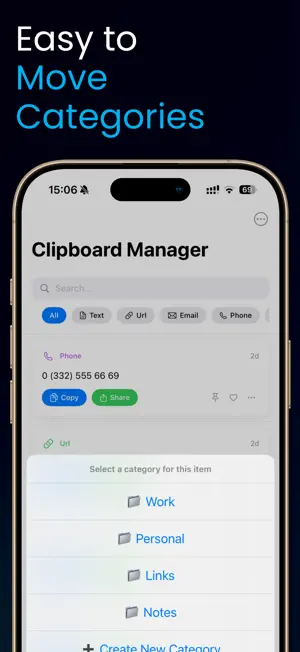
Every copy worth keeping, still there when you need to paste. If you have ever copied an address, switched apps to grab a phone number, and watched the address vanish forever, a real clipboard manager is the fix iOS quietly never shipped. Pastin remembers what you copied five minutes ago, yesterday and last week — snippets, addresses, passwords, code, links — so the second paste is as fast as the first. It behaves as a calm snippet manager rather than another notification factory: capture happens automatically, the copy history is searchable, and the app never tries to be more than the place your clipboard lives. There is no account, no advertising network, and your data stays on this device. Every feature described below is unlocked only with an auto-renewable subscription purchased inside the app. New users receive a 3 day free trial; you may cancel anytime during the trial to avoid being charged. Open Pastin and your full clipboard history is searchable, with auto-detected types for URLs, phone numbers and addresses so the right snippet surfaces by topic, not just by time. Pin favourites like email signatures, support replies and wallet addresses so they live at the top of the list forever, group repeating snippets into folders and tags, and capture new entries directly through the Share Sheet from any app. A Home Screen and Lock Screen widget exposes pinned snippets for quick paste, the clipboard organizer lets you reorder and rename items so the most-used live first, and Siri Shortcuts let you wire copy history into your own automations. The paste manager also handles the messy reality of long-running work: a clip history that grew during a customer support shift can be filtered to a single client, a developer can pull back the regex they wrote three weeks ago, and translators can hold a multi clipboard of source and target strings without juggling notes. Smart format detection means a copied address is recognised as an address and a copied phone number is recognised as a phone number, so quick paste actions like "open in Maps" or "call this number" surface where they make sense. Bulk export lets you walk away with everything in a plain text or CSV file at any time, and the clipboard saver behaviour can be paused for a few minutes when you are entering sensitive data you do not want stored. The clipboard tool is built for developers, customer support agents, writers, translators, sales teams replying to the same five questions all day, and anyone who has ever had to type the same paragraph twice today. The interface ships in 39 languages with full VoiceOver support, runs fully offline, and respects iOS clipboard privacy prompts the way the system intends. Nothing about your clip history is shared with a server, an analytics provider, or a third-party server in the loop. Unlock with Pro: • Unlimited history (free: last 50 items) • Unlimited pinned snippets and folders • All widgets, themes and Shortcuts actions • Smart format detection for URLs, phones and addresses • Bulk export of clipboard history Subscription Pricing & Terms Features require a subscription. Pricing and terms available in-app. Terms of Use: https://www.apple.com/legal/internet-services/itunes/dev/stdeula/ Payment will be charged to your Apple ID account at confirmation of purchase. The subscription automatically renews unless auto-renew is turned off at least 24 hours before the end of the current period. Your account will be charged for renewal within 24 hours prior to the end of the current period. Manage or cancel your subscription and free-trial conversion in Settings > Apple ID after purchase. Any unused portion of the free-trial period will be forfeited when you purchase a subscription.
What’s new
Version 1.27 · Updated August 26, 2026
Readability and accessibility improvements, better support for larger text sizes, and a number of bug fixes.
App privacy
The developer, Bahattin Duran, reported these privacy practices to Apple.
Data Not Linked to You
The following data, which may be collected but is not linked to your identity, may be used for the following purposes:
- Purchases: Purchase History
Used for: App Functionality
Alternatives to Pastin Clipboard Manager
Looking for apps like Pastin Clipboard Manager? Here are 6 similar apps on the App Store. The highest rated is Clipboard Manager Quick Notes (4.5/5), and all 6 are free to download.
-
 Bookmark Manager - Linkmark
1.0
Bookmark Manager - Linkmark
1.0
-
 Calculator: Money & Tools
1.7
Calculator: Money & Tools
1.7
-
 Clipboard Manager Quick Notes
4.5
Clipboard Manager Quick Notes
4.5
-
 Handwriting To Text
-
 HelloAndBye
-
 gjICE
gjICE
| App | Rating | Price | Last updated | Compare |
|---|---|---|---|---|
| Pastin Clipboard Manager | 3.0 / 5 (2 ratings) | Free | August 26, 2026 | |
| Bookmark Manager - Linkmark | 1.0 / 5 (1) | Free | Oct 6, 2025 | Compare |
| Calculator: Money & Tools | 1.7 / 5 (3) | Free | Aug 13, 2026 | Compare |
| Clipboard Manager Quick Notes | 4.5 / 5 (2) | Free | Nov 6, 2024 | Compare |
| Handwriting To Text | – | Free | Dec 3, 2024 | Compare |
| HelloAndBye | – | Free | Jul 7, 2025 | Compare |
| gjICE | – | Free | Feb 27, 2025 | Compare |