

DateSmith Light - Date Widgets
Benjamin Staab Productivity iPhoneiPadiPod touch
DateSmith Light - Date Widgets is a free Productivity app for iPhone and iPad by Benjamin Staab. Rated 5.0/5 from 2 ratings. Requires iOS 17.6.
- Rating
- 5.0
- 2 ratings
- Price
- Free
- on the App Store
- Size
- 1 MB
- Age 4+
- Updated
- Jun 9
- 2025 · v11.1
Screenshots



About DateSmith Light - Date Widgets
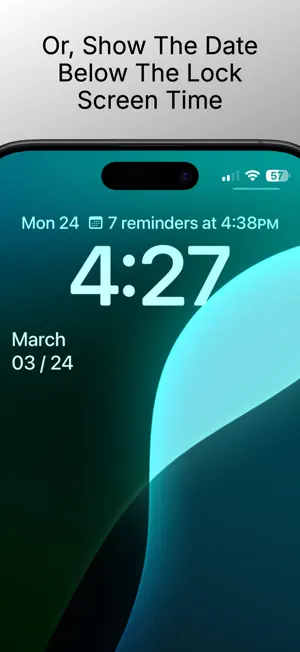
DateSmith Light: YOUR LOCK SCREEN DATE PERFECTED DateSmith Light delivers what other widget apps don't - a beautifully formatted date display specifically designed for the premium space above your lock screen clock. With reliable midnight updates and customization options, DateSmith Light enhances your iPhone with information you need at a glance. ABOVE-CLOCK PERFECTION Unlike generic widget apps, DateSmith Light specializes in the coveted space above your lock screen clock. Our elegant date formats complement your iPhone's design language while delivering essential information at a glance. RELIABLE MIDNIGHT UPDATES DateSmith Light employs sophisticated background processing technology that ensures your date always updates precisely at midnight - even if your phone is asleep. Say goodbye to yesterday's date lingering on your lock screen! PERSONALIZATION OPTIONS Choose from multiple date format styles or switch to countdown mode to track days until an important event. Make your lock screen truly yours with the perfect date display that fits your needs. MINIMALIST DESIGN We focus on doing one thing perfectly - showing today's date in a clean, elegant format that enhances your lock screen. No clutter, no distractions, just the information you need. KEY FEATURES - Custom date widget designed specifically for the space above your lock screen clock - Multiple widget formats available for home screen and other widget areas - Personalized display with customizable date formats - Countdown mode to track days until important events - Automatic midnight updates with advanced background technology - Simple configuration - set it up once and forget it - One-time purchase - no subscriptions, no recurring fees - Extremely battery efficient design - 100% privacy focused - no data collection, no analytics - No internet connection required - Minimal storage footprint PRIVACY FIRST DateSmith Light is designed with your privacy in mind. We don't collect any data, require unnecessary permissions, or need an internet connection to function. Your date is your business. SIMPLE SETUP 1. Long press on your lock screen 2. Tap 'Customize' 3. Tap the widget area above the time 4. Find and select the DateSmith Light widget 5. Tap 'Done' DateSmith Light - The date widget that works your way.
What’s new
Version 11.1 · Updated June 9, 2025
- General fixes and improvements
App privacy
The developer, Benjamin Staab, reported these privacy practices to Apple.
Data Not Collected
The developer does not collect any data from this app.
Alternatives to DateSmith Light - Date Widgets
Looking for apps like DateSmith Light - Date Widgets? Here are 6 similar apps on the App Store. The highest rated is ClockZ | Desk Clock & Alarm (4.5/5), and all 6 are free to download.
-
 Date Today: Date Widget
4.1
Date Today: Date Widget
4.1
-
 MyDayWidget - Calendar Widgets
4.4
MyDayWidget - Calendar Widgets
4.4
-
 Analog Clock - Desk Widget
4.3
Analog Clock - Desk Widget
4.3
-
 WidgetCal-Calendar Widget
3.6
WidgetCal-Calendar Widget
3.6
-
 ClockZ | Desk Clock & Alarm
4.5
ClockZ | Desk Clock & Alarm
4.5
-
 Superlist: To Do List & Notes
4.5
Superlist: To Do List & Notes
4.5
| App | Rating | Price | Last updated | Compare |
|---|---|---|---|---|
| DateSmith Light - Date Widgets | 5.0 / 5 (2 ratings) | Free | June 9, 2025 | |
| Date Today: Date Widget | 4.1 / 5 (27) | Free | Aug 26, 2024 | Compare |
| MyDayWidget - Calendar Widgets | 4.4 / 5 (29) | Free | Sep 26, 2026 | Compare |
| Analog Clock - Desk Widget | 4.3 / 5 (1,167) | Free | Oct 20, 2026 | Compare |
| WidgetCal-Calendar Widget | 3.6 / 5 (1,460) | Free | Oct 18, 2026 | Compare |
| ClockZ | Desk Clock & Alarm | 4.5 / 5 (5,560) | Free | Sep 26, 2026 | Compare |
| Superlist: To Do List & Notes | 4.5 / 5 (460) | Free | Oct 13, 2026 | Compare |