

Business Card Generator QR
Bahattin Duran Utilities iPhoneiPadiPod touch
Business Card Generator QR is a free Utilities app for iPhone and iPad by Bahattin Duran. Rated 5.0/5 from 2 ratings. Requires iOS 18.4.
- Rating
- 5.0
- 2 ratings
- Price
- Free
- on the App Store
- Size
- 15 MB
- Age 4+
- Updated
- Aug 25
- 2026 · v1.33
Screenshots


About Business Card Generator QR
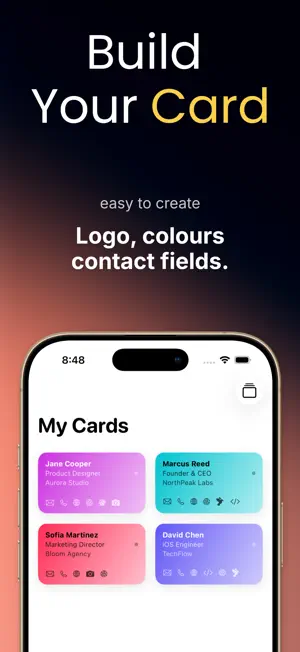
A business card you carry as pixels, not paper. If you have ever run out of cards at a conference, handed someone a crumpled rectangle, or watched a fresh hire's title change a week after print, a digital business card is the quieter answer. Business Card Generator QR turns your contact details into a clean networking card and a QR people actually scan — phone, email, website, company, job title, and your social profiles encoded into a vCard their phone saves as a real contact. It is a card generator and business card maker designed for the moment when a stranger across the table is about to type your name into their phone wrong. The work it does is small, focused, and ends with the other person having you in their address book before either of you finishes coffee. There is no contact harvesting, no follow-up email scraping, and the people you meet are not added to a growth funnel behind their backs. Every feature described below is unlocked only with an auto-renewable subscription purchased inside the app. New users receive a 3 day free trial; you may cancel anytime during the trial to avoid being charged. Open the app, fill in your details once, pick a template, add your logo and brand colors, and share via AirDrop, Messages, Mail or print. The QR code auto-generates from your vCard, so contact sharing works without internet and adds you straight to the other person's address book. Keep multiple cards for personal and work life, switch between a professional card for clients and a relaxed one for meetups, and export as PDF or PNG when you need a printed run for an event. A Home Screen widget keeps your QR business card one glance away at the moment someone asks, and per-card scan analytics tell you which version of you is doing the work. Write your business profile onto an NFC tag for a single-tap hand-off, drop a card into Apple Wallet so it travels with your boarding passes, and update the underlying details once when a job title or phone number changes — every shared link reflects the new version immediately. The card creator supports a quiet template library covering minimal monochrome layouts, classic corporate styles and bolder creative themes for designers, photographers and consultants who want their card to feel like their portfolio. Batch share a card with a whole team after a conference, save a partner's contact profile alongside yours for joint outreach, and use the share contact flow with people who are not yet sure they want to download anything — the vCard simply lands in their Contacts app. This is a calm digital vcard rather than a contact-harvesting service, and your data stays on this device. There is no account, no cloud upload, and no analytics following your taps. The interface ships in 39 languages with full VoiceOver support, designed for freelancers, founders, salespeople, students at career fairs and anyone who simply wants the next handshake to end with their details in the right place. Everything works offline. Unlock with Pro: • Unlimited cards (free: 1) • All templates, themes and premium icons • Watermark removal and PDF or PNG print export • NFC tag writing and Apple Wallet pass • Per-card scan analytics Subscription Pricing & Terms Features require a subscription. Pricing and terms available in-app. Terms of Use: https://www.apple.com/legal/internet-services/itunes/dev/stdeula/ Payment will be charged to your Apple ID account at confirmation of purchase. The subscription automatically renews unless auto-renew is turned off at least 24 hours before the end of the current period. Your account will be charged for renewal within 24 hours prior to the end of the current period. Manage or cancel your subscription and free-trial conversion in Settings > Apple ID after purchase. Any unused portion of the free-trial period will be forfeited when you purchase a subscription.
What’s new
Version 1.33 · Updated August 25, 2026
Readability and accessibility improvements, better support for larger text sizes, and a number of bug fixes.
App privacy
The developer, Bahattin Duran, reported these privacy practices to Apple.
Data Not Linked to You
The following data, which may be collected but is not linked to your identity, may be used for the following purposes:
- Purchases: Purchase History
Used for: App Functionality
Alternatives to Business Card Generator QR
Looking for apps like Business Card Generator QR? Here are 6 similar apps on the App Store. The highest rated is Blur Face Editor tool (5.0/5), and all 6 are free to download.
-
 Extractify: UnZip, UnRar, 7z
1.0
-
 AskMe: AI Chat, Talk, Text
4.6
-
 Image Compressor and Converter
-
 Blur Face Editor tool
5.0
-
 SensorScope: Phone Diagnostics
-
 Subber - Store Your Bookmarks
3.3
| App | Rating | Price | Last updated | Compare |
|---|---|---|---|---|
| Business Card Generator QR | 5.0 / 5 (2 ratings) | Free | August 25, 2026 | |
| Extractify: UnZip, UnRar, 7z | 1.0 / 5 (2) | Free | Jul 7, 2025 | Compare |
| AskMe: AI Chat, Talk, Text | 4.6 / 5 (15) | Free | Sep 15, 2025 | Compare |
| Image Compressor and Converter | – | Free | Jul 7, 2025 | Compare |
| Blur Face Editor tool | 5.0 / 5 (2) | Free | Jul 28, 2025 | Compare |
| SensorScope: Phone Diagnostics | – | Free | Feb 25, 2025 | Compare |
| Subber - Store Your Bookmarks | 3.3 / 5 (3) | Free | Aug 27, 2026 | Compare |