

Screenshot Editor - SnapStyler
Manuel Chilela Saliulo Graphics & Design iPhoneiPadiPod touch
Screenshot Editor - SnapStyler is a free Graphics & Design app for iPhone and iPad by Manuel Chilela Saliulo. Requires iOS 17.6. Updated October 8, 2026.
- Price
- Free
- on the App Store
- Size
- 46 MB
- Age 4+
- Updated
- Oct 8
- 2026 · v1.3
Screenshots


About Screenshot Editor - SnapStyler
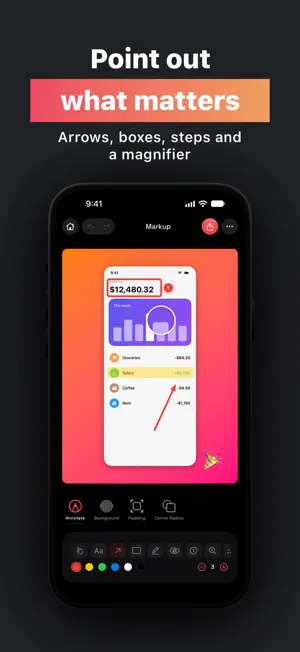
Make every screenshot look great. SnapStyler turns plain screenshots into polished images in seconds. Pick what you're making on Home and get just the tools for it: a styled screenshot, a social media post, App Store and Google Play screenshots, a screen recording or a quick markup. BEAUTIFUL SCREENSHOTS • Gradients, solid colors, your own photos or a smart background made from your screenshot's colors • Rounded corners, padding, soft or colored shadows and an outline • Square, portrait, landscape or any aspect ratio • Built-in presets, and save your own looks to reuse WINDOWS AND DEVICES • macOS and Linux window frames, light or dark • iPhone, iPad, Android phones and tablets, MacBook and browser mockups • Tilt any of them in 3D MADE FOR SOCIAL MEDIA • Exact sizes for Instagram posts and Stories, X, LinkedIn, Facebook and YouTube • Combine up to 3 screenshots side by side, in a fan or in depth • Style screen recordings and export them as MP4 APP STORE AND GOOGLE PLAY • Ready-made templates with titles and subtitles: Classic, Hero, Marker, Dark, Bold, Tilted and more • Exact App Store sizes for iPhone 6.9", 6.5" and iPad 13", plus Google Play phone and tablets • Build a whole series, give each screen its own background or style, and export them all at once POINT OUT WHAT MATTERS • Arrows, boxes, highlights, numbered steps, a magnifier, a spotlight, emoji and text • Blur anything private before you share YOUR WORK, SAVED • Projects save automatically, so you can pick up where you left off • Share and open .snaps project files • Send screenshots straight from Photos or any app with the share extension • Export as PNG or JPEG, up to 3x, straight to Photos or Files Terms of Use: https://www.apple.com/legal/internet-services/itunes/dev/stdeula/
What’s new
Version 1.3 · Updated October 8, 2026
SnapStyler has been redesigned from top to bottom. • New Home: pick what you're making (screenshot, App Stores, social post, video or markup) and get just the tools for it • App Store and Google Play templates with titles, including the new Marker style, and whole series with a style per screen • Android devices, store templates without the Dynamic Island, and 3D tilt for any device • New annotations: numbered steps, magnifier, spotlight and emoji • Exact sizes for Instagram, Stories, X, LinkedIn, Facebook and YouTube • Combine up to 3 screenshots, and style screen recordings as MP4 • Projects save automatically, and you can share them as .snaps files • Smart backgrounds, your own presets, and a new introduction
App privacy
The developer, Manuel Chilela Saliulo, reported these privacy practices to Apple.
Data Not Collected
The developer does not collect any data from this app.
Alternatives to Screenshot Editor - SnapStyler
Looking for apps like Screenshot Editor - SnapStyler? Here are 6 similar apps on the App Store. The highest rated is Screenshot Editor – Ekran (5.0/5), and all 6 are free to download.
-
 Screenshot - PrettyShot
-
 GradientSnap - Screenshot tool
-
 OziSnap - Photo Editor & Snap
-
 Screenshot Editor – Ekran
5.0
Screenshot Editor – Ekran
5.0
-
 Shotbot - Framed Screenshots
5.0
Shotbot - Framed Screenshots
5.0
-
 Screenshot Remote - PC Capture
5.0
Screenshot Remote - PC Capture
5.0
| App | Rating | Price | Last updated | Compare |
|---|---|---|---|---|
| Screenshot Editor - SnapStyler | – | Free | October 8, 2026 | |
| Screenshot - PrettyShot | – | Free | Nov 27, 2024 | Compare |
| GradientSnap - Screenshot tool | – | Free | Apr 18, 2024 | Compare |
| OziSnap - Photo Editor & Snap | – | Free | Nov 25, 2025 | Compare |
| Screenshot Editor – Ekran | 5.0 / 5 (4) | Free | Sep 7, 2025 | Compare |
| Shotbot - Framed Screenshots | 5.0 / 5 (14) | Free | Mar 30, 2026 | Compare |
| Screenshot Remote - PC Capture | 5.0 / 5 (1) | Free | Sep 3, 2026 | Compare |