

SmartZDOBD
深圳市正德友邦科技有限公司 Utilities iPhoneiPadiPod touch
SmartZDOBD is a free Utilities app for iPhone and iPad by 深圳市正德友邦科技有限公司. Requires iOS 12.0. Updated October 10, 2025.
- Price
- Free
- on the App Store
- Size
- 38 MB
- Age 4+
- Updated
- Oct 10
- 2025 · v4.20
Screenshots


About SmartZDOBD
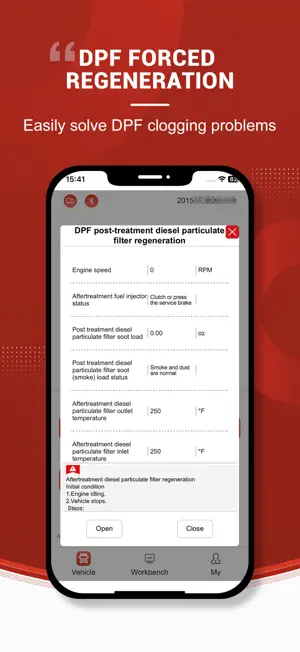
C001 is an intelligent diagnostic tool designed specifically for professional auto repair technicians, integrating fault detection, action testing, and parameter calibration. By connecting to the vehicle's OBD-II interface via Bluetooth, it turns your iPhone into a professional diagnostic device in seconds, allowing you to solve auto repair problems anytime, anywhere. Key Features: Intelligent Fault Diagnosis Quickly read vehicle "identity": Rapidly and accurately read version information of core systems such as the vehicle's ECU, engine, and transmission. Keep track of the vehicle's "health records" in real-time, detect the need for software updates at the first time, and provide a reliable basis for maintenance decisions. Action Test Mode Perform actuator action tests, including DPF regeneration and urea injection tests. Parameter Calibration Tool One-click modification of VIN code. Maintenance Knowledge Base Built-in in-depth analysis library for common faults, covering mainstream vehicle models. Advantages Compact and portable, ready at all times: Put professional diagnostic equipment in your pocket. There's no need to carry bulky instruments – just a mobile phone allows you to carry out diagnostic work anytime, anywhere, making your maintenance services more flexible and timely.
What’s new
Version 4.20 · Updated October 10, 2025
Dear Users, The software has been updated. We have fixed issues, optimized user experience, and added new features. Here’s a plain-language breakdown: I. Issue Fixes a. Fixed VCI connection failure: The strict restrictions on Mode 81 in the original CAN branch of the protocol stack caused incorrect command sending to the lower-level device; this has now been resolved. b. Fixed data stream issues: Resolved crashes of the data stream executor, failure to recognize random sequence numbers, and protocol stack errors when receiving large data. c. Fixed text display: Multi-line input is automatically converted to single-line display to avoid confusion. d. Fixed system jump/CDB recognition: Eliminated the "parent system undefined" prompt during system jumps and resolved unknown errors when recognizing CDB files without menus. e. Fixed update and download issues: Successful updates of lower-level device firmware/config tables and successful downloads of Chinese-version CDB packages are now ensured. II. User Experience Optimization a. Optimized metric-imperial unit conversion: Removed redundant rules for faster and more accurate conversion. b. Updated startup interface: Now cleaner and more intuitive. c. Overseas version optimization: Added "Condition Mode" – automatic metric-imperial conversion is performed before numerical comparison. III. New Features Added a. New data stream functions: Added display of maximum/minimum values; a "function not supported" prompt is shown when the number of data stream entries is empty. b. New capabilities: Added the CDBD5XX algorithm; added "Condition Mode" to the overseas version. We recommend updating to the latest version as soon as possible. For any issues, please contact [Customer Service].
App privacy
The developer, 深圳市正德友邦科技有限公司, reported these privacy practices to Apple.
Data Not Collected
The developer does not collect any data from this app.