

Kaizen - Tasks & Calendar
Lennard Zieten Productivity iPhoneiPadiPod touch
Kaizen - Tasks & Calendar is a free Productivity app for iPhone and iPad by Lennard Zieten. Rated 1.5/5 from 2 ratings. Requires iOS 15.6.
- Rating
- 1.5
- 2 ratings
- Price
- Free
- on the App Store
- Size
- 132 MB
- Age 4+
- Updated
- Sep 28
- 2026 · v8.6.0
Screenshots
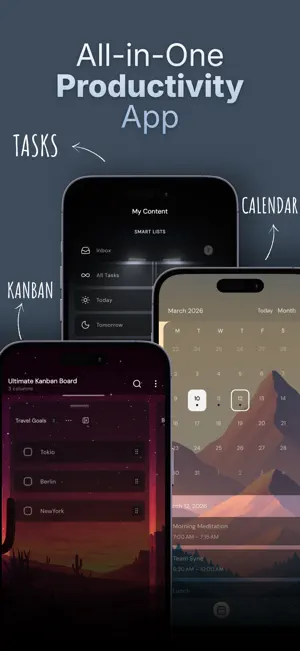
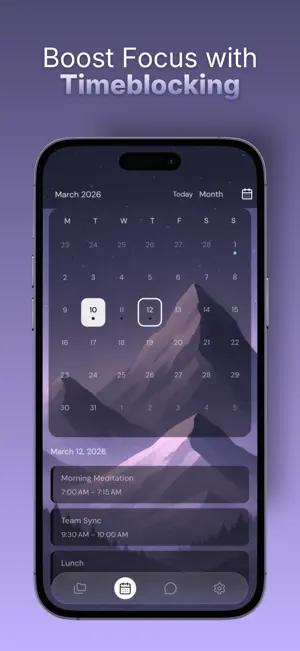
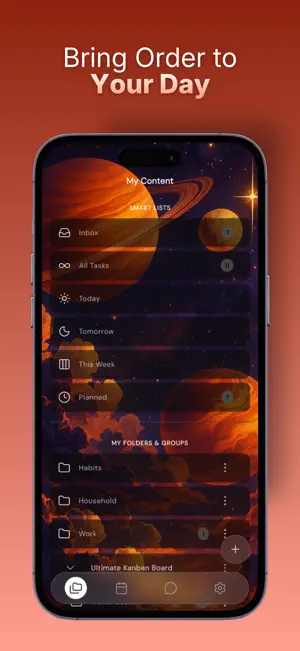

About Kaizen - Tasks & Calendar
End your day feeling done — not buried. 88% of people go to bed feeling unaccomplished. Not because they didn't work hard, but because their tools fight them: a to-do list in one app, a calendar in another, a Kanban board in a third, and an AI chat in a fourth. Nothing talks to anything. Kaizen brings it all into one app that you actually want to open. → TIME-BLOCK YOUR DAY, NOT JUST LIST IT Drag tasks straight onto your calendar. See your real day — to-dos AND time blocks — side by side on a split screen (iPad/large screens). No more "I have 17 to-dos and 6 hours, what now?" — Kaizen shows you when, not just what. → AI THAT ACTUALLY KNOWS YOU You can use Kaizen's build in AI assistant or work with frontier models through MCP. Set persistent instructions ("Be blunt", "Push me on my side project", "Cut me slack on Fridays") and the AI shapes itself around you instead of you adapting to it. Brain-dump out loud, get a structured plan back. → KANBAN WHEN A LIST ISN'T ENOUGH Every project gets a board view. Drag tasks through Backlog → Doing → Done. Perfect for side projects, course work, and creative work where a flat list doesn't fit. → LIFE TIERLIST: SEE WHAT ACTUALLY MATTERS Hidden behind a long-press on the calendar icon: rank the areas of your life — Career, Health, Family, Learning, Side Project, ... — into a visual hierarchy. When you don't know what to work on, your tierlist answers for you. No other planner does this. → MAKE IT YOURS — REALLY YOURS Backgrounds per page. Custom fonts, sizes, icons. Opacity and blur per element. Custom colors. Windowed mode on larger devices. Most planners give you "dark mode and three theme colors." Kaizen gives you a workspace that feels like it was built for your brain. WHO IT'S FOR • Employees juggling work, life and a side project • Founders and freelancers who can't afford a messy day • Students whose calendar and homework live in different worlds • Anyone who's tried five planners and bounced off all of them WHAT YOU GET WITH UNLIMITED - Unlimited tasks, folders, and task lists - Calendar with day, week, month views - Drag-and-drop time blocking - Kanban board per project - Habit-style recurring tasks and reminders - iOS, Android, and Web — synced - Life Tierlist - Deep customization (backgrounds, opacity, blur, custom fonts) - Import/export your data anytime AI UNLOCKS - Kaizen AI with persistent instructions + MCP for Claude/ChatGPT - Speech task creation WHY "KAIZEN" Kaizen (改善) is the Japanese practice of getting 1% better, every day. Not a productivity hack. A way of building a life that compounds. START TODAY Spend 60 seconds importing your existing tasks. Block tomorrow morning. Notice the difference by Friday. Have an idea? Tap "Suggest a feature" in settings — we read every one.
What’s new
Version 8.6.0 · Updated September 28, 2026
What's new in 8.6.0: → Create tasks and now also events by voice with Kaizen AI dictation → Reworked haptic feedback: crisp, precise and consistent across the app → Smoother calendar: events appear, move and delete instantly → Design refinements throughout the app → A fresh round of bug fixes and performance tweaks Thanks for using Kaizen.
App privacy
The developer, Lennard Zieten, reported these privacy practices to Apple.
Data Used to Track You
The following data may be used to track you across apps and websites owned by other companies:
- Identifiers: Device ID
Data Linked to You
The following data, which may be collected and linked to your identity, may be used for the following purposes:
- Purchases: Purchase History
- Identifiers: User ID, Device ID
- Usage Data: Product Interaction
- Diagnostics: Crash Data, Performance Data
- Contact Info: Email Address
- User Content: Customer Support, Other User Content
Used for: Analytics, App Functionality
Data Not Linked to You
The following data, which may be collected but is not linked to your identity, may be used for the following purposes:
- Identifiers: Device ID
Used for: Developer’s Advertising or Marketing
Alternatives to Kaizen - Tasks & Calendar
Looking for apps like Kaizen - Tasks & Calendar? Here are 6 similar apps on the App Store. The highest rated is Kaizen: ToDo & Productivity (5.0/5), and all 6 are free to download.
-
 Altus: Daily Planner & Coach
3.8
Altus: Daily Planner & Coach
3.8
-
 Kaizen: ToDo & Productivity
5.0
Kaizen: ToDo & Productivity
5.0
-
 Beck: AI Calendar Assistant
4.7
Beck: AI Calendar Assistant
4.7
-
 Meli: Personal AI
3.8
Meli: Personal AI
3.8
-
 DayDo Calendar
4.5
DayDo Calendar
4.5
-
 Habit & Goal Tracker - Clay
4.0
Habit & Goal Tracker - Clay
4.0
| App | Rating | Price | Last updated | Compare |
|---|---|---|---|---|
| Kaizen - Tasks & Calendar | 1.5 / 5 (2 ratings) | Free | September 28, 2026 | |
| Altus: Daily Planner & Coach | 3.8 / 5 (18) | Free | Feb 14, 2026 | Compare |
| Kaizen: ToDo & Productivity | 5.0 / 5 (2) | Free | Mar 10, 2026 | Compare |
| Beck: AI Calendar Assistant | 4.7 / 5 (53) | Free | Oct 2, 2026 | Compare |
| Meli: Personal AI | 3.8 / 5 (30) | Free | Oct 1, 2026 | Compare |
| DayDo Calendar | 4.5 / 5 (6) | Free | Jun 29, 2026 | Compare |
| Habit & Goal Tracker - Clay | 4.0 / 5 (5) | Free | Jan 14, 2026 | Compare |