

OBD2 Car Scanner — Carvi
Vitali Usau Utilities iPhoneiPadiPod touch
OBD2 Car Scanner — Carvi is a free Utilities app for iPhone and iPad by Vitali Usau. Rated 5.0/5 from 2 ratings. Requires iOS 16.0. Updated June 27, 2026.
- Rating
- 5.0
- 2 ratings
- Price
- Free
- on the App Store
- Size
- 140 MB
- Age 9+
- Updated
- Jun 27
- 2026 · v1.1.1
Screenshots
About OBD2 Car Scanner — Carvi
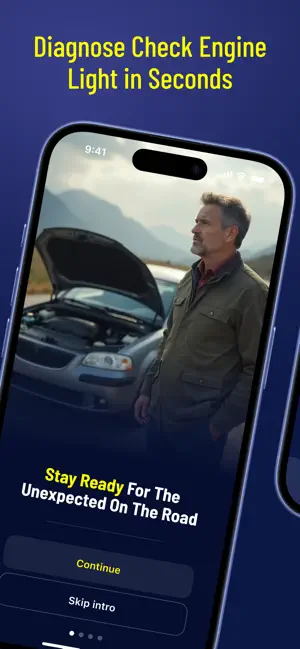
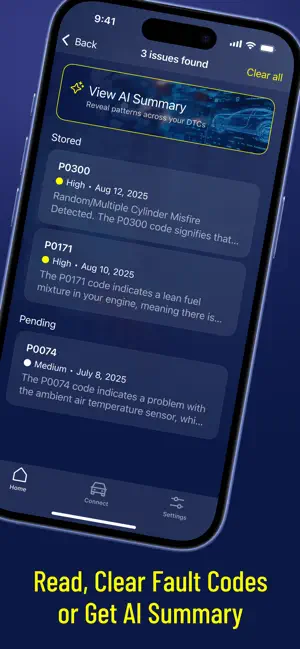
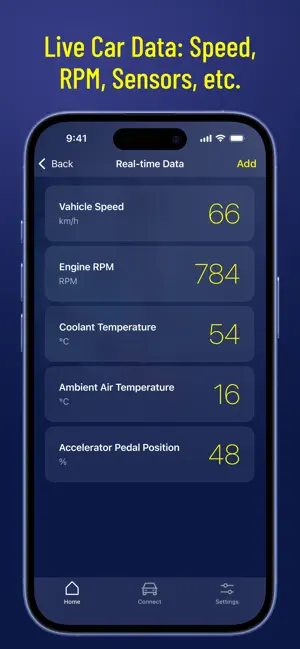
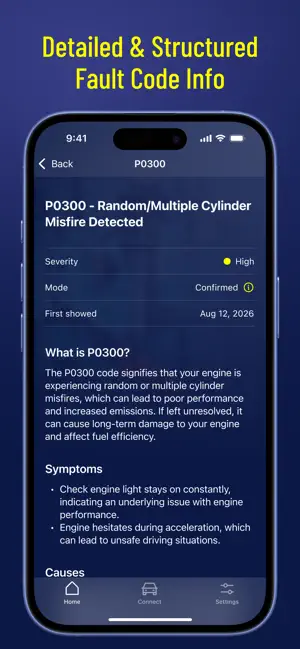
Turn your phone into a simple, easy-to-use car diagnostic tool. See what’s behind a check engine light in minutes, right from your smartphone. CARVI connects to your car via a Bluetooth OBD2 adapter and lets you quickly scan trouble codes, clear them, save a scan history, and check battery health, so you can drive with more confidence and avoid unpleasant surprises. WHAT YOU CAN DO WITH THE CARVI APP Read trouble codes: - Scan your vehicle and view diagnostic trouble codes (DTCs). - See which systems are reporting issues, so you can decide what to do next. Clear trouble codes: - After you’ve addressed an issue, clear trouble codes. - Useful for checking whether a warning returns (and when). Scan history. Every scan is saved so you can: - Track when codes appear. - Compare results over time. - Keep a clear before/after record around repairs or maintenance. See live car data: speed, RPM, sensors, etc. WHY DRIVERS USE THE CARVI APP - Save time: Get quick answers without guessing. - Save money: Clear outdated warnings and avoid unnecessary trips to the dealer. - Be prepared: Keep scan records for maintenance and troubleshooting. - Stay in control: Understand what your car is telling you—in plain terms. HOW IT WORKS - Plug in a Bluetooth OBD2 adapter to your car’s OBD2 port. - Pair it with your phone via Bluetooth. - Tap Scan to read codes, view results, and save them to history. COMPATIBILITY & REQUIREMENTS - Requires a Bluetooth OBD2 adapter (commonly ELM327-compatible or similar). - Works with most OBD-II–compliant vehicles. - Feature availability may vary by make/model/year and the data your vehicle provides. Install now and scan your car in minutes. Privacy Policy: https://carvi-obd.webflow.io/privacy-policy
What’s new
Version 1.1.1 · Updated June 27, 2026
Added AI summary mode that provides advices based on diagnostic!
App privacy
The developer, Vitali Usau, reported these privacy practices to Apple.
Data Linked to You
The following data, which may be collected and linked to your identity, may be used for the following purposes:
- Location: Coarse Location
- Identifiers: User ID
- Usage Data: Product Interaction
- Diagnostics: Crash Data, Performance Data, Other Diagnostic Data
- User Content: Other User Content
- Other Data: Other Data Types
Used for: Analytics, Product Personalization, Other Purposes
Alternatives to OBD2 Car Scanner — Carvi
Looking for apps like OBD2 Car Scanner — Carvi? Here are 6 similar apps on the App Store. The highest rated is OBDPulse OBD2 Car Scanner (5.0/5), and all 6 are free to download.
-
 AutoPulse: OBD2 Scanner
-
 OBDPulse OBD2 Car Scanner
5.0
OBDPulse OBD2 Car Scanner
5.0
-
 OBD2 Cat: Car Scanner
5.0
OBD2 Cat: Car Scanner
5.0
-
 AutoCheck OBD
4.0
AutoCheck OBD
4.0
-
 DriveSense: OBD2 Car Scanner
-
 Rheosoft OBD2
| App | Rating | Price | Last updated | Compare |
|---|---|---|---|---|
| OBD2 Car Scanner — Carvi | 5.0 / 5 (2 ratings) | Free | June 27, 2026 | |
| AutoPulse: OBD2 Scanner | – | Free | Sep 7, 2026 | Compare |
| OBDPulse OBD2 Car Scanner | 5.0 / 5 (1) | Free | Oct 9, 2026 | Compare |
| OBD2 Cat: Car Scanner | 5.0 / 5 (1) | Free | Oct 19, 2026 | Compare |
| AutoCheck OBD | 4.0 / 5 (1) | Free | Jul 22, 2026 | Compare |
| DriveSense: OBD2 Car Scanner | – | Free | Jul 19, 2026 | Compare |
| Rheosoft OBD2 | – | Free | Jun 29, 2026 | Compare |