

Swiftflip Flashcards
HK Softworks AB Education iPhoneiPadiPod touchMacApple Watch
Swiftflip Flashcards is a free Education app for iPhone and iPad by HK Softworks AB. Rated 3.7/5 from 3 ratings. Requires iOS 26.0. Updated October 18, 2026.
- Rating
- 3.7
- 3 ratings
- Price
- Free
- on the App Store
- Size
- 78 MB
- Age 4+
- Updated
- Oct 18
- 2026 · v1.21.0
Screenshots


About Swiftflip Flashcards
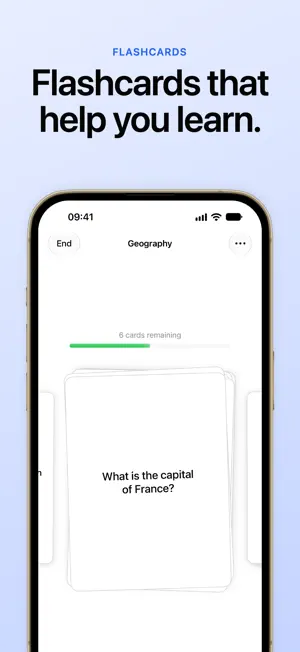
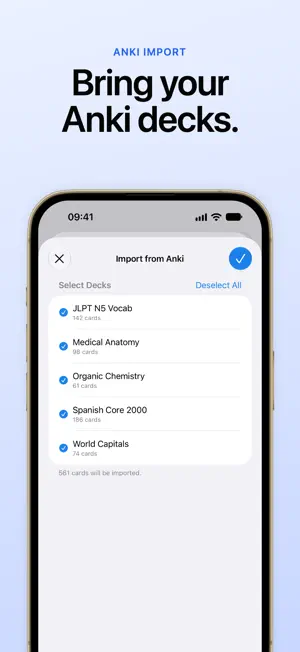
Unlimited flashcards with spaced repetition. No account. Import Anki, review on Apple Watch, and sync privately with iCloud. Spaced Repetition Swiftflip uses an FSRS scheduling model to bring each card back shortly before you would forget it. Flashcards Make cards with text, a picture, and audio together on each side. Organize cards into decks, search across them, and edit a card in the middle of practice. Across Your Devices Pick up where you left off with iCloud sync across iPhone, iPad, Mac, and Apple Watch. Practice on Apple Watch for quick due-only sessions on the go. Focused Practice Tap to flip, then mark answers to keep moving. A short sound plays when you mark a card, and you can look over every card when a session ends. Hints show you how to flip and mark cards the first time, and Swiftflip follows accessibility settings like Reduce Motion. Practice Both Ways Turn on Practice Both Ways for a deck to keep separate Front → Back and Back → Front progress. Build Custom Practice sessions with the decks, first side, order, size, focus, and retries you choose. Pause Reviews Pause a card or a whole deck when you are not studying it. It stays in the library and comes back with its schedule when you resume. Import & Export • Import from Anki (.apkg / .colpkg) • Import and export CSV • Export as a Swiftflip archive for backup and sharing Shortcuts Use the Shortcuts app and Siri to add a card, practice due cards, practice or open a deck, search your library, view decks, and view insights. Home Screen quick actions help you jump in faster. Insights Stat cards show your streak and how many cards you have. Unlimited decks and cards will always be free. Premium (Optional) • Smart decks (dynamic decks based on filters) • Folders • Custom icons • More answer reveal styles • Full insights: month, year, and custom timeframes, study activity, accuracy trends, library growth, cards by deck, upcoming reviews, and an activity calendar • AI card generation, with saved per-deck instructions for how cards should read Premium is available as monthly and yearly subscriptions, or a lifetime purchase. Made for Apple Devices Swiftflip supports iCloud sync, Shortcuts, and a companion Apple Watch app, plus Home Screen and Lock Screen widgets, a Practice Due Cards control for Control Center and the Action button, a Due Cards watch-face complication, optional practice reminders, a due-count badge, Spotlight search, and a Share Extension for creating cards from other apps. Privacy Swiftflip does not track you. Your flashcards sync through iCloud. Cloud AI is included with Premium on iPhone and iPad and asks before it is first used. When it runs, your topic, instructions, and card text are sent to Swiftflip’s Cloud AI, which uses a third-party AI model to write cards. No account is required. Great for exam revision, language vocabulary, and medical or nursing terminology. Terms of use: https://www.apple.com/legal/internet-services/itunes/dev/stdeula/ Privacy policy: https://hksw.io/privacy/
What’s new
Version 1.21.0 · Updated October 18, 2026
- Start practicing due cards from Control Center, the Lock Screen or the Action button. - Add a Deck widget to the Home Screen or Lock Screen to practice one deck with a tap. - Add a picture and a recording to either side of a card, along with its text. - See how many cards come due in the coming days, and every day you practiced, in Insights. - Open Anki and CSV files from the Files app, and see how far an import has come. - Undo the answer to a card that came back after a miss. - And many other bug fixes and improvements.
App privacy
The developer, HK Softworks AB, reported these privacy practices to Apple.
Data Linked to You
The following data, which may be collected and linked to your identity, may be used for the following purposes:
- User Content: Other User Content
- Identifiers: User ID, Device ID
- Usage Data: Product Interaction
- Diagnostics: Other Diagnostic Data
Used for: App Functionality
Alternatives to Swiftflip Flashcards
Looking for apps like Swiftflip Flashcards? Here are 6 similar apps on the App Store. The highest rated is Flashcards by NKO: Flash Cards (4.9/5), and 5 of the 6 are free to download.
-
 WatchStudy: Pro AI Flashcards
-
 TangoWrist Watch Flashcards
-
 Flashcards by NKO: Flash Cards
4.9
Flashcards by NKO: Flash Cards
4.9
-
 Spaced Repetition SmartCards+
4.6
Spaced Repetition SmartCards+
4.6
-
 Amazing Flash Cards
4.8
Amazing Flash Cards
4.8
-
 Mochi - Flashcards and notes
4.6
Mochi - Flashcards and notes
4.6
| App | Rating | Price | Last updated | Compare |
|---|---|---|---|---|
| Swiftflip Flashcards | 3.7 / 5 (3 ratings) | Free | October 18, 2026 | |
| WatchStudy: Pro AI Flashcards | – | Free | Oct 22, 2026 | Compare |
| TangoWrist Watch Flashcards | – | 4.99 USD | Oct 18, 2026 | Compare |
| Flashcards by NKO: Flash Cards | 4.9 / 5 (2,049) | Free | Oct 8, 2025 | Compare |
| Spaced Repetition SmartCards+ | 4.6 / 5 (2,307) | Free | Oct 25, 2026 | Compare |
| Amazing Flash Cards | 4.8 / 5 (1,347) | Free | Oct 27, 2026 | Compare |
| Mochi - Flashcards and notes | 4.6 / 5 (175) | Free | Oct 26, 2026 | Compare |